




















Draft, Review & Sign Contracts 3X Faster with AI-Powered CLM 365 One System to Handle the Entire Contract Lifecycle
AI-powered SharePoint contract management software that simplifies your entire contract lifecycle from request to renewals with high accuracy and zero-trust security model.

Trusted by 11700+ businesses from 167 countries


CLM 365 delivers clarity and control to every department that deals with contracts
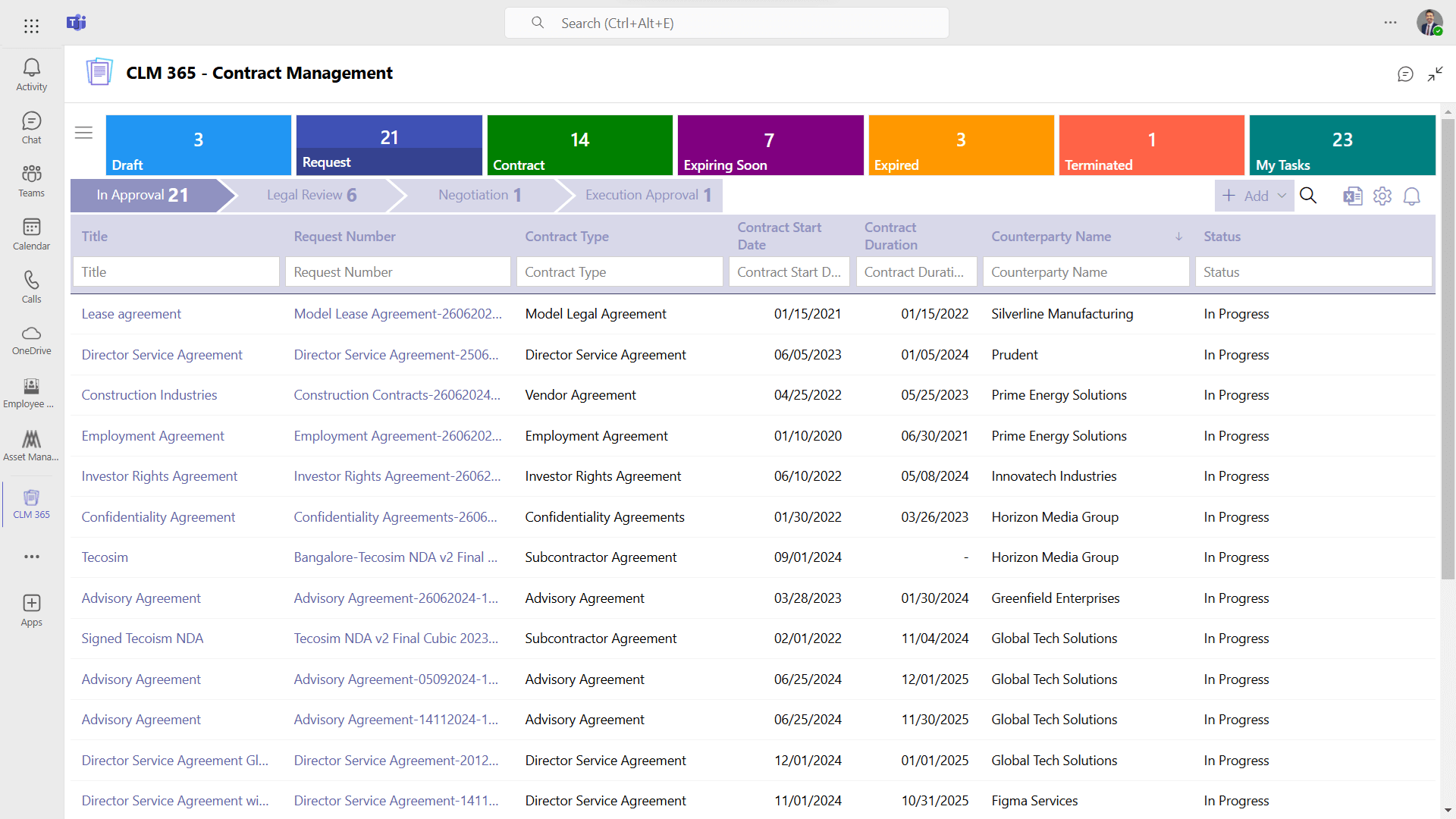
Manage contracts faster, strengthen compliance, and automate processes with ease. Our SharePoint contract management software helps your teams move quickly through simplified workflows that make every stage of the contract lifecycle feel effortless. The SharePoint contract lifecycle management software integrates with Microsoft 365 apps like Teams, Outlook, MS Word and SharePoint, keeping every contract accessible, organized, and easy to manage.
CLM 365 is now available on Microsoft Teams with


AI-Powered SharePoint Contract Management – Turn Complex Clauses into Clear Insights
Turn complex contract language into something your team can easily understand. Our SharePoint contract lifecycle management analyses clauses instantly, flags risks, manage obligations and simplify key terms to support faster decision-making.

Contract Summary
Contract summary provides your team with a fast and precise overview of all contracts without hours of reading and understanding long legal documents. SharePoint contract lifecycle management identifies key terms, dates, obligations, and risks and display them in a clean and easy-to-read format.


AI Agentic Tickets
AI agents help your team make smarter contract decisions by providing alternative clauses for key terms. Microsoft contract management keeps all your contract details organized, and if you need to search anything, just ask the AI agent. With instant insights, your team can compare options and select the best fit for each contract.


AI Risk Management
AI risk management automatically analysis contracts and highlights potential risks directly in the document. SharePoint contract management software suggests AI-powered alternatives and lets your team modify or replace clauses to strengthen compliance and negotiation. Microsoft 365 contract management simplifies how you handle risks.

Obligation Monitoring
The AI obligation feature simplifies the compliance process by locating and managing obligations in your contract documents automatically. Microsoft contract management will also allow your team to remember about important tasks and deadlines, thus nothing will be overlooked. Your organization can keep track of all the contracts by receiving real-time alerts and having a clear insight.

Built to Work with Microsoft 365 & Beyond
SharePoint contract lifecycle management integrates right into Microsoft 365 and works alongside the apps you’re already comfortable with SharePoint, MS Teams, Outlook and more. Microsoft 365 contract management creates one connected workspace where everything flows naturally, making your work easier.

Connection that Works
Integrate your SharePoint contract management software with the tools you already use like Teams, SharePoint, or Outlook. Centralize contract tasks, and data in a single smart workspace where everything stays well-organized and in sync.
Take the Stress Out of Contracts, Close Deals Faster with CLM 365
All-in-one SharePoint contract lifecycle management to help your team create contracts, manage them, and strengthen vendor relationships.
AI Powered CLM
AI analyses every contract and provides concise clause summaries instantly. Key obligations, deadlines, and terms are highlighted for quick understanding. Make faster, informed decisions with complete clarity and control over every agreement.
Automated Contracts
Agreements move smoothly from start to finish. Your team can focus on high-value decisions instead of manual follow-ups. Every agreement progresses on schedule, keeping your operations smooth and predictable.
Obligation Management
Track all commitments clearly and never miss an important deadline. Stay proactive with every milestone and responsibility in view. Build trust with teams and partners by keeping obligations organized and actionable.

Contract Request
Send contract requests straight from Outlook without changing platforms. Keep all communication and documentation connected while speeding up the creation process.
Clause Library
Access the perfect clause instantly for every contract. Ensure every agreement is precise, compliant, and professional while saving time on searching or rewriting.

Contract Repository
Store all contracts securely in a single, organized, searchable location. Retrieve any document instantly while maintaining a complete history for full clarity and accessibility.
Multi-level Approval
Route contracts through all necessary approvers automatically, keeping every step visible. Ensure timely approvals while maintaining alignment and accountability across your team.

Role-Based Security
Control access to contracts with precise permissions for every team member. Protect sensitive information while enabling collaboration securely and only with the right people.
Redlining
Highlight updates and collaborate in real time with complete visibility. Track every change clearly to keep everyone informed and maintain a precise record of edits.

Negotiation & Review
Every negotiation becomes easier and more secure with clear insights and OTP-based password protection, keeping all parties aligned and agreements moving forward smoothly.
Digital Signature
Collect signatures instantly from anywhere in the world with complete security. Finalize contracts quickly while keeping every agreement legally binding and protected.
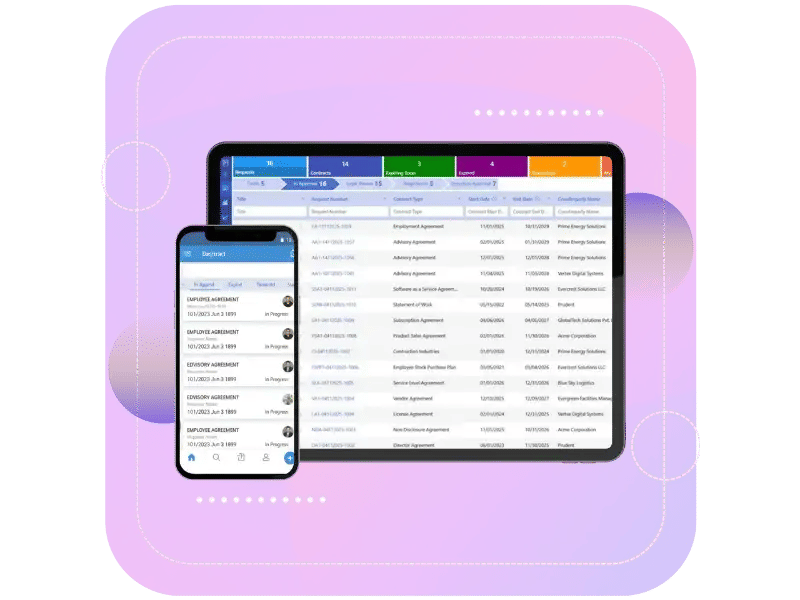
Smart Automation with Built-In AI Intelligence
CLM 365 automates every step of the contract lifecycle from creation and routing to approvals and renewals. SharePoint contract management software
highlights risky clauses in your contracts and identifies the obligations that need your immediate attention. You’ll know exactly what to watch out for and which commitments matter most.

Why CLM 365?
SharePoint contract management software handles all contract processes drafting, approvals, signing, renewals. It automates workflows, keeps contracts in one system, ensuring faster completion with better accuracy. Managing contracts becomes easy with Microsoft contract management, regardless of your business size.

Built for Microsoft 365
It works inside the tools you already use, like Teams, SharePoint, and Outlook. No setup needed just integrate quickly to get started.

Centralized Repository
All your contracts and updates stay organized in one place. You can see their status, who is responsible, and what requires attention next.
AI-Powered Efficiency
It summarizes contracts and suggests industry-relevant clauses, highlights risks and obligations.
Secure & Scalable
Your contract information remains in Microsoft 365, which makes it secure and safe. The system expands with your team easily as your team grows.
Get Started with CLM 365
Live on Azure
Buy directly from Azure Marketplace or via your enterprise agreement.
Special Pricing for NPOs
Non-profits and government-funded educational institutes can avail exclusive rates.
Enterprise Pricing for 50+ Users
Organizations with more than 50 users can avail special pricing.
Apps 365 Advantage
Apps 365 delivers smart, cloud-powered solutions that simplify operations and fuel growth. With seamless integrations and top-tier security, it helps businesses stay agile, efficient, and ahead of the curve.


Cyber Security
Cyber Security in GCC & GCC High within the Microsoft environment places high importance on stringent measures to protect sensitive government data, ensuring security with robust defenses and Microsoft applications.
GCC & GCC High
Our apps are built for GCC & GCC high tenants of US Federal clouds.
SOC2 Type II Certified
Our apps ensure security, compliance, and data protection
MS Azure Marketplace
Our apps are tested by Microsoft and available on MS Azure Marketplace
Microsoft Appstore
Our innovative applications are available on the Microsoft Appstore.
Customer Support
Your Support Team merges technical prowess with sincere care, fostering trust through expertise and empathy. They build lasting relationships, transcending mere service to create meaningful connections.
AI Enabled Apps
Our innovative apps are built with the options of Azure AI, Copilot, and custom AI solutions.
Swift Deployment
Choose any deployment method—Teams, Outlook, or SharePoint—that suits your preferences.
Modern UI/UX
Every app is crafted using the latest Fluent UI, ensuring seamless functionality across all devices.
Free Updates
Our valued subscribers enjoy unlimited support, enhancements, features, and updates.
SharePoint Consultant, Raymond West
California
Finance Manager, Exeevo
New York
IT Director, Frontier Waste Solutions
Texas, US
Sharepoint Developer, Recor Medical
Washington, US
Business Manager, Cerilon
Canada
Director of IT, JConnelly
New York
System Admin
Oregon, US
IT Manager, Pallas LLP
England, UK
IT Officer, HanmiGlobal Saudi
Saudi Arabia
ICT Manager, SMT Shipping
Europe
Barton Associates
Cofounder
Vice President of Operations
Head Of Information & Technology
Director of Infrastructure
Customer Testimonials
Listen to organizations that have positively impacted their business with Apps 365
One Platform for Your Entire Contract Workflow with CLM 365
SharePoint contract management software brings agreements, teams, and tools together inside Microsoft 365, giving you full visibility, control, and collaboration in one place.

Book a Personalized CLM 365 Demo!
Frequently Asked Questions
Can SharePoint be used for contract management?
Yes. SharePoint contract management software offers a flexible platform to handle contracts, which stores and tracks contracts in a centralized platform. SharePoint can be used to manage contract processes such as approvals, renewals, notifications, and compliance tracking. and workflows.
Does Microsoft have a contract management system?
Yes. Microsoft offers CLM 365, which integrates with Microsoft 365 apps. With CLM 365, your organization can manage the entire contract lifecycle from requesting to renewal without having to rely on third-party tools.
Tips to manage contracts in SharePoint contract management software
Here are some practical steps to manage contracts more effectively using SharePoint contract management software.
- Use metadata to categorize contracts by type, department, or counterparty.
- Automate approval workflows to ensure timely execution.
- Track obligations with custom lists or Power Automate reminders.
- Implement version control to manage edits and redlining.
- Utilize Power BI for reporting and audit tracking.
Does SharePoint contract management help counterparties to collaborate?
Yes, it assists counterparties to work with the business. SharePoint contract management software supports redlining, contract negotiation, and reviewing of the terms of the contract, where all the stakeholders are able to collaborate effectively and have a clear audit trail.
What browsers does CLM 365 support?
CLM 365’s SharePoint contract management supports the use of modern browsers such as Google Chrome, Microsoft Edge, Mozilla Firefox, and Safari.
Can we search for specific contracts from SharePoint contract lifecycle management?
Yes, SharePoint contract management software provides powerful search options based on keywords, contract numbers, or custom properties, enabling users to find contracts fast.
How does SharePoint contract management software handle contract redlining?
SharePoint CLM supports redlining for change tracking and integrates with Word for in-document editing.
How does CLM 365 track contract obligations and deliverables?
CLM 365 tracks the obligations and deliverables by custom lists and fields per milestone, automated reminders and alerts via Power Automate, and compliance, deadlines, and completion rates via dashboards in Power BI.
Can SharePoint contract management software handle different contract types with unique workflows?
Yes, CLM 365 enables organizations to establish complete workflows to each type of contract, such as approval hierarchies, review cycles, notifications, automated escalations, and specific dashboards based on each type of contract.
Does CLM 365 require on-premise servers?
No, CLM 365s SharePoint contract management is fully cloud-based, running on Microsoft 365 and Azure, with no hardware to maintain. The system automatically scales and updates, providing full accessibility, security, and reliability.
Can Microsoft contract management handle e-signatures?
Yes, CLM 365 integrates with e-signature systems, including DocuSign and Adobe Sign. With Power Automate, contracts can be send automatically to be signed.
How does SharePoint contract management software help during reporting?
The SharePoint contract management software uses Power BI dashboards to monitor the status of the contract, obligations, and milestones, performance and compliance metrics, and automatically generate reports to the stakeholders or audits.
How does Microsoft Teams contract management helps users?
Microsoft Teams contract management helps users collaborate better by managing contracts directly within Microsoft Teams, where conversations and documents stay connected. It speeds approvals, improves visibility, and keeps contract work organized without switching tools.
How does AI in SharePoint contract management help summarize clauses automatically?
AI helps summary clauses automatically by reading full contracts stored in SharePoint and generating clear, easy-to-understand summaries within seconds. Users can select an entire contract or specific sections, and AI instantly highlights key details such as scope, obligations, risks for faster contract review process.
What AI capabilities does CLM 365 offer for contract analysis?
CLM 365 uses built-in AI to automatically summarize lengthy contracts, identify important clauses, extract key dates and obligations, highlight potential risks, and present clear insights for faster decision-making. The AI can also suggest alternative clauses and help teams understand complex language without manual review.
Can AI in CLM 365 help with tracking contract obligations and deadlines?
Yes — CLM 365 uses AI to identify and monitor obligations within contracts, automatically flagging key deliverables and deadlines so teams don’t overlook important commitments. Users can receive alerts and get a clear compliance overview without manually reviewing documents.
Schedule a free personalized 1:1 demo
By proceeding, you accept Cubic Logics’s terms and conditions and privacy policy


By proceeding, you accept Cubic Logics Terms and Conditions and Privacy Policy
Try It Free, No Obligation


Please provide your contact details, we will connect with you soon!
Request for the custom price
By proceeding, you accept Cubic Logics Terms and Conditions and Privacy Policy
Schedule a free personalized 1:1 demo
By proceeding, you accept Cubic Logics’s terms and conditions and privacy policy


Request of the Free License
By proceeding, you accept Cubic Logics Terms and Conditions and Privacy Policy