

CLM 365 + MS WordSimplifying Redlining in Contracts
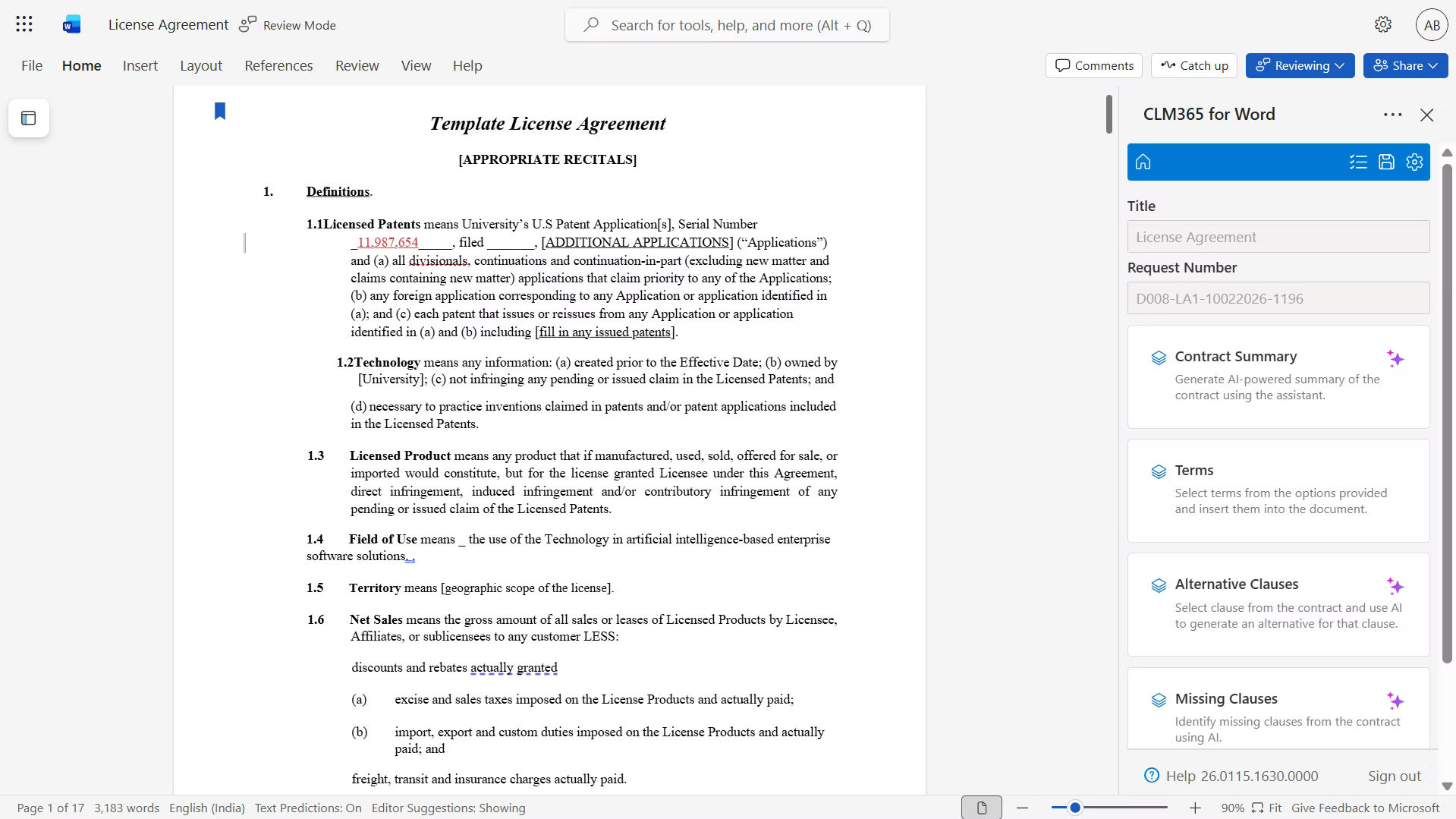
CLM 365 makes redlining easy with MS Word integration, easy to monitor changes, add comments and collaborate on edits without the need to change tools.Â

Redlining Made Simple with MS Word Integration
Integrating CLM 365 with Microsoft Word, makes it easy to redline contracts. Legal teams can easily find contract templates, monitor changes and comment on them in Word to simplify the process of review/approval. The MS Word Integration ensure that any changes or edits of the contract can be easily seen, minimize errors and enhance redlining collaboration.Â

Maximizing Efficiency With CLM 365 Word Add-in
CLM 365 Word Add-in allows reviewing and updating contracts easily. The MS Word integration allows users to track the changes, provide feedback and sign documents in a single environment, which enhances productivity.
%20(1).webp)
Instant Redlining
Redline contracts automatically, track changes, and work with your team in Microsoft Word.

Comment & Edit
Access contract templates, add comments, and approvals directly within Word to streamline workflows and make them quicker.

Effortless Version Control
Monitor revisions, maintain version control, and ensure compliance seamlessly while working within Microsoft Word.

CLM 365 – The Key to Better Contract Redlining
CLM 365 and MS Word Integration, makes the process of reviewing and redlining contracts quicker and easier. Businesses can edit, comment, and approve contracts in a single location without having to change tools. Every update is automatically logged, and users can see all the changes with version history. This keeps everybody updated and makes collaboration quicker and simpler.Â

Frequently Asked Questions
Does Microsoft Word have contract templates through CLM 365?
Yes, with the help of MS Word integration, users can draft using pre-written contract templates. The templates have placeholders of key information such as names, dates, terms, and conditions, which assist the teams in developing contracts more quickly and precisely.Â
How can I add comments during a contract review using CLM 365?
Using CLM 365, users can add comments directly in MS Word through the Review tab. This allows reviewers to share feedback, suggest changes, and discuss contract terms without leaving Word, keeping the review process smooth and organized. All comments stay linked to specific clauses, making follow-ups and revisions easier to manage.
Can contract approvers see tracked changes with CLM 365?
Yes, CLM 365 ensures all edits, comments, and tracked changes are visible to approvers. This helps maintain transparency, simplifies review, and supports faster contract approvals. Approvers can review changes in context and make informed decisions without switching tools.
How can I restrict who edits a contract using CLM 365?
CLM 365 provides role-based security to control who can edit contracts. By assigning specific roles and permissions through only authorized users can make changes. This helps protect contract accuracy, prevents unauthorized edits, and keeps sensitive information secure throughout the contract lifecycle.
Does the system helps compare different contract versions during reviews?
Yes. it allows users to compare different versions of a contract at any time during the review process. It clearly highlights what has been added, removed, or changed by each reviewer. This makes it easy to understand how the contract has evolved and helps teams review updates without confusion or manual checking.





