

SharePoint Contract Management System – Built for MS 365 Users

In case you are using Microsoft 365 applications in your everyday office routine and need to manage contracts within it. Then you come on the right page.
The SharePoint users usually use the platform to store, handle, and retrieve valuable business documents, such as contracts. A SharePoint contract management system assists the users to manage all the contracts under a single location. It links contracts with the appropriate teams, approvals, and updates, which simplify and organize daily work.
Having more than 321 million Microsoft 365 users all over the world, many organizations are interested in the contract management solution working directly in SharePoint, which they already use.
In this blog, you will get to know how SharePoint contract management can assist businesses to handle agreements better and facilitate better business operations.
Maximize SharePoint’s potential by organizing your contracts with centralized libraries, detailed metadata, and automated workflows. Applying best practices like standardized naming conventions and regular audits will keep your contract management system efficient and compliant.
Click here to listen on the go!
What is a SharePoint Contract Management System?
SharePoint contract management system is an application built into the Microsoft 365 platform that helps companies to manage the entire contract lifecycle. It enables teams to view, read and handle agreements without moving to other platforms.
SharePoint has handy features like document libraries, metadata tagging and version tracking. These functions assist users in organizing contracts in the correct way, locating them in a short period, and viewing the most recent version whenever modifications are done.
SharePoint is used by businesses to handle various forms of agreements. The best part? If your organization already uses Microsoft 365, there is no need to purchase separate contract management software. CLM 365 can be utilized to manage contracts and works directly with Microsoft tools like Teams, Outlook, and Word. This allows users to handle contracts within the same environment they use every day.
Difference Between SharePoint Contract Management and Traditional Contract System
Here is a short comparison between SharePoint contract management system and traditional contract system.
| Aspect | Other Contract Management Systems (Without SharePoint Integration) | SharePoint Integration (with CLM 365) |
| Contract storage location | Contracts are stored in separate software, shared drives, or emails, making them hard to locate. | All contracts are stored in SharePoint in one central location, making them easy to find and manage using CLM 365. |
| Finding contracts quickly | Users spend time searching folders, emails, or asking others to locate the latest contract. | Users can search contracts instantly using filters like contract name, owner, status, or date in CLM 365. |
| Version tracking | Multiple copies of the same contract exist, and users may open outdated versions. | SharePoint keeps version history, and CLM 365 clearly shows the latest version and previous updates. |
| Approval process visibility | Approval status is unclear, and users must manually follow up through email or messages. | CLM 365 shows approval status, pending actions, and completed approvals in one dashboard. |
| Access control and security | Contracts may be accessible to the wrong users or shared without proper restrictions. | SharePoint and CLM 365 use role-based permissions to control who can view, edit, or approve contracts. |
| Integration with daily tools | Users switch between multiple tools to review, approve, and communicate about contracts. | CLM 365 works directly with SharePoint, Teams, and Outlook, so users can manage contracts within Microsoft 365. |
| Contract renewal and deadline tracking | Expiry dates are often missed because reminders are not automated. | CLM 365 sends automatic alerts and reminders for renewals, deadlines, and important contract dates. |
How Does Contract Management Work in SharePoint?
SharePoint is used by more than 250 million people worldwide, making it one of the most trusted platforms for document management and team collaboration. Many businesses also use it to manage contracts because it provides a central place to store, track, and control agreements. SharePoint contract management system like CLM 365 are built on SharePoint to help organizations manage the full contract lifecycle within Microsoft 365.
Here is how contract management works in SharePoint:
- Stores all contracts in one secure location
SharePoint acts a centralized contract repository where businesses can create, upload, and access contracts anytime. With CLM 365, users can manage all agreements from a single dashboard. - Organizes contracts using metadata and libraries
Contracts can be grouped using custom columns such as contract type, owner, status, and expiry date. This makes it easy to filter, search, and find documents quickly using CLM 365. - Keeps track of contract versions
SharePoint records every update made to a contract. Users can view previous version of the contract, compare changes, and restore older copies if needed. CLM 365 makes version tracking easy and helps maintain a complete contract history. - Supports approval and notification workflows
SharePoint allows businesses to create approval steps, send alerts, and track contract progress. Teams receive notifications for approvals, renewals, and important updates. - Controls access with user permissions
SharePoint allows admins to decide who can view, edit, or approve contracts. This protects sensitive information and limits access to authorized users only. - Works with other Microsoft 365 tools
SharePoint connects with Microsoft Teams, Outlook, Microsoft Copilot, and Power BI. This helps teams communicate, review contracts, and analyse contract data without leaving the Microsoft 365 environment.
Step-by-Step Guide: 20 Best Practices to Create Contract Management in SharePoint
Contract management is a crucial aspect of any organization and SharePoint is a secure platform to store, manage and track contracts. The step by step outline below outlines 20 best practices that can assist you in creating an effective process with the SharePoint contract management system.
1. Use a Central Dashboard for All Contracts
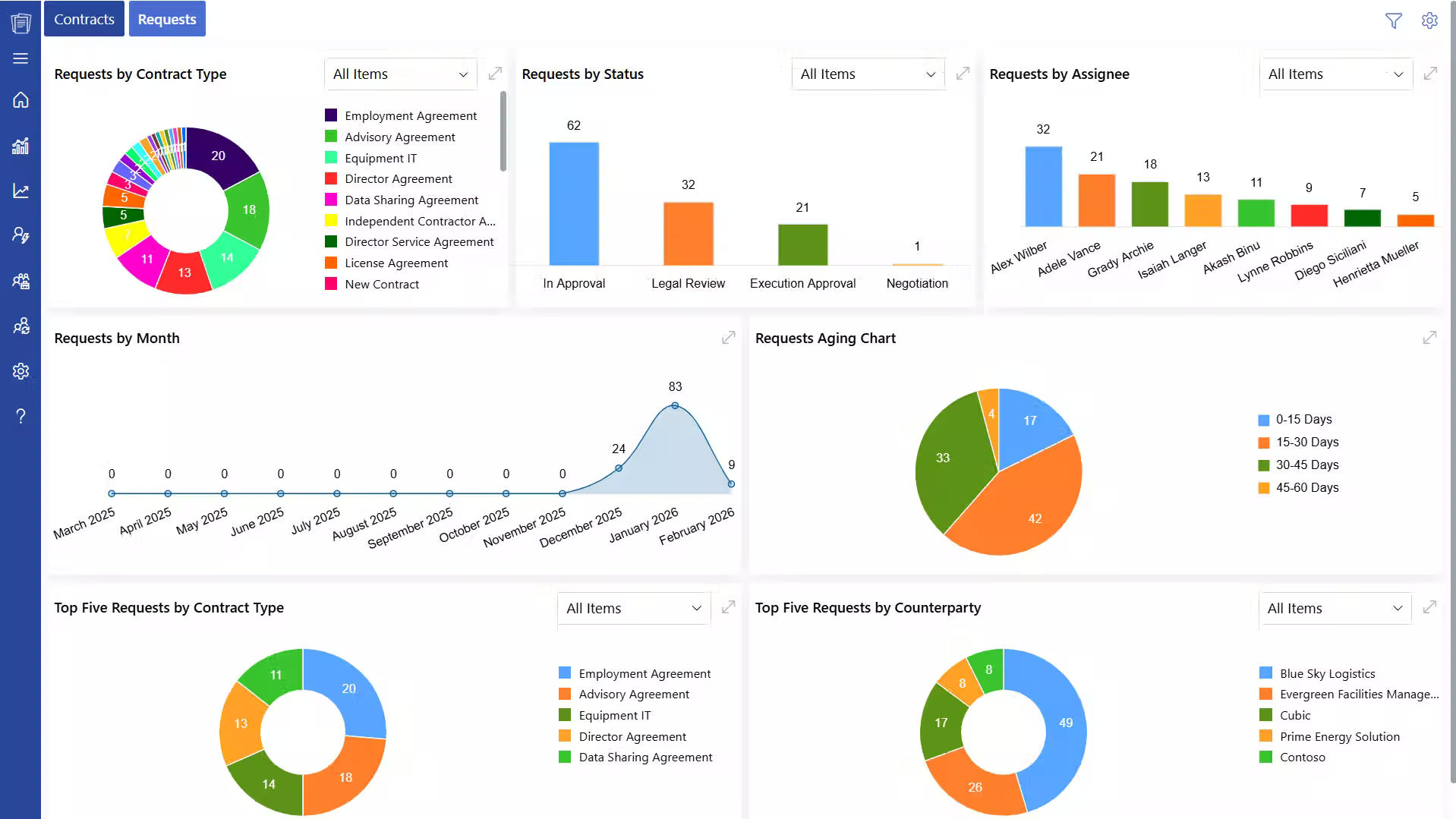
The CLM 365 Home Page is the primary dashboard with the help of which users may see the contract requests, drafts, approvals, and active contracts. Users will be able to view all in a single place, as opposed to checking several folders or emails.
A contract management dashboard provides teams with a clear picture of the status of the contract, the approvals awaiting, and the expirations to come.
Example: A legal manager can open the dashboard and see contracts that require legal review or approval of their execution.
2. Manage Contract Requests and Drafts Properly
The user can generate new contract requests and store the drafts until they are submitted to be approved. Drafts enable users to check information, add supporting files, and save details to be filled later in case of necessity.
SharePoint contract management system assist in the enhancement of accuracy and avoidance of incomplete submissions.
Example: A sales executive will be able to make a draft agreement and fill it in once the pricing is agreed with the finance team.
3. Use Approval Workflows to Control Contract Movement
Contracts are automatically distributed to the appropriate reviewers through approval workflows that are set according to specific steps. Each approver is assigned a task and can review, approve or seek changes.
SharePoint contract management system assists in keeping the contract approval process organized and offers an insight into the progress of the contracts
4. Assign Legal Review Tasks for Compliance
The legal team can be assigned with contract verification, terms, conditions and compliance requirements. The reviewers of the law can leave comments and make amendments and accept the contract within the system.
Example: The legal department can examine a vendor contract to ensure that there are liability conditions and adherence to company policies.
5. Complete Approval Before Activating Contracts
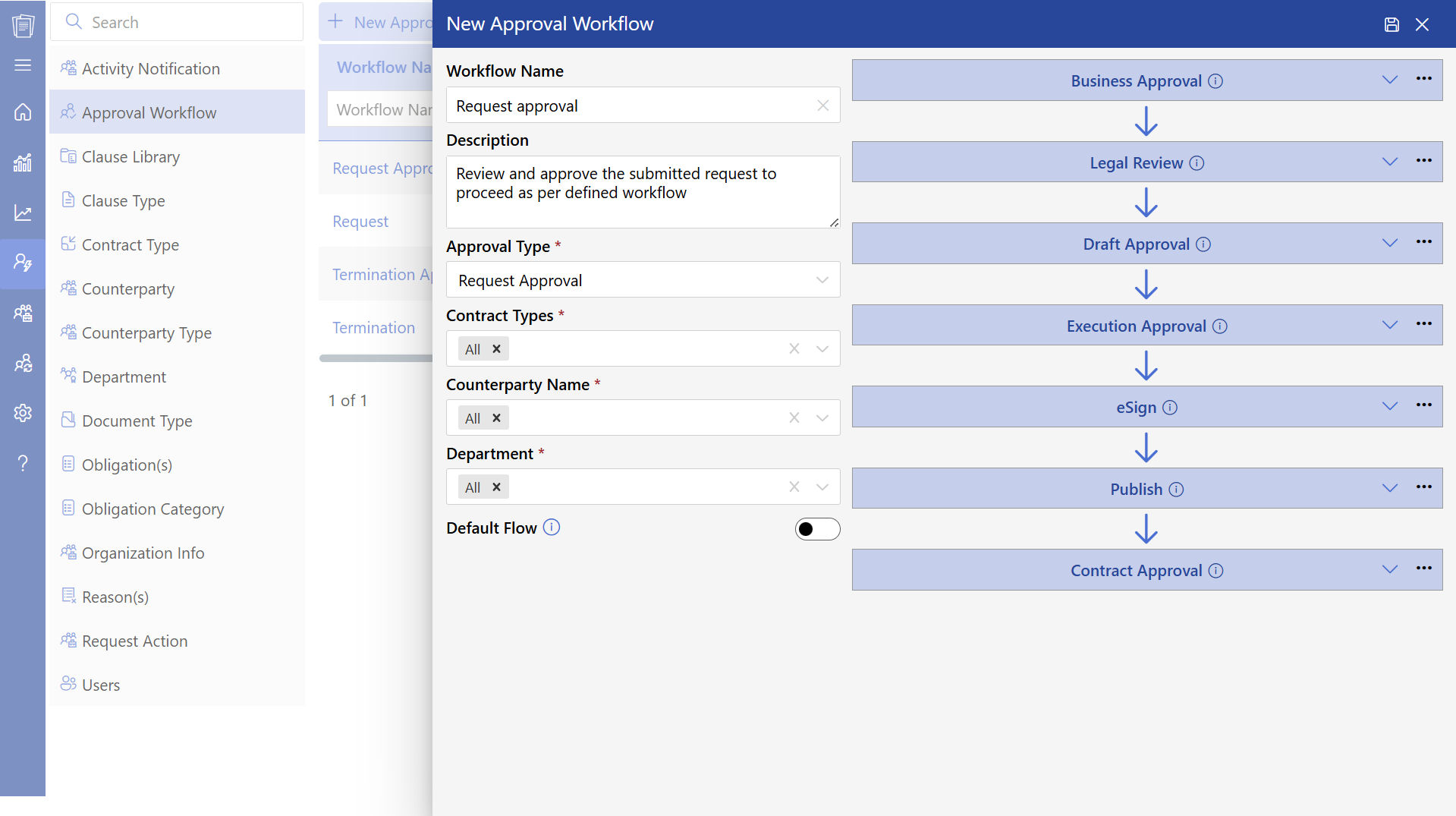
The last stage of review is the approval of the execution before the contract can be active. Approvers ensure that the contract contents, documents and approvals are final. This is to ensure that the contract is business ready.
6. Publish Approved Contracts for Easy Access
Once the contract are done with execution, the contracts are posted and stored in SharePoint. These contracts can be accessed by the authorized users whenever required.
SharePoint contract management system will assist teams in rapidly accessing contract information without having to scroll through emails and local folders.
Example: When checking the employment terms, HR can open employee contracts.
8. Track Contract Expiration Dates and Act
CLM 365 displays contracts that are expiring. This assists teams to be ready to renew contracts, renegotiate or close. Example: A vendor contract that is going to expire after 60 days can be checked beforehand to prevent service disruptions.
9. Use Activity Logs to Track Contract History
All activities of the contract are documented in activity logs and they include the creation of the contract, updates, approvals, and status changes. This gives a good audit trail and assists users to keep track of contract history.
10. Monitor and Track Contract Deviations
Tracking of deviation assists in controlling alterations in standard contract terms. Deviations can be reviewed by approvers who may approve or reject them. This assists in keeping track of changes in the contract.
Example: In case a client asks to change the terms of payment, the deviation can be monitored and accepted.
11. Detect and Track Contract Risks
The users can document risks associated with contracts, including financial risks, compliance risks, or delivery risks. Risk may contain priority and mitigation measures. SharePoint contract management system assists teams to track and manage risks prior to contract execution.
12. Detect Risks and Important Clauses with AI
The AI capabilities of CLM 365 can scan contracts and detect risky terms or missing data. This assists users to go through contracts at a faster rate and concentrate on critical areas.
Example: AI can point to a provision that is not in line with company norms.
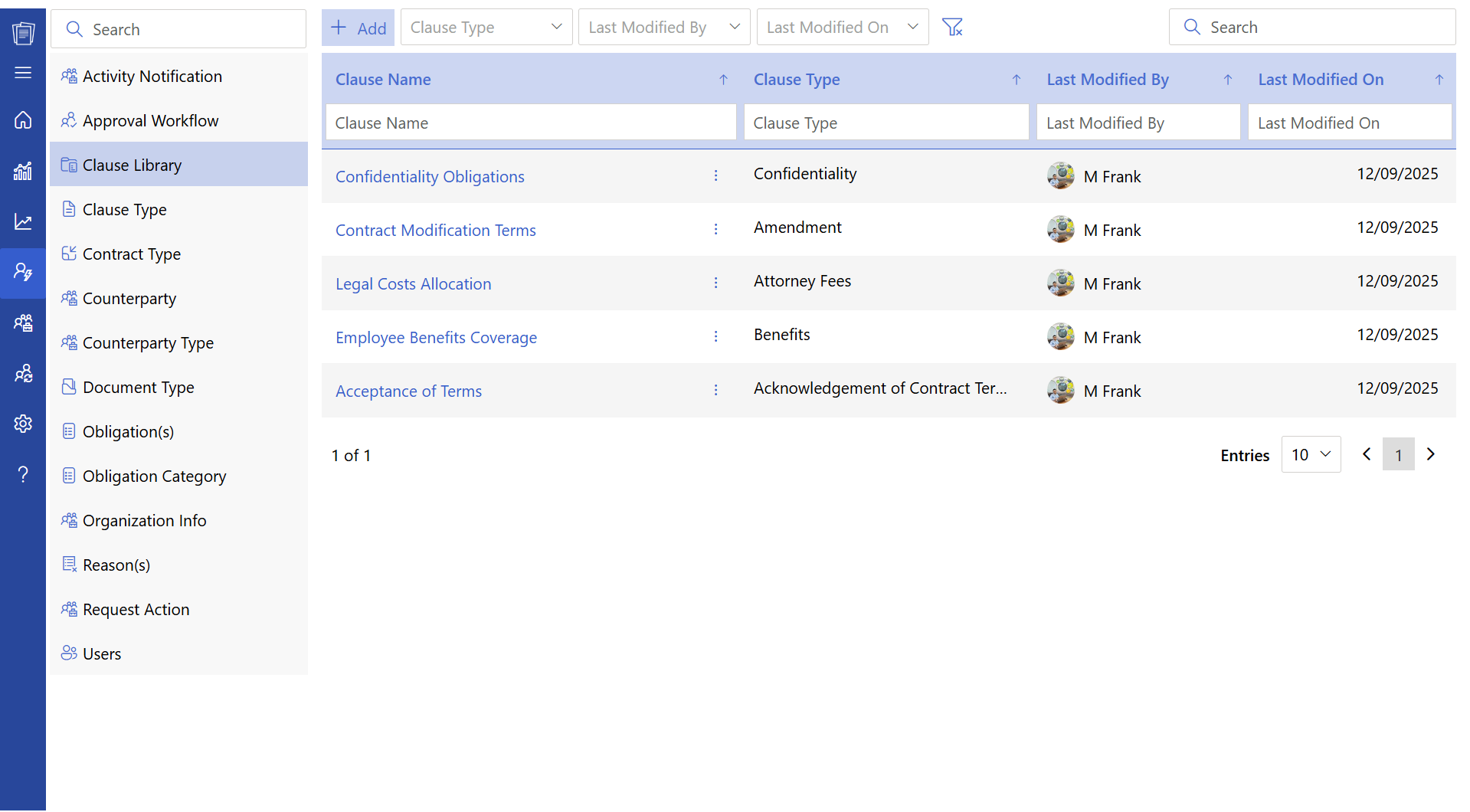
13. Standardized Contracts Use a Clause Library
Clause libraries are libraries of approved clauses which can be reused in contracts. These clauses can be chosen and inserted by users whenever they are making agreements. This assists in remaining consistent and time saving when drafting a contract.
Example: A typical confidentiality agreement may be reused in several vendor agreements.
14. Give Review and Consultation Assignments
Users may ask other subject matter experts to review it, including finance or compliance teams. The reviewers may give feedback, recommend contract amendment or accept the contract.
15. Add Multiple Review Levels on High Value Agreements
More levels of review may be needed on contracts of greater value or risk. Every reviewer fulfills his or her work prior to the advancement of the contract.
Example: A big service contract can be subjected to procurement, legal and finance review.
16. Track Responsibilities with the help of the My Tasks Dashboard
The My Tasks section displays all the approvals, reviews and assignments awaiting each user. Users can open contracts, review and do tasks in the same location. This assists users to handle their duties effectively.
17. Save Time with AI-Generated Summaries
AI can produce brief summaries of contracts, emphasizing such important facts as the period of the contract, payment conditions, and responsibilities. This assists the users to comprehend the details of contracts in a fast manner.
Example: A manager will be able to look at the summary rather than read a long contract document.
18. Compare Contract Versions to Monitor Changes
Draft and final contract versions can be compared by the users. The system identifies additions, deletions and updates. SharePoint contract management system assists in transparency and monitoring of changes in the contract.
Example: Negotiation changes can be reviewed by comparing versions in legal teams.
19. Automatic Language Detection is Better to Use
The system identifies the language of the browser used by the user and presents the interface. In case the browser language is not available, a default language is used.
20. Support Manual Risk Entry and AI Detection
The AI can be used to add risks that are not detected by the user. The risks may contain severity level, owner and mitigation plan. This assists in capturing risks identified by the system and those identified by the user.
Example: A project manager can add a risk, which is associated with delivery deadlines, manually.
Note: The contract workflow structure remains consistent, but installation steps may differ depending on the integration type. Refer to the knowledge base for integration-specific setup instructions.
Top 10 SharePoint Contract Management System
Here is a list of the top 10 SharePoint contract management systems that help businesses store, track, and manage contracts in one place. These solutions offer features like approval workflows, version tracking, deadline alerts, and centralized contract storage.
1. CLM 365
CLM 365 is built on the Microsoft ecosystem and integrates with SharePoint, Microsoft Teams, Outlook, Microsoft Copilot, Power BI, and Power Automate. This allows users to manage the contract lifecycle directly within Microsoft 365, using the tools they already work with.
It also uses AI contract analysis to summarize contracts, identify contract risks, and highlight important terms. The contract management software helps legal teams, procurement teams, and business users review agreements faster and make informed decisions.
CLM 365 is designed with enterprise-grade security and a user-friendly interface, making it suitable for both SMBs and large enterprises. It helps organizations maintain contract compliance, stay audit-ready, and keep all contracts organized in SharePoint.
CLM 365 is SOC 2 compliant, Microsoft certified, and a Microsoft Solutions Partner, meeting strict security and compliance standards. It also supports GCC and GCC High environments, making it ideal for government organizations and companies that require high-security contract management and data protection.
Key Features
- AI for effective contract process
- Customizable workflow automation
- Draft comparison
- Effective compliance management
- Customizable workflow automation
- Contract redlining and edits
- Agreement Negotiation
- Contract amendment
- Version tracking and audit trails
- Secure electronic signature
- Real-time reporting dashboards
- Enterprise grade security protocols
- User friendly interface (Built with Microsoft Fluent UI)
Ratings: 4.8 – G2 Platform
Best Known For: Built on the reliable Microsoft ecosystem, CLM 365 provides strong security features and allows users to manage contracts directly within their existing Microsoft 365 tools. It also offers flexible pricing plans designed to match the needs of different organizations, making it suitable for both growing businesses.
Pricing starts from $29.99 per user/month, billed yearly
Get Special pricing for non-profits and government-funded educational institutes
2. ConvergePoint
ConvergePoint is a good SharePoint-based contract management system that assists organizations to manage contracts, approvals and compliance in a single location. It enables teams to keep all contracts in one place and monitor them through their creation to renewal. The system also assists the users to track deadlines and keep track of the right contract records.
Key Features
- Pre-prepared contract templates
- Automated approval routing
- Renewal and expiration notifications
- Role-based user access control
- Contract analytics and reporting
Rating
G2: 4.9
3. Contracts365
Contracts365 is created to assist organizations to manage contracts in SharePoint. It provides the users with complete insight into the stages of the contract, including request and approval, as well as renewal. The platform assists in minimizing manual tracking since it systematizes contracts and reminds about significant dates.
Key Features
- All contracts stored centrally
- Electronic notifications of contract expiry
- Contract review approval workflows
- Meta data and filter-based search
Rating
G2: 4
4. HyperStart
HyperStart is a contract management system that is compatible with SharePoint and is oriented towards rapid deployment and simple configuration. It assists organizations in the process of developing, authoring contracts and retaining access and contract information.
Key Features
- Quick installation and simple installation
- Custom workflows and templates
- Control access and permissions of users
- Audit records to monitor contract activity
Rating
G2: 4.6
5. Volody
Volody is a contract management system that is connected to SharePoint and assists teams with contract creation, editing, and tracking. It promotes teamwork and maintains an entire history of contract modifications.
Key Features
- Development of a contract through collaboration
- Alerts and notifications of deadlines
- Version history tracking
- Custom approval workflows
Rating
G2: 4.8
6. Dock 365
Dock 365 is a combination of contract lifecycle management and SharePoint document storage. It enables organizations to use one system to manage contracts and other associated documents. Users can trace approvals, keep track of deadlines and manage contracts effectively.
Key Features
- Single storage of contracts and documents
- Workflow management and approval tracking
- Metadata tagging to increase search speed
- Contract update and deadline notification
Rating
G2: 4.3
7. Juro
Juro is an online contract management software that integrates with SharePoint and assists teams in making, revising, and signing contracts. It enables teams to collaborate on contracts and monitor their progress via dashboards.
Key Features
- Automation and contract templates
- Contract editing and approval
- Support of electronic signatures
- Contract dashboards and reporting
Rating
G2: 4.6
8. ContractWorks
ContractWorks is a safe contract management solution that is integrated with SharePoint to store and manage contracts. It assists users to monitor contract status, deadlines and produce reports.
Key Features
- Secure contract storage
- Renewal and expiration notifications
- Dashboard of contract reporting
- Custom workflows and templates
Rating
G2: 4.6
9. Agiloft
Agiloft is a versatile contract management system compatible with SharePoint and can create, approve, and track contracts. The SharePoint contract management system is appropriate in those organizations that have complex contract requirements.
Key Features
- Automated contract approval workflow
- Central repository for contracts
- Compliance audit tracking
- Reporting and analytics
Rating
G2: 4.5
10. Conga
Conga is a contract lifecycle management tool that is connected to SharePoint. It assists organizations to design, administer, and monitor contracts during their lifetime. Contract approvals and reporting are also supported in the platform.
Key Features
- Contract development and editing software
- Easy contract approval
- Integration of electronic signature
- Reporting and compliance monitoring.
Rating
G2: 4.3
Key Features of a SharePoint Contract Management System
Organizations selecting a SharePoint contract management system expect more than basic document storage. They need a solution that protects contract data, organizes agreements properly, supports collaboration between teams, and helps maintain compliance throughout the contract lifecycle. A SharePoint-based contract management system provides these capabilities while allowing businesses to manage contracts directly within Microsoft 365.
1. AI Contract Summary and Risk Insights
With CLM 365 integration with Microsoft Copilot, users will be able to create AI-generated summaries of contracts to get a quick overview of key terms, clauses, obligations, and risks. Users can choose certain clauses and receive immediate clarifications and insights provided by the AI agent, which will allow them to read contracts more quickly. It also assists the teams in determining the risks of the contract, obligations and significant conditions without having to read the whole document manually.
2. Secure Contract Storage Within Microsoft 365
A SharePoint contract management system stores all your contracts within your Microsoft 365. This enables organizations to control data on contracts with the available SharePoint security configurations, such as user permissions, access control, and encryption. Since contracts are stored in SharePoint, organizations have the complete freedom to control who is allowed to see, edit, or approve agreements.
3. Digital Signature Integration
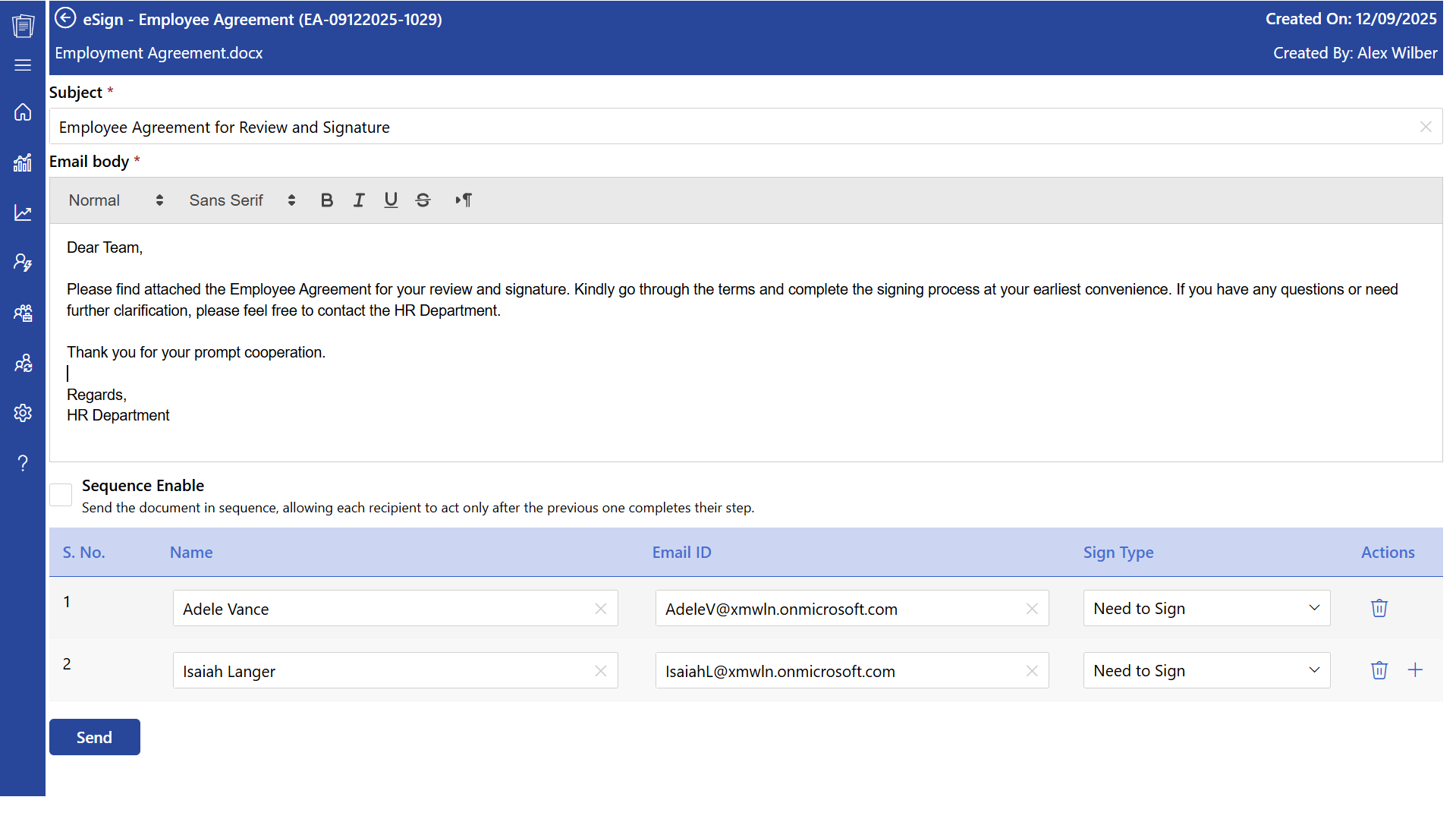
SharePoint contract management system is integrated with digital signature software, including Adobe Acrobat Sign and DocuSign. This will enable users to submit contracts to be signed in SharePoint and track the signing process. Contracts are automatically saved in the appropriate SharePoint library once contract is signed, and the activity of signing is logged.
4. Configurable Approval Processes
Organizations have different contract approval structures based on their business operations. SharePoint contract management system enable administrators to set up approval processes, contract fields, naming conventions, and document templates. This will enable companies to handle contracts according to their internal operations instead of adjusting their workflow to software constraints.
5. Flexible Templates and Metadata Management
SharePoint enables companies to design standardized contract templates and to organize contracts with the help of metadata fields. Metadata may contain the type of contract, the owner, the department, the value of the contract, the date of starting the contract and the date of expiration. SharePoint contract management system enhances the organization of contracts and simplifies the search, filtering and retrieving of agreements.
6. Automated Approval Workflows
Automated contract management assist in the transfer of contracts to approval processes without the need of manual coordination. Upon the creation of a contract, the contract is automatically assigned to the relevant reviewers according to the preset workflow configurations. All approval actions are logged and the users are notified when they need to review something.
7. Custom Workflows for Different Contract Types
The various types of contracts might have varying review and approval procedures. SharePoint contract management systems enable organizations to develop distinct workflows of vendor contracts, client agreements, employment contracts, and partnership agreements.
SharePoint contract management system assists organizations in using the right amount of review and approval depending on the importance of the contract, level of risk and business needs.
8. Integration with Microsoft 365 Applications
SharePoint contract management system are compatible with Microsoft 365 applications including Microsoft Teams, Outlook, Power BI, Power Automate, and Microsoft Copilot. This enables the users to handle contracts in the same platform that they use to communicate and report daily.
Outlook can provide approval notifications to users, Microsoft Teams can help them collaborate on contracts, Power Automate can be used to automate tasks, and Power BI can be used to analyse contract data.
Future Trends in SharePoint Contract Management
SharePoint contract management is growing with the use of AI and Microsoft 365 tools. Microsoft reports that nearly 70% of Fortune 500 companies use Microsoft 365 Copilot to support tasks such as contract drafting, review, and tracking. Microsoft Teams has also seen a 76% increase in file sharing, showing the rising need for connected contract access.
The future focuses on AI-powered contract summaries, risk detection, automated compliance tracking, and real-time contract visibility. With SharePoint, Microsoft Teams, and Microsoft Copilot, organizations can manage contracts securely, track activities, and improve contract management within the Microsoft ecosystem.
Conclusion
A SharePoint contract management system assists companies in storing, tracking and managing contracts in the Microsoft 365 platform already in use. It offers a central point on contracts, facilitates the approval process, and simplifies access and monitoring of agreements by the team.
Explore how CLM 365 can enable you to work with contracts in your Microsoft 365 environment, store them safely, and have automated processes and AI-driven insights into your contracts.
Join Our Creative Community
Frequently Asked Questions
How do I search for a specific contract quickly?
The SharePoint search bar can be used and you can enter the keywords like contract name, vendor name, or contract ID. Metadata filters such as the type of contract, the owner, or the expiration date can also be used to find contracts more quickly.
How are contract permissions managed in SharePoint CLM 365?
With SharePoint contract management system, permissions are controlled using role-based access. Access can be defined at site, library or individual contract levels where authorized users are only able to view, edit or approve contracts.
Is the SharePoint contract management system easy to deploy?
Yes, deployment is simple because it uses your existing Microsoft 365 and SharePoint environment. If your contracts are already stored in Microsoft tools, they can be managed directly without complex setup or migration.
How are renewal reminders or alerts sent in CLM 365?
SharePoint contract management system sends automatic renewal reminders and alerts using SharePoint workflows or Power Automate. Notifications are sent to responsible users through email before contract expiration or renewal dates.
What’s the best way to organize contracts in SharePoint CLM 365?
Contracts should be stored in a structured SharePoint document library with proper metadata fields, such as contract type, owner, and expiration date. This makes it easier to search, filter, and manage contracts efficiently.
What is a SharePoint contract management system?
A SharePoint contract management system is a solution built on Microsoft 365 that helps organizations store, track, and manage contracts in one secure location. It allows teams to access contracts, monitor approval status, view version history, and manage contract data directly within the Microsoft 365 platform.
Table of Contents

Trusted by the Best

_JiluXJRGNl.svg)























