

- Contract redlining highlights proposed changes, making it easy to see what has been added, removed, or updated.
- It helps both parties review and negotiate contract terms in a clear and structured way.
- Comments and suggested edits can be discussed directly within the document, reducing confusion.
- A clear record of revisions helps teams reach a final agreement faster and with greater confidence.
Every well-executed contract goes through an essential redlining stage.
Contract redlining gives every stakeholder a chance to review the agreement closely. It’s a valuable stage where partners highlight sections that need clarification or suggest changes to better reflect their objectives. This process often involves multiple reviews, where feedback is added, discussed, and refined
To handle this effectively, it is important to have the right platform one that helps you edit transparently, track suggestions with ease, and maintain one clear version throughout the review.
This guide takes a closer look at what contract redlining is, why it is important, and how the process can be handled with more ease and clarity.
What is Contract Redlining?
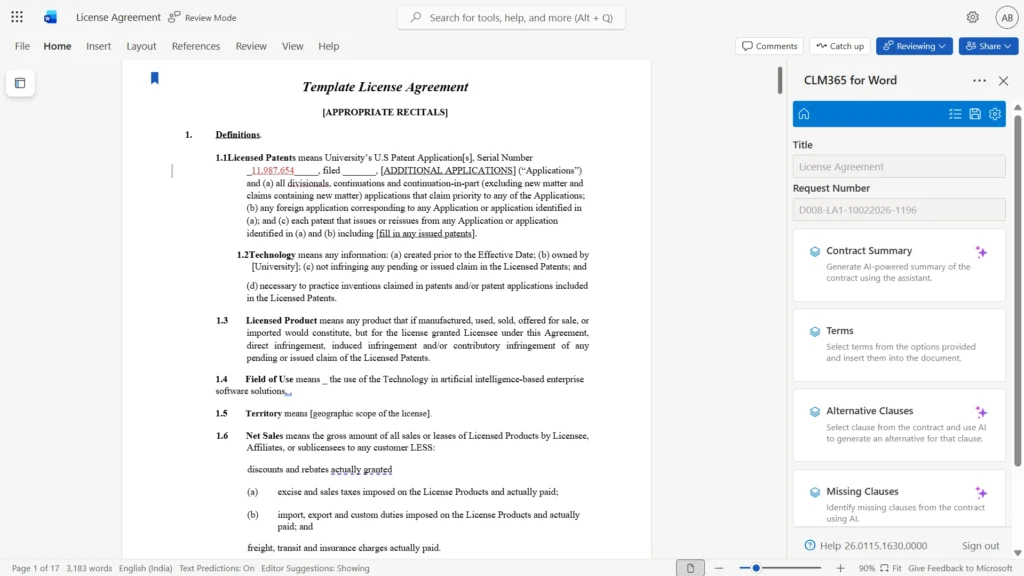
Contract redlining is the process of reviewing a legal agreement and suggesting edits directly within the document. Contract redlining usually happens during the negotiation stage, when both sides review the draft closely and point out areas, they would like to revise whether that’s changing wording, adding new sections, or removing parts that don’t quite fit.
- The name “redlining” comes from the old habit of using red ink to mark those edits on printed documents.
- The word “redlining” comes from the earlier practice of using red ink to mark edits on printed contracts, making changes easy to spot during review.
- Redlining makes it easy to see additions, deletions, and revised wording within the contract.
- Parties can review proposed changes and provide feedback directly in the document.
Importance of Contract Redlining
It is an important step where everyone involved reviews the agreement together, suggests changes, and works toward a final version that everyone’s comfortable with.
Redlining helps everyone stay on the same page by highlighting the parts of a contract that need changes or further discussion. It makes the review process clearer and prevents misunderstandings before the contract is finalized.
Redlining also allows the parties to clarify any unclear language and resolve potential misunderstandings early on. Addressing these concerns before signing the contract. This helps prevent costly disputes or problems after the contract is in effect.
When used well, redlining makes communication clearer and helps build trust. It keeps the contract process simple and open, so everyone feels confident and informed.
Key Teams Involved in the Contract Redlining Process
It is rarely handled by just one person or department. It is a team effort where different groups, each with their own expertise, come together to get things done. Let us take a closer look at the main teams involved in the redlining process.
Legal Team
The legal team leads most contract markup efforts. Their main job is to review the contract for legal accuracy and protect the company from possible risks. They look closely at the language, terms, and clauses to make sure everything is clear, fair, and meets legal requirements.
Lawyers also help remove unclear language and add terms that protect the company’s rights. They work with other teams to make sure any suggested changes do not conflict with existing laws or company policies.
Recommended Read: Contract Management for Legal Departments
Procurement or Purchasing Team
When a company is buying a product or service, the procurement team is often involved. Their focus is on making sure the terms support the company’s purchasing goals. They check delivery dates, payment terms, and vendor responsibilities to confirm that the contract supports business needs.
They may also look for ways to make the agreement more favourable in terms of cost, timing, or long-term value.
Sales Team
In contracts involving customers or clients, the sales team plays an active role. They know the client relationship and can offer context about what was discussed before the contract was created.
Sales professionals help make sure the terms match what was promised during the sales process, including pricing, service levels, and timelines. They may also support negotiations by helping both sides reach a middle ground that benefits the client and the company
Finance Team
The finance team checks the financial parts of the contract. They review payment terms, billing schedules, penalties, and any pricing details to make sure the agreement works well from a budget and revenue standpoint.
Their job is to prevent any terms that could hurt cash flow, affect taxes, or cause unwanted surprises in the company’s books. They may also help set expectations for invoicing and payments.
Operations Team
The operations team looks at how the contract will be carried out day-to-day. They focus on tasks, deadlines, and resource planning. Their input helps make sure that what’s written in the contract can actually be delivered in practice.
They often work closely with legal and sales to fine-tune service terms, delivery windows, or project timelines so that the business can meet its commitments.
Challenges Faced During the Contract Redlining Process
Here are some common challenges faced during the contract redlining process that can slow down negotiations and complicate contract management.
Understanding Complex Legal Language
Legal documents can be hard to follow, especially for people who aren’t familiar with legal jargon or complex wording. The redlining process further adds to this challenge by introducing edits and comments throughout the document. Constant changes to a contract can make it harder to keep track of, leading to misunderstandings, mistakes, and potential delays in the negotiation.
Formatting Challenges
Redlining usually requires input from several team members, each offering suggestions and feedback to improve the document. This requires the document to be clear, accurate, and well-organized. However, when different teams use various process, formatting can sometimes become disrupted.
This occurs because not all software handles formatting in the same way, which may cause the document’s structure to break. Accepting edits can also affect how the document looks, resulting in additional time spent correcting these issues.
Managing Untracked Changes
When several people work on a contract using different tools or versions, it can be tough to stay on top of all the changes. It is important for teams to clearly identify who made each change, who requested it, and when the document was updated.
This make sure the contract stays accurate and that everyone’s concerns are properly considered.
Clearly tracking updates helps everyone stay on the same page, reducing confusion and keeping the process moving smoothly.
Recommended Read:
Lengthy Review Cycles
The process of reviewing contracts often requires several rounds of revisions, where different team members provide their feedback and suggest changes. Each round involves careful examination and thoughtful consideration, which naturally takes time. When feedback comes from multiple people, it can lead to repeated adjustments and discussions.
Constant changes can slow down the negotiation and make it harder to reach an agreement quickly.
This can cause the contract approval to take longer than planned, which might affect the project schedule or business goals.
Risk of Data Loss
Contract changes can sometimes be lost or displayed incorrectly when a file is converted between different formats. This often happens because one software may not support all the features of another, or the way formatting works varies across tools.
To avoid confusion and missing information, it is best to work on contract redlining using the same platform as your collaborators or to use platforms that are fully compatible with each other.
How Does Contract Redlining Tool Works?
According to a LinkedIn survey, 91% of lawyers rely on Microsoft Word as their primary tool for drafting legal documents.
Instead of sharing multiple versions of a contract across different documents, contract redlining tool helps keep everything in one place. All feedback, suggestions, and updates are captured within a single digital copy, reducing confusion and helping everyone stay on the same page. Signing parties can leave comments, propose changes, and notify the relevant people directly within the document.
- It offers a thoughtful balance between working quickly and following legal processes. It helps make agreement negotiations clearer and more open, so everyone involved can better understand the updates being made.
- Some contract tools are also designed to work well with word processing software, making it easier to review and update documents during redlining.
- Nearly 92% of contract experts favor using Microsoft Word’s Track Changes when reviewing and exchanging edits on commercial agreements.
- They also include smart review functions that highlight even the smallest edits, helping teams spot all updates with confidence.
Effective Steps for a Smoother Contract Redlining Process
An effective contract redlining process is essential for clearly identifying changes, minimizing errors, and speeding up collaboration between parties.
- Define key contractobjectivesbefore starting the review to focus on critical terms and risks.
- Gather all related documents,previousversions, and supporting materials for complete context.
- Assign clear ownership and responsibilities to streamline reviews and approvals.
- Organize the contract into sections and use consistent formatting for all edits.
- Add clear comments and explanations to justify proposed changes and reduce misunderstandings.
- Communicate revisions professionally, using specific and objective language.
- Use collaborative tools and set deadlines to keep reviews moving efficiently.
- Perform a final review, confirm agreement from all parties, and archive approved versions securely.
Benefits of Using Contract Redlining
Using this process offers a practical way to manage changes and feedback during negotiations, helping all parties work together more clearly and effectively.
Faster Contract Negotiations
One of the biggest advantages of contract redlining is the ability to accelerate negotiations. Instead of exchanging multiple document versions through email and respond to edits directly within the contract. This streamlined approach reduces delays and speeds up decision-making.
Improved Visibility into Proposed Changes
Contract redlining makes every proposed modification easy to identify. Additions, deletions, and revisions are clearly highlighted, allowing reviewers to quickly understand what has changed. This visibility helps stakeholders focus on important updates and ensures that no critical modification goes unnoticed.
Easier Comparison Between Contract Versions
Reviewing multiple contract versions manually can be time-consuming and prone to errors. With contract redlining, changes are displayed directly within the document, making it much easier to compare revisions. This allows legal and business teams to assess updates quickly and understand how specific clauses have evolved.
More Accurate Contract Revisions
By providing a clear record of edits, contract redlining helps reduce mistakes during contract reviews. Reviewers can verify every proposed change before it is accepted, minimizing the risk of overlooked updates, duplicated revisions, or unintended modifications. This leads to more accurate and reliable contract documents.
Greater Control Over Contract Language
Contract terms often require careful review to ensure they align with business objectives and legal requirements. Contract redlining gives stakeholders greater control over the wording of specific clauses by allowing them to evaluate and discuss. This helps maintain consistency and clarity throughout the contract.
Simplified Review
Contract redlining keeps all proposed edits in a single document, making reviews easier to manage. Stakeholders can quickly review changes without switching between multiple versions or email threads. This streamlined approach reduces confusion and helps approvals move forward faster.
Better Documentation
Every edit, suggestion, and accepted revision is preserved throughout the negotiation process. This creates a detailed record of how the agreement developed over time. Having a complete history of changes provides valuable context, supports accountability, and makes it easier to reference previous discussions.
How CLM 365 Supports the Contract Redlining?
CLM 365 offers a powerful solution to manage contract redlining with ease and precision. It provides a centralized platform where all parties can view, edit, and comment on contracts in real time. This eliminates confusion by keeping every change visible and accessible within a single document.
Certified by Microsoft, the platform delivers strong security measures that protect the entire contract process. Its user-friendly design allows for easy navigation, enabling users to work efficiently and confidently within the system.
Built on a foundation of trust and security, the platform is backed by SOC 2 compliance, Microsoft certification, and Microsoft Solutions Partner status, helping organizations manage contracts with confidence.
The solution fully supports GCC and GCC High environments, making it well-suited for government agencies and highly regulated industries that require enhanced security, compliance, and data protection standards.
What sets it apart is its Zero Trust Security Model, AI-powered capabilities, and user-focused design. Unlike many contract management solutions, it keeps contract data within your organization’s own SharePoint environment, giving you greater control, security, and ownership of sensitive information.
Conclusion
Contracts don’t have to slow things down. With CLM 365, the contract redlining becomes fast, clear, and hassle-free. It empowers teams to collaborate effortlessly while keeping every detail safe and easy to manage.
Take the next step toward smarter contract management. Try CLM 365 today and experience the difference firsthand!
Frequently Asked Questions
How do I know who suggested a specific contract change?
Yes. Redlining tracks changes by user, helping teams understand who suggested specific revisions.
What's the easiest way to speed up contract negotiations?
Redlining helps by keeping all edits visible in one place, allowing parties to review and respond to changes more quickly.
Is contract redlining suitable for international agreements?
Yes. It can be used for international agreements, with appropriate consideration for different legal systems and country-specific requirements.
Who is typically involved in the contract redlining process?
Contract redlining is usually a collaborative effort involving legal teams, business stakeholders, procurement teams, and external advisors who review and negotiate contract terms together.
How does CLM 365 control access to sensitive contract information?
CLM 365 provides role-based security, allowing organizations to assign specific permissions based on user roles and responsibilities to protect sensitive contract data.
Table of Contents

Trusted by the Best

_JiluXJRGNl.svg)









