

_mVFFaHUZhS.webp)
The issue of employee time off may soon become a problem when your business grows. Spreadsheet tracking and endless email chains can easily be subject to errors and misunderstandings. This is when an efficient employee absence tracker is required.
Absence management is made easy, precise, and transparent through these intelligent tools. They will allow you to handle attendance without the stress that is normally
Employee absence trackers are smart digital tools that simplify leave and attendance management by automating approvals, tracking time off, and integrating with existing HR systems. They are essential for hybrid and remote teams to maintain transparency, productivity, and compliance without relying on spreadsheets or manual processes.
These trackers streamline HR workflows, reduce administrative workload, and improve accuracy in scheduling and reporting. Using the right employee absence tracker ensures better team planning, fairness, and a more organized, efficient, and satisfied workforce.
associated with it, including approving time-off requests and looking at real-time calendars.
We have created this 2026 guide to take you through the best absence tracking tools that will save you time, increase your productivity, and get your HR department to concentrate on what truly matters to your people.
What Is an Employee Absence Tracker
An employee absence tracker is a computer program that assists the HR departments and managers to manage attendance, vacation days, and sick leave at a single location. It does not use cumbersome spreadsheets and manual approvals but an automated system that saves time and minimizes errors. Employees are able to request time off, check balances and receive quick approval notices all within a few clicks.
Imagine it as a smart time-off management center that keeps your team updated and business running well. It is just and eliminates scheduling problems and provides managers with full access to who is available. The absence trackers of the modern days can also be integrated with such tools as Microsoft 365 and SharePoint, and collaboration is simple.
The main characteristics of an employee absence tracker:
- All leave requests on a single dashboard.
- Live-time attendance of teams.
- Automated approvals and notifications.
- Calendars and HR system integration.
- Pattern and compliance with smart reporting.
Be it a small group or a big organization, an absence tracker will ensure that everything is clear, consistent and linked to ensure your HR department is not in charge of paperwork but people.
Why Employee Absence Trackers Matter in 2026
The workplaces today are much different in appearance, as hybrid teams, remote work and flexible working hours have become the new order of things. Spreadsheets and other manual processes are no longer sufficient. This is why it is necessary to invest in an employee absence tracker in 2026.
Here’s why these tools matter:
Adapts to New Work Styles: Does not get lost in remote, hybrid, and flexible schedules and does not commit manual errors.
Increases Productivity: According to SHRM, effective absence management plays a crucial role in improving employee performance and organizational productivity. Studies show that well-structured absence management programs help minimize disruptions, enhance team efficiency, and promote workplace consistency.
Enhances Transparency: Employees will be able to see their leave balances and request leave in real-time, which will minimize back and forth communication.
Minimizes HR Workload: Automated approvals and intelligent notifications save hours of work.
Ensure Team Balance: Managers can immediately view the availability of people to plan projects or shifts in a better manner.
Improves Employee Experience: A hassle-free process depicts trust, and thus the employees feel respected and valued.
Facilitates Evidence-Based Decisions: Sophisticated absence management software provides information about attendance patterns and leave trends.
Maintains Businesses in Compliance: Monitors accruals and policies with precision to comply with legal requirements.
An effective leave-tracking system will make sure that all the absences are recorded, all the schedules are even, and your whole organization performs more effectively wherever your people work.
The major advantages of an Employee Absence Tracker.
Good absence management software is not just a time off record, but it also changes the way in which teams approach absence and workforce planning.
Key Benefits of Using an Employee Absence Tracker
Conserves Time and Reduces Paperwork
Automate the whole process without following up on approvals and updating spreadsheets. When the appropriate tool is in place, the HR teams will be able to concentrate on strategic activities rather than data entry.
Improves Accuracy
Correct leave information ensures that there is no conflict in scheduling and the HR reporting is more accurate. A centralized tracker will make sure that all the absences are recorded and synchronized in all departments.
Ensures Compliance
Keep track with labor laws automatically. The software to use is the one that updates accruals, carryovers, and legal limits on your behalf. This assists in minimizing policy breaches and expensive mistakes.
Increases Transparency
All the team members can verify their balances at any time and no longer must ask themselves the same question twice, How many vacation days do I have left? emails. The process of tracking and requests is transparent with self-service dashboards.
Boosts Morale and Fairness
Employees feel respected by having clear and consistent policies. Fair tracking fosters a culture of trust and balance within the teams enhancing overall satisfaction.
Strengthens Team Planning
Check who is not at work in real time to organize shifts and projects more efficiently. Work can be scheduled easily by the managers, which can guarantee productivity even in the absence of the team members.
In a recent HR Tech Report (2024), firms with automated absence tools saved up to 45% of administrative time and eliminated almost 30% of unplanned absences, leading to a major productivity increase to any business.
What to Look for in the Best Employee Absence Tracker
Not all trackers are the same. The most appropriate one is based on the size, structure and objectives of your company.
The key features that should be searched before selecting include:
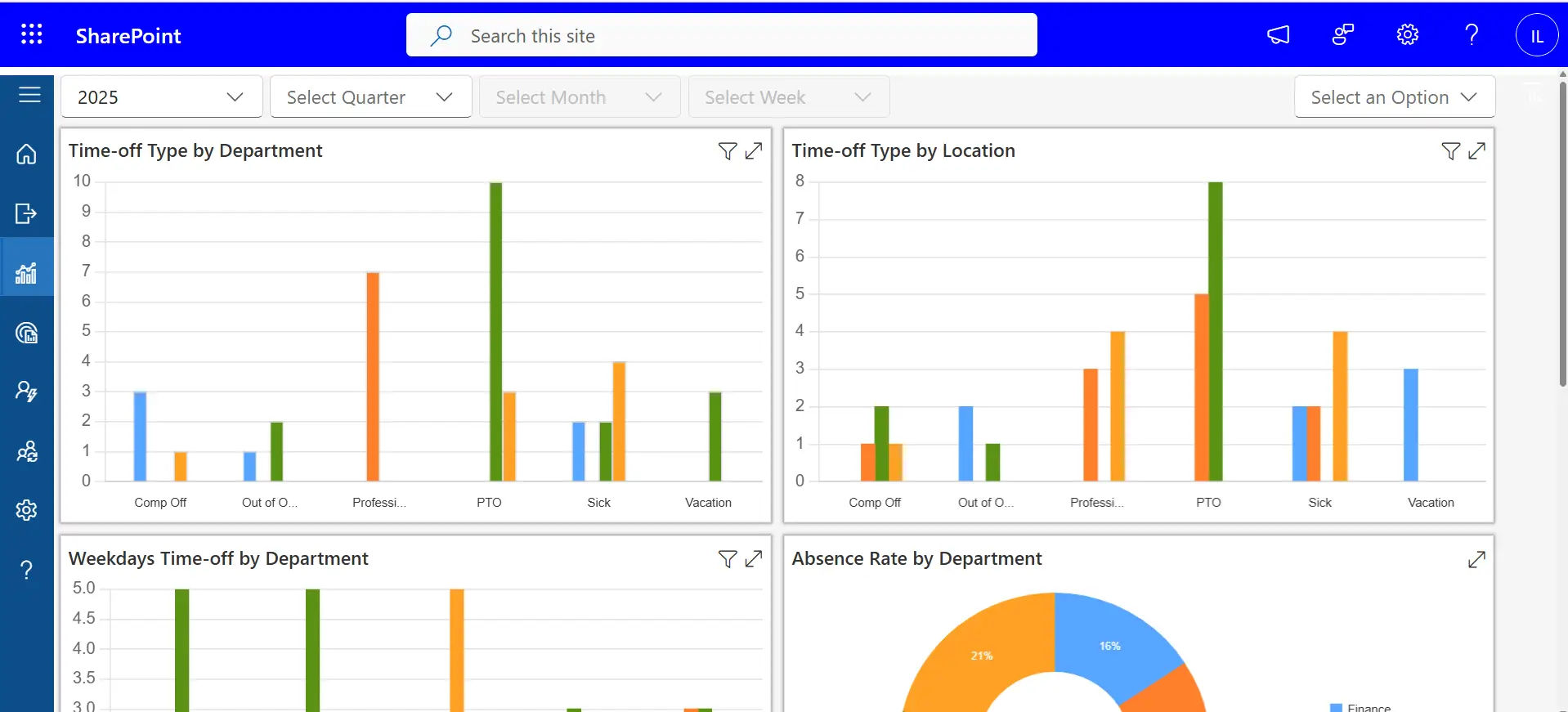
User-Friendly Dashboard
Convenient navigation among the employees and managers. An easy interface will promote frequent use and less training will be required.
Mobile Access
Let’s staff request time off at any time anywhere. This is flexible and the approvals are quicker and communication is easier.
Custom Leave Policies
PTO, sick, or unpaid leave. Customized policy environments assist organizations to match the tool to their individual HR regulations and compliance requirements.
SharePoint integration with Microsoft
Messages, meetings, and reminders in your Microsoft world. Integration ensures that workflows are connected without the need to update them manually.
Progress Tracking and Transparent Dashboards
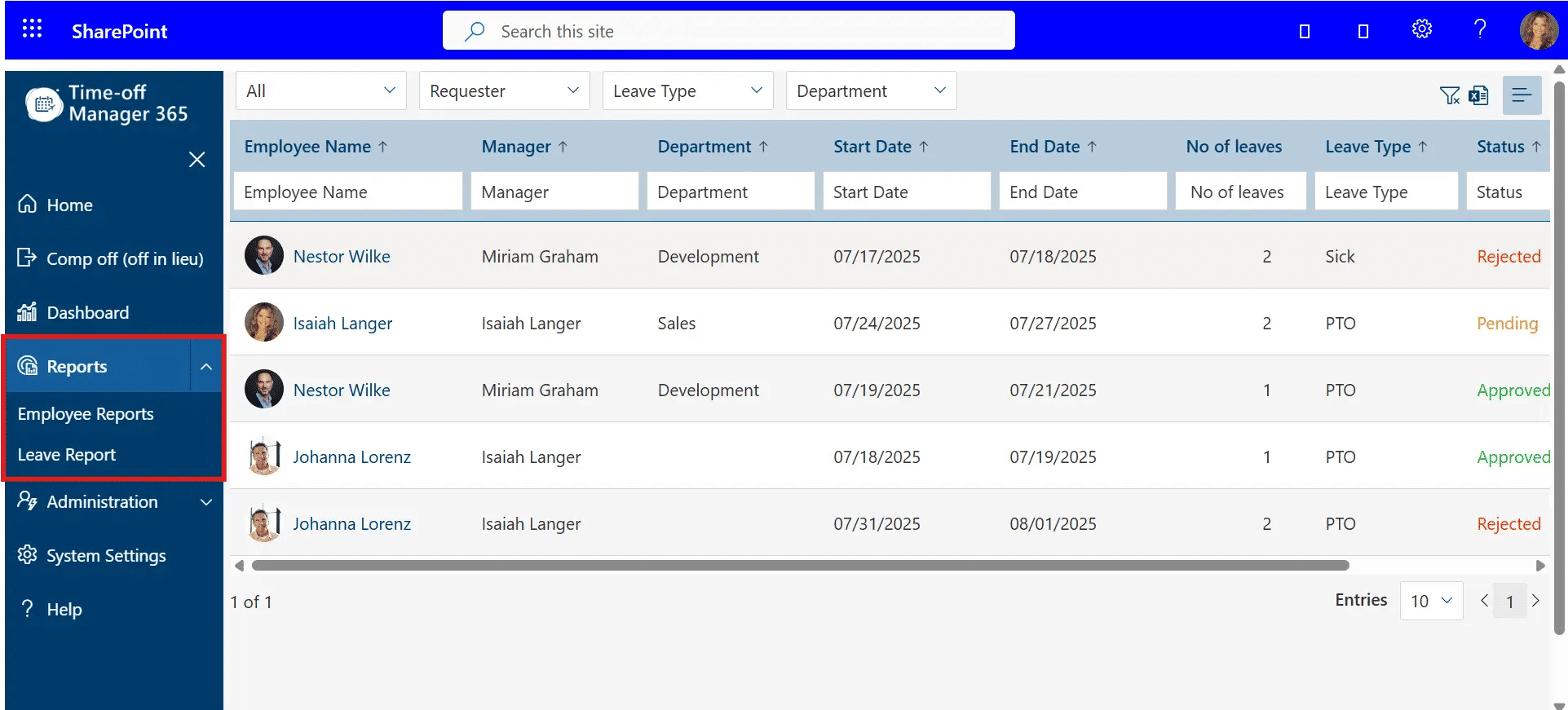
Smart Reporting
See absence trends, usage trends and compliance data in seconds. Real-time analytics assist HR leaders to make sound decisions and staff optimization.
Data Security
Secure confidential employee data. The high-level encryption and access control guarantee the complete adherence to data privacy requirements.
Scalability
Scales with your business. A scalable system will guarantee that you perform at a constant level even when you are adding more workers.
Gartner 2024 HR Insights state that 72 percent of HR professionals want absence tracking software that includes embedded reporting capabilities since it demonstrates the importance of analytics in HR decision-making.
Top 10 Best Employee Absence Trackers of 2026
The following are the best tools that will make absence tracking painless this year, all of which have been chosen based on reliability, advanced functionality, and ease of use. These solutions assist companies big or small to streamline attendance, minimize mistakes, and enhance the efficiency of the working force.
1. Time off Manager 365– Best All-in-One Solution.
Best: Businesses that prefer to have it all under one roof.
Time off Manager 365 is an effective employee absence tracking tool that allows managing requests, PTO balances, and attendance records on a single dashboard. It is also compatible with Microsoft 365 teams that provide a smooth connection between applications.
Key Highlights:
- Automated leave tracking
- Team-specific policies.
- Microsoft and SharePoint integration
- In-built chat to provide fast communication.
- Real-time calendar updates
- Easy approval workflows
Why It Stands Out:
Time off Manager 365 avoids any scheduling conflicts by notifying managers that an employee on leave is scheduled to work a shift. It can be easily integrated with Microsoft that makes it smooth among well-known tools, and real-time visibility enhances team coordination.
Pricing: Free with up to 5 users; premium plans begin at $79/month.
2. Zoho People– Complete HR with Absence power.
Best to: Companies that require a wider scope of HR capabilities.
Zoho people is an HR management, performance monitoring and attendance system. It is a great option when expanding companies, which desire to have all HR functions under one platform.
Pros:
- Customizable leave types
- Mobile app access
- Detailed analytics
- Self-service portal of employees.
- Zoho CRM and other Zoho integrations.
Cons:
- Low learning curve amongst new users.
- Premium features that need to be paid for.
Why It Stands Out:
Zoho People is a full-fledged HR ecosystem that is scalable. Its user-friendly dashboards and adaptable policies make it more convenient to manage international teams.
Pricing: Begins at $1.25 per user/month.
3. Mirro– Ideal in Transparent Team Management.
Ideal: Organizations that are engagement and recognition oriented.
Mirro It is not just an absence tracker, but it is a people-centric platform, which is a combination of time-off management and employee performance and recognition tools. It assists in making the workplace transparent and motivational as it demonstrates who is not at work, who is doing a great job, and how the teams are doing.
Key Highlights:
- Fast leave requests and notifications to the manager.
- Intrinsic performance monitoring and feedback.
- Automated notices on impending absences.
- Recognition badges and goal tracking of employees.
- Microsoft Teams and Slack integration.
Why It Stands Out:
Mirro encourages team transparency and accountability. Its absence tracking and recognition features reinforce the workplace culture and enable managers to celebrate the success as well as attendance management.
Pricing: From $9 per user/month.
4. Sage HR– Perfect fit in the growing companies.
Best: Small and midsize teams.
Sage HR (previously CakeHR) is a clean and flexible time off, HR workflow, and attendance management platform. It is oriented at the fast-growing companies, as it facilitates the daily work of HR, and all leave requests are managed effectively.
Key Features:
- Easy navigation with intuitive dashboard.
- Mobile support of approvals on the go.
- In-house HR and payroll.
- Team visibility Calendar syncing.
- Individual leave policies and reports.
Pros:
- One-stop HR solution to smooth management.
- Superior customer care and onboarding services.
Cons:
- A bit old-fashioned interface relative to newer tools.
Why It Stands Out:
Sage HR is a combination of strong absence management and basic HR features, which is why it is an excellent option when a team requires flexibility without complexity. It expands automatically along with your business and maintains the simplicity of HR processes and relationships.
Pricing: Begins at 5.50 per user/month.
5. Vacation Tracker– Ideal Remote and Hybrid Workforce.
Best if: Distributed teams with Slack or Microsoft Teams.
Vacation Tracker is made to suit modernized, hybrid workplaces. It enables workers to request, approve, and monitor time off directly in Slack or Microsoft Teams, and absence management is made easy in remote-first organizations.
Key Features:
- Request and approve leave requests directly in Teams or Slack.
- Facilities in support of various leaves, locations and departments.
- Live notifications and reminders.
- Automatic updates in the balance of leaves.
- More visibility of the teams with detailed team calendar.
Pros:
- Smooth communication integration.
- Fits well in remote and hybrid workplaces.
Cons:
- Inadequate inbuilt reporting and analytics.
Why It Stands Out:
Vacation Tracker makes all your team connected and informed regardless of where they are working. It is a simple design, automation, and integrations that enable it to suit best companies that have flexible schedules across time zones.
Pricing: $1 per user/month.
6. LeaveBoard– Most Economical Alternative.
Best: Startups and small business.
LeaveBoard is a cheap and simple absence tracking application designed to serve small teams that require simplicity but not features. It is meant to assist managers and employees to monitor vacations, sick days and holidays within a single location.
Key Highlights:
- Team calendar with real time visibility.
- Regional holiday lists.
- Quick request self-service dashboard.
- Automated approval processes.
- HR insights downloadable reports.
Pros:
- Free with a small group of 9 users.
- Fast installation and little training.
Cons:
- Few third-party integrations as compared to bigger tools.
Why It Stands Out:
LeaveBoard provides a great value to small teams that want to digitalize absence management without exceeding their budget. It is easy, efficient and can ensure transparency in the team with minimum effort.
Pricing: Free up to 9 users; paid subscriptions start at 1.35 per user/month.
7. TimeOffCloud– Microsoft-Connected Workflows.
Best fit: Companies with absences in Microsoft contexts.
TimeOffCloud is developed to work with companies using Microsoft applications such as Outlook and SharePoint. It consolidates leave requests, approvals, and reporting, and assists HR teams to handle attendance without any issues on familiar Microsoft platforms.
Key Features:
- Automatic accrual tracking of PTO.
- SharePoint integration of synchronized data management.
- Personal leave and routing approvals.
- Live reporting and audit trails.
Pros:
- Good integration with SharePoint and Microsoft 365.
- Easy, user-friendly employee and management interface.
Cons:
- None of the specific mobile apps.
Why It Stands Out:
TimeOffCloud is a solution that fits well in the case of an organization that desires to handle all the workflows related to absences in the Microsoft ecosystem. Its extensive integrations and synchronization of data in real time make the process of tracking leave quick, precise, and easily available to all departments.
Pricing: From $1 per user/month.
8. CaptureLeave– Simple Vacation Tracker.
Better in: Small teams that require a no-frills solution.
CaptureLeave is a simple web-based application that is meant to make the process of tracking vacation and time-off easy. It suits small businesses seeking a low priced simple to install system without complex integration or installation.
Key Highlights:
Better organization of the leave types.
- Approval and reminder of email notifications that are automated.
- Team visibility calendar synchronization.
- Easy web-based interface that is available on any device.
- Role-based permissions of managers and staff, which are flexible.
Pros:
- Quick and easy setup process
- Small team-friendly and cost-effective.
Cons:
- Limited reporting options
- None of the specific mobile apps.
Why It Stands Out:
CaptureLeave is a company that concentrates on simplicity and efficiency. It is ideal in the case of organizations who require only simple absence tracking without the complexity of a full HR application, which makes management simple and transparent.
Pricing: $1 per user/month.
9. Day Off App– Lightweight and Mobile-Friendly.
Best when: Starting up and freelancers.
Day Off App is a simple but effective application that allows tracking employee leave on any device. Its mobile-first design fits perfectly with small teams or freelancers who would like to deal with absences on the fly.
Key Features:
- Single tap leave requests and approvals.
- Full visibility calendar of absence.
- Push and instant email notifications.
- Basic dashboard to monitor balances.
- Easy installation without any technical skills.
Pros:
- Very mobile-friendly and user-friendly interface.
- Ideal in small and nimble teams.
Cons:
- Minimal third-party integrations.
Why It Stands Out:
Day Off App is bright when it comes to the teams that value convenience and mobility. It takes all the necessary absence tracking features and puts them in a straightforward and easy to use mobile application, which is perfect when a business prefers flexibility to complicated options.
Pricing: Free up to 5 users; paid subscriptions begin at $79/month.
10. Jibble – Best Free Absence and Attendance Tracker for Teams.
Best for: Deskless teams that need real-time attendance tracking.
Jibble is a free time and attendance tracker for teams that need more than basic absence
management. It combines PTO tracking with real-time timesheets and attendance
monitoring, giving managers clear visibility into workforce availability. With GPS tracking,
facial recognition, and smart alerts that notify managers when employees fail to clock in, it is
especially useful for remote and deskless teams that need accurate, reliable attendance
tracking.
Key Features:
- PTO and absence tracking on mobile and web.
- Multi-level approvals and custom leave policies.
- Automated leave accrual and balance tracking.
- Real-time attendance visibility and calendar updates
- Automated timesheets and reports.
Pros:
- Free plan available for unlimited users.
- Combines absence tracking with time and attendance management.
Cons:
- Some advanced features are only available in paid plans.
Why It Stands Out:
Jibble stands out by combining leave management with time tracking and real-time
attendance visibility. Managers can quickly see who is working, who is absent, and how
hours are being tracked. Its free plan for unlimited users makes it a strong option for growing
teams.
Pricing: Free forever for unlimited users; paid plans available with additional advanced
features
How to Choose the Right Employee Absence Tracker
The decision of the appropriate employee absence tracker depends on the size of your company, its budget, and workflow. The following is a simple process to make you find the perfect fit:
Step 1: Define Your Goals
- Determine whether your primary goal is to decrease administration workload, enhance accuracy or enhance cross-team visibility.
- Establish quantifiable goals like a reduction of 30% of manual labor or increased efficiency in reporting.
Step 2: Check Compatibility
- Make sure that the tracker is integrated with such tools as Microsoft 365, SharePoint, and your current HR systems.
- Replication of data is minimized through compatibility and workflows are linked.
Step 3: Take into account User Experience.
- Test the ease of navigation by employees and managers.
- An easy to use, user-friendly interface will promote daily usage and reduce training.
Step 4: Revise Security Standards.
- Confirm the data protection policies and encryption procedures in the platform.
- Ensure that it is in line with GDPR and other privacy policies.
Step 5: Pricing and Support Comparison.
- Pricing models should be reviewed to ensure scalability with the growth of your team.
- Ensure that there are good customer service and frequent software upgrades.
Step 6: Test Before You Buy
- Use free trials or demos.
- Consult the various departmental heads to get a final decision.
- The Future of Absence Management of Employees.
Any company works better when individuals feel safe and times are predictable. Absence management is not about keeping track of who is away but enabling teams to be more planned and confident in working.
With the increase in hybrid and flexible workplaces in 2026, the appropriate employee absence tracker is necessary to achieve balance and productivity. The HR leaders are redefining time-off management as smart automation and real-time insights are turning it into a strategic advantage.
The Future of Employee Absence Management
In case you want to make time-off monitoring easier and at the same time be able to integrate with Microsoft and SharePoint, Time off Manager 365 will provide you with precisely that. It is free to use by up to five users and premium plans start at $1.58 per user/month.
Go one step further towards a stress-free leave management and create a workplace where time off and productive work go hand in hand. Through the appropriate system, your organization will be able to create transparency, trust and long-term employee satisfaction.
Conclusion
It is not hard to manage the time off of employees with the right tool. Employee absence tracker is an automated tool that approves, complies, and keeps teams in touch, which saves HR a lot of time and enhances transparency and balance.
Try it out with Time Off Manager 365 a Microsoft-integrated solution designed to make leave management smarter. Free 14-day trial starts now no credit card needed and streamline time-off tracking to make the workplace happier and more productive.
Join Our Creative Community
Frequently Asked Questions
What is an employee absence tracker and what does it do?
An employee absence tracker is software that helps HR teams and managers handle leave requests, PTO balances, and attendance records from a single dashboard. It replaces manual spreadsheets with automated approvals, real-time calendars, and instant notifications – keeping your entire team organized and informed.
Which is the best employee absence tracker for Microsoft 365 users?
Time off Manager 365 is the top choice for Microsoft users. It integrates directly with Microsoft 365, Teams, and SharePoint – so leave requests, approvals, and calendar updates all happen inside tools your team already uses daily.
Can small businesses use an employee absence tracker for free?
Yes. Several tools on this list offer free plans. Time Off Manager 365 and Day Off App are free for up to 5 users, while LeaveBoard supports up to 9 users for free — making them ideal starting points for small teams before upgrading.
What key features should I look for in an absence tracker?
Look for a user-friendly dashboard, mobile access, custom leave policies, Microsoft or Slack integration, smart reporting, and strong data security. These features ensure the tool fits your team’s workflow and scales as your business grows.
How does an employee absence tracker help reduce HR workload?
It automates the entire leave process — from requests and approvals to balance updates and compliance tracking. Companies using automated absence tools have saved up to 45% of administrative time and reduced unplanned absences by nearly 30%, freeing HR to focus on people, not paperwork.


_JiluXJRGNl.svg)























