


Are you struggling to track contracts across emails, folders, and spreadsheets while approvals and renewals get delayed?
Many organizations manage contracts manually, making it difficult to know the status, find the latest version, or track important dates.
With CLM software organizations have improved control, visibility and structured contract management. This guide will define what CLM software is, how it is applied in practice in real business, and why modern organizations should have it to handle contracts efficiently and on a large scale.
CLM 365 was built specifically for teams using Microsoft 365 who want greater control over their contracts without switching tools or disrupting existing workflows. It allows organizations to manage the entire contract lifecycle directly within familiar Microsoft applications.
Click here to listen on the go!
What Is CLM Software?
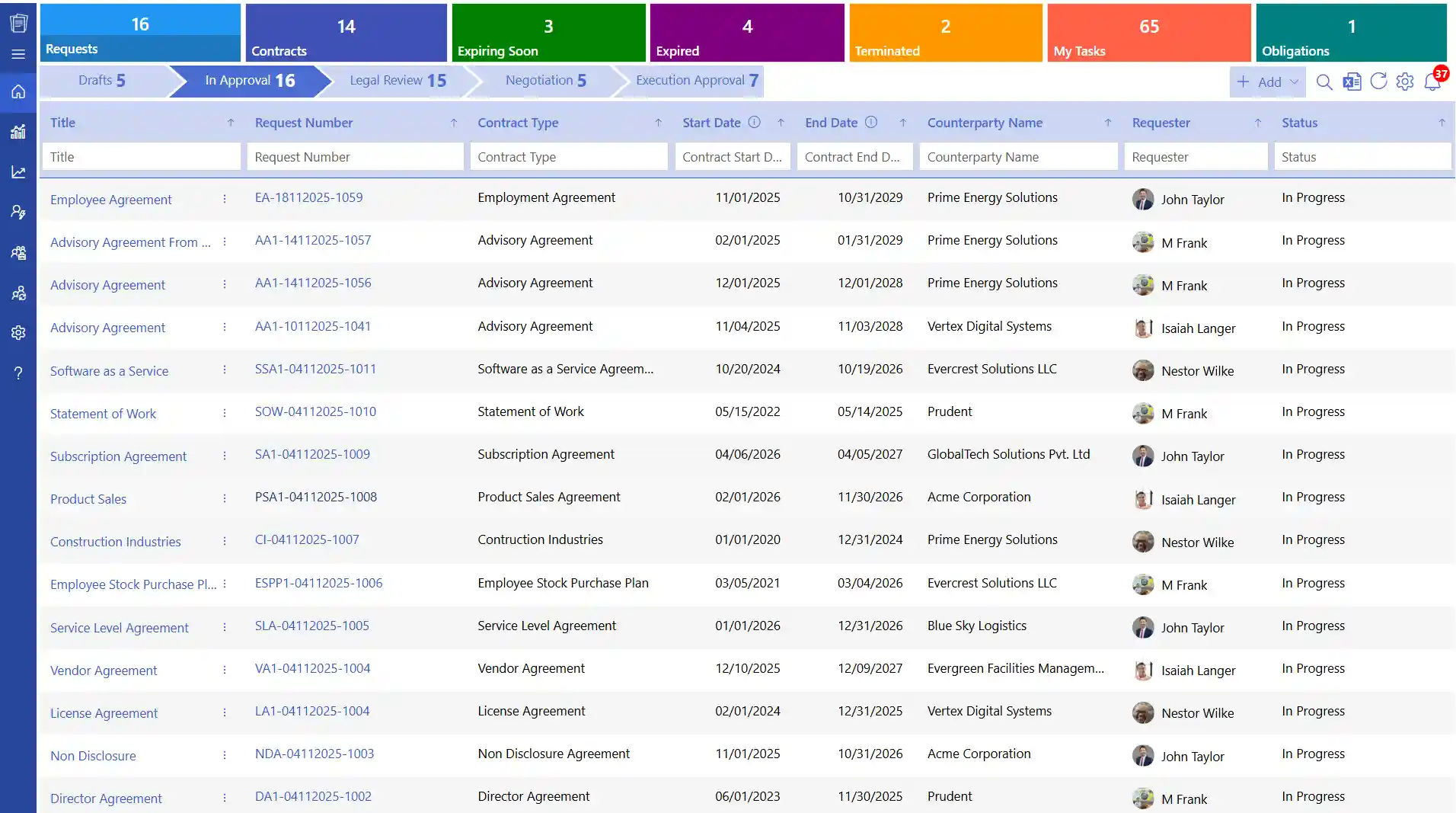
CLM software is a system that is used to handle the contracts starting with the initial request and ending with approval, signing, active use, renewal, or termination. It centralizes major contract operations like drafting, reviewing, approvals, signing, tracking and reporting in a single secure and controlled platform.
This assists teams in monitoring the progress of the contract, retrieve the most recent versions and manage obligations with increased visibility and control.
How CLM Software Works Across the Contract Lifecycle
CLM software helps manage contracts with a well-defined and structured lifecycle. It assists teams in developing, reviewing, approving, signing and tracking contracts within a single system.
1. Contract Request
CLM software enables one to make contract requests on the platform. Important details like the type of contract, the parties involved, value of the contract, department, timelines are entered by the users. This information provides legal and business teams with a clear picture of the contract prior to the drafting.
2. Drafting
Upon approval of the request, CLM 365 improves the contract drafting process. Pre-approved contract templates are legal templates that contain standard legal terms and clauses and can be used by legal teams. This minimizes manual drafting and assists in ensuring uniformity of contracts.
3. Review and Negotiation
CLM 365 offers a safe platform on which legal, finance, and business teams can review contracts. AI capabilities can create summaries of clauses and draw attention to the most important aspects to view more quickly. In the system, teams can comment, propose edits and debate changes.
4. Approval
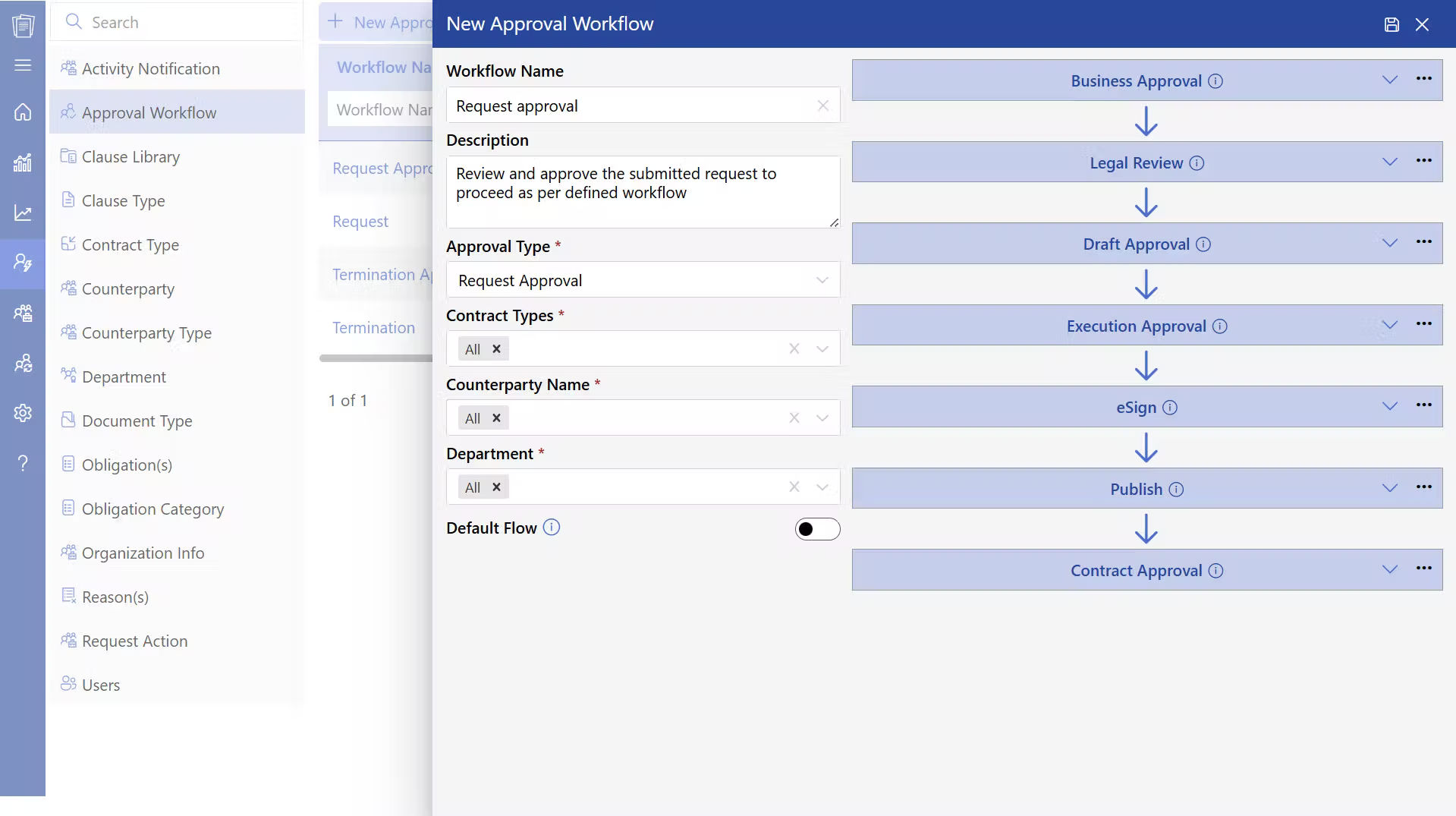
A lot of organizations are dealing with numerous contracts annually. Indeed, 29% of the respondents note that they deal with 100-500 contracts in a year, hence a proper approval system is necessary. The CLM software is used to control approvals where the automatic transmission of contracts to the appropriate approvers is done according to the value of the contract, department, or the level of risk.
5. Execution
CLM 365 facilitates electronic signatures, which means that all parties can sign contracts electronically. This eliminates the necessity of using physical papers and accelerates the process of signing. After contract execution, the final contract is stored in a central repository by the system.
6. Obligation Tracking
Contract responsibility is an issue that is usually difficult to manage. 40% of organizations acknowledge that they lack a clear ownership of contract responsibility. This is solved by CLM software which monitors important obligations like payment terms, deliverables, milestones and dates of renewal.
7. Renewal or Closure
The CLM 365 reminds teams about the upcoming contract renewal process or expiry of contracts. Before making decisions, users can review the history of contracts, past versions, and performance. Contracts may be renewed, extended or closed depending on the business requirements.
Difference Between Traditional and Enterprise CLM Software
Traditional contract management relies on documents, emails, and shared folders, making tracking and control difficult. Contract management software uses a centralized system to manage contracts with better visibility, tracking, and control.
Key Differences at a Glance
| Aspects | Traditional Method | Enterprise CLM Software |
| Contract Storage | Spread across emails and drives | Centralized, searchable repository |
| Drafting Method | Manual edits in documents | Template-driven drafting |
| Approval Process | Email-based follow-ups | Department based approval workflows |
| Version Control | Multiple copies with unclear history | Complete version tracking |
| Risk Identification | Manual legal review and consumes time | AI-assisted review process |
| Reporting | Limited or manual reporting | Real-time dashboards |
| Scalability | Difficult to manage at volume | Built for enterprise growth |
Key Features of Enterprise CLM Software
CLM 365 assists organizations to handle numerous contracts in various teams. It offers solutions that enhance storage, drafting, approvals, tracking, and compliance of contracts. The following are the main characteristics to consider.
1. Centralized Contract Repository
According to EY, 90 percent of contracting professionals report that they have difficulties in attempting to find contracts. A good software for contract management addresses this by having all contracts in a central repository. Every contract has the information on the type of contract, date of commencement, expiry date, owner, and value.
2. Clause Library
Having 84% of the legal professionals predicting the use of globally standardized contract templates, the clause library are significant in the creation of contracts. The CLM software offers pre-approved clauses and templates that are controlled by legal departments. Teams can choose the right template depending on the type of contract that needs to be worked on
3. Automated Workflows & Approvals
An EY survey found that 70% of organizations have a formal contracting technology strategy, yet 99% of them still do not have the data and tools to enhance their contracting process. CLM 365 solves this through automated workflow. Contracts are automatically routed to the appropriate approvers depending on set rules like the value of the contract.
4. Redlining & Draft Comparison
CLM software with an intuitive software enables users to make comparisons between contract versions and monitor changes within the system. The teams can view the changes made, the person who made the change, and the time of the change. This allows the review of contracts to be more structured and enables teams to monitor changes at the clause level.
Recommended Reading: Everything you need to know about contract redlining software
5. AI-Powered Contract Review & Insights
According to Super legal, that the average time to review a contract is 92 minutes. CLM software is an AI-driven solution to accelerate contract review. AI can summarize contracts, point out key clauses, find risky language and propose alternative wording. CLM 365 assists the legal teams to go through contracts more quickly and focus on making key decisions.
6. Digital Signatures
CLM software with an intuitive software also facilitates the use of digital signatures whereby contracts can be signed electronically by all parties. This minimizes the time wastage in printing, scanning or even hand signing. Contracts signed automatically become official records with timestamps and details of the signers and are easily accessible in the future.
7. Obligation & Renewal Management
The contract obligation software tracks contractual obligations such as deliverables, payment terms, and renewal dates. Teams receive reminders about upcoming deadlines and renewals. This helps organizations stay aware of contract responsibilities and avoid missing important contract actions.
8. Contract Amendment
CLM 365 enables users to make corrections on the contracts based on the initial contract record. Clauses, terms, dates or pricing can be updated by teams without establishing a new contract. All contract amendment are versioned and the version history displays what was changed, by whom and when.
9. Reporting & Contract Visibility
The enterprise CLM software has dashboards which display the contract status, approval dates, renewal dates and contract risks. These insights assist the leadership teams to keep track of contract activity, trends, and make better business.
10. Compliance Management
According to Zoho Contracts, compliance is mentioned as the largest contract challenge in 43% of organizations. Enterprise CLM software assists in solving this by keeping a record of contracts and approval history. It records all the contract activities, which assists organizations to observe the internal policies and regulatory requirements.
Benefits of Using Enterprise CLM Software
The CLM software assists companies to manage contracts in a more organized, visible, and controlled manner. This assists teams in operating more effectively and making decisions during the lifecycle of the contract.
1. Faster Contract Turnaround Across Teams
CLM software assists in contracts that pass through request to approval and signing fast. Contracts have pre-established approval routes, and thus there is no time wastage in determining the next reviewer or approver.
One system can allow legal, finance and business teams to collaborate without relying on emails and manual tracking.
2. Clear Visibility into Every Contract Stage
CLM software provides real-time insight into the status of the contract, whether it is being created, renewed or closed. Users can be able to see whether a contract is under review, pending approval, signed or approaching expiration. Managers and stakeholders can get clear visibility of contracts, monitor the tasks, and respond in time when necessary.
3. Reduced Legal and Compliance Risk
CLM 365 assists organizations in adhering to accepted standards of contracts through pre-existing templates and clause collections. This makes the language of contracts uniform and in line with the company policies. All the contract activities such as edits, approvals and signatures are captured in the system. CLM software provides a good audit trail that assists in internal audits and compliance audits.
4. Better Cost Control and Financial Planning
CLM software provides a transparent insight into the contract values, terms of payment, and renewal dates. Contract commitments and future payments can be reviewed by the finance and procurement teams.
This assists organizations to plan budgets better and prevent unforeseen expenditures. It is also possible to review contract terms by the team before renewal and make improved financial decisions based on business requirements.
5. Improved Control During Negotiations
CLM software assists teams in handling business contract negotiations in efficiently. Users can monitor the changes in the clauses, view the contract versions and know the impact of each change in the agreement. Changes can be reviewed by legal and business teams more quickly without having to compare several files manually.
6. Easy Renewal Management
CLM software is used to monitor the expiry dates of contracts and give alerts on the renewal dates. This provides the teams with sufficient time to assess contract performance and determine whether to renew, amend or terminate the contract. This assists organizations to have active contracts that are in line with the present business objectives.
7. Better Decision-Making
The CLM software allows convenient access to summary of the contracts, timelines and essential terms. The teams do not have to read through whole contracts to locate critical information. Contract data can be reviewed by leaders and stakeholders and make informed decisions within a short time.
Who Uses CLM Software?
Many industries deal with numerous contracts with various terms, schedules and compliance needs. CLM software assists organizations to handle these contracts in an organized manner. Here are some industries where CLM software plays a major role.
1. Legal
Contract management software assists legal teams to create, review and manage contracts on a single platform. It offers access to accepted templates and libraries of clauses, which saves time on drafting. The version of the contract, approvals, and changes can be tracked by legal teams and it is easier to keep audit ready records.
2. Manufacturing
CLM software is used by manufacturing companies to control supplier contracts, pricing agreements, and delivery terms. Teams can monitor the contract requirements, delivery timetables, and supplier promises. This assists production teams in better planning and assists in controlling costs.
3. Supply Chain
CLM software provides access to service agreements and vendor contracts to supply chain teams in a single location. Teams can track milestones, terms of the contract, and the responsibility of the vendor. This will assist in managing the vendors better, will aid in better planning, and will minimize the likelihood of service delays.
4. Oil and Gas
Oil and gas companies deal with high value contracts that have high compliance and operation requirements. A good contract management software for oil and gas documents approvals, obligations, and stores contract documents in a secure environment. This assists the teams to track the activities of the contract and keep appropriate records regarding the operations and regulation.
5. Healthcare
CLM software is used by healthcare organizations to handle contracts with vendors, service agreements, and other documents related to compliance. It assists in monitoring the timelines of the contracts, approvals, and renewal dates. This assists in compliance needs and aids administrative teams to manage contracts in a more efficient way.
6. IT Sector / SaaS
CLM software is applied by technology and SaaS companies to administer customer contracts, subscription agreements, and renewals. It assists in monitoring the timelines and renewal dates of contracts which aid in revenue monitoring. The teams can check the status of contracts and customer agreements in a single system.
7. Energy Utility
Energy utility companies deal with long-term contracts with suppliers, associates and service providers. A best energy contract management assists in the monitoring of the terms, milestones, and obligations of contracts in the long term. This helps teams monitor contract performance and maintain proper records for compliance and operational needs.
Best Practices for Building an Efficient Contracting Workflow
A clear contracting workflow assists organizations to administer contracts with improved uniformity, visibility and responsibility. The below best practices can be used to develop a robust and dependable contracting process.
1. Standardize Templates Before Automation
Standard contract templates offer a good basis on contract creation and review. They assist teams in the use of approved contract language and consistency between agreements.
- Use templates for common contract types such as vendor, service, and partner agreements
- Include pre-approved clauses that follow legal and company policies
- Review and update templates regularly to reflect business and policy changes
2. Define Approval Roles Clearly
Clear approval roles help contracts move through the approval process without delays. When teams know who is responsible, approvals happen faster and more efficiently.
- Assign approvers based on contract type, value, or risk level
- Define approval levels and escalation paths for faster decision-making
- Track approval status so teams know where the contract stands
3. Track Obligations from the Start
Contract obligations should be tracked as soon as the contract is signed. This helps teams stay aware of key commitments and deadlines.
- Identify milestones, deliverables, and important dates early
- Assign responsibility for monitoring each obligation
- Review obligation status regularly to support timely action
4. Use Reporting to Monitor Contract Performance
Contract reports help teams understand how contracts support business goals. Regular reviews provide useful insights into timelines, renewals, and compliance.
- Track contract timelines, renewals, and performance metrics
- Compare actual performance with agreed contract terms
- Share reports with leadership and business teams for better planning
5. Assign Clear Contract Ownership
Contract ownership helps maintain accountability throughout the contract lifecycle. When a contract owner is assigned, there is clear responsibility for tracking contract activities.
- Assign a contract owner for each contract
- Monitor important dates, renewals, and contract requirements
- Update ownership when contracts are renewed, amended, or transferred
These best practices help organizations build a structured contracting workflow, improve contract tracking, and maintain better control over contract activities.
How CLM 365 Helps Businesses Manage Agreements
CLM 365 is built on Microsoft ecosystem, which enables organizations to handle contracts in the tools they are already using. It is connected to SharePoint, Microsoft Teams, Outlook, Microsoft Copilot, Power BI, and Power Automate, allowing teams to create, review, approve, and track contracts as part of their everyday tasks.
CLM 365 assists companies in ensuring compliance with the contract, monitoring the obligations, and approvals by using AI-driven workflows. All contracts have a specified process of approval, and all operations are documented, providing a clear view and control of all activities in the contract lifecycle.
It is designed to be secure on an enterprise level and is easy to use, which is why it is suitable to both small businesses and large enterprises in any industry.
CLM 365 is SOC 2 compliant, Microsoft certified and a Microsoft Solutions Partner. This gives the organizations a safe and trusted environment in the management of compliance and governance of contracts.
The CLM 365 apps are also designed to support GCC and GCC High tenants, which makes them applicable to organizations that need high-security environments.
- How to Implement CLM 365 Into Your Existing System
Examine your existing contract procedure to determine delays, gaps, and manual procedures that slows work
- Identify the tools that you currently use to draft, approve, communicate and store information to determine how CLM 365 fits in your workflow
- Turn on CLM 365 and integrate it with Microsoft 365 to take advantage of every available feature
- Connect it to Outlook, Teams, SharePoint, Microsoft Copilot, and the Word add-in to manage contracts within the context of familiar applications
- Establish approval processes, role-based access, and enable notifications of important dates and contract milestones
- Give your team simple instructions and real-life examples to enable them to start fast
- Monitor the usage of the track system and performance to determine what can be improved with time
Tip: CLM 365’s AI agent can review contracts, highlight risks, identify obligations, and show key clauses. This helps teams review contracts faster and focus on important contract details.
Conclusion
Contracts define business value, responsibilities, and partnerships. Managing them through emails and folders makes tracking, approvals, and visibility difficult. CLM software provides a structured system to manage contracts, track activities, and maintain clear records throughout the contract lifecycle.
Start a 14-day free trial of CLM 365 to explore its key features and see how it helps your organization manage contracts, track obligations, and maintain compliance using Microsoft-integrated tools.
Join Our Creative Community
Frequently Asked Questions
Is CLM software only for legal teams?
No. CLM software supports legal, sales, procurement, finance, and leadership teams.
Is CLM software secure?
Yes. Enterprise CLM platforms have role-based access, encryption, and audit trails that are in line with security standards.
How does CLM software improve contract visibility?
It keeps all contracts in a centralized system, which can easily be searched, tracked, and important terms and deadlines can be seen.
Does CLM 365 support role-based access control?
Yes, CLM 365 enables organizations to establish user roles and permissions in order to ensure that only authorized users can see, edit, or download particular contracts to ensure confidentiality and control access.

Trusted by the Best

_JiluXJRGNl.svg)























