


Growing businesses often face a common problem: a lack of clear visibility into where their money is going.
- Track all business expenses in one place to stay organized and avoid missing records.
- Capture and store receipts easily so they’re always available when you need them.
- Get better visibility into business spending and understand where your money is going.
- Save time on manual expense tracking and make reporting and reimbursements faster
Whether it’s employee travel expenses, office purchases, or recurring subscription costs, managing these manually often leads to misplaced receipts, inconsistent records, and poor financial clarity.
It is at this point that a business expense tracker would be invaluable. It assists organizations to document, track and manage all business transactions in an organized manner.
In this article, we’ll break down why tracking business expenses matters, the key features to look for, the benefits it offers, and the best practices to keep your business spending under control. We’ll also explore how the right tools can simplify financial workflows and improve decision-making across your organization.
What Is a Business Expense Tracker?
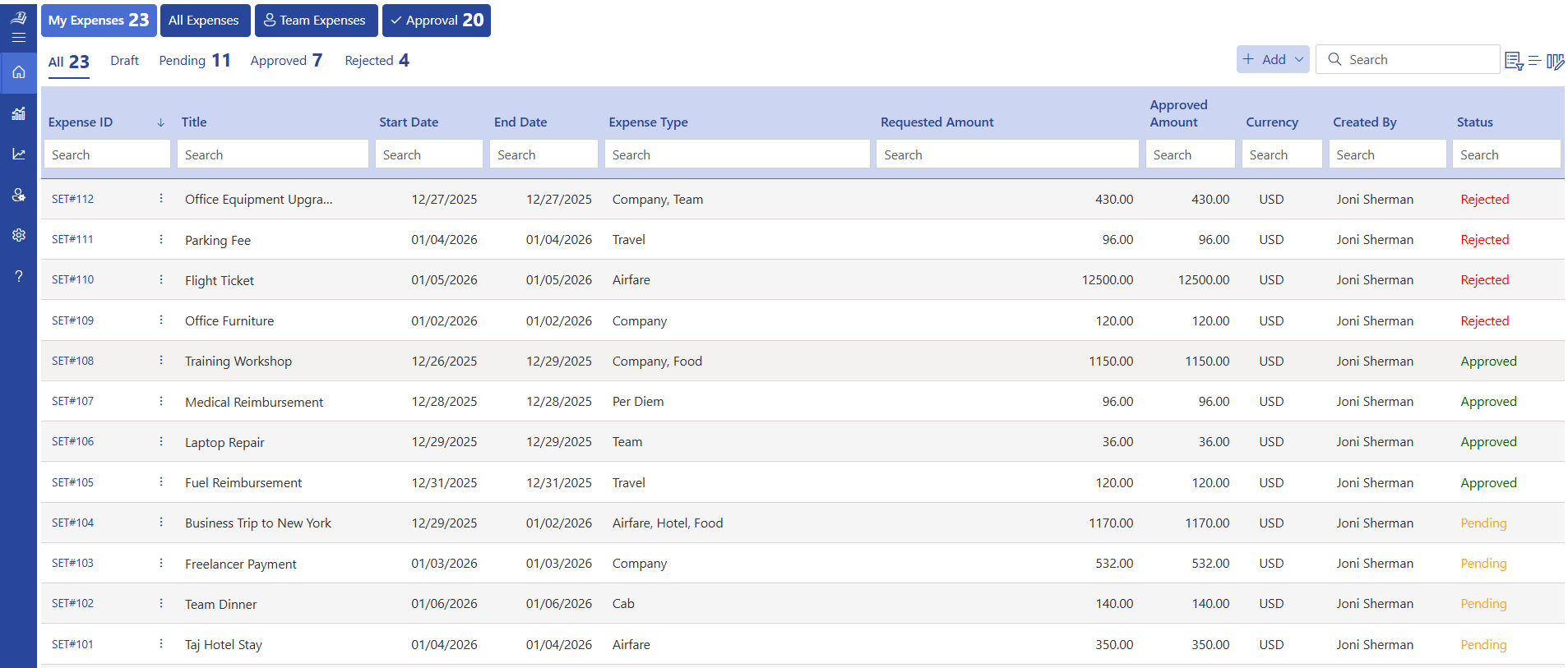
A business expense tracker is a expense management tool that helps companies record, organize, approve, and report every dollar spent during normal operations. It replaces paper receipts, manual spreadsheets, and email chains with a single digital system where employees submit costs and finance teams approve them all in one place.
For example, a company with 25 employees spending $120 each per month on travel and small costs already hits $3,000. Add subscriptions and office supplies, and monthly expenses can exceed $6,500.
Without a proper tracker, even a 10% error from lost receipts or manual mistakes means $650 goes unaccounted each month nearly $8,000 a year. This is why a business expense tracker is essential to maintain accuracy and control over spending.
What Counts as a Business Expense?
Before choosing a business expense tracker app, it helps to understand what falls under the category of “business expenses.”
Business expenses are the costs a company pays to keep operations running. They are separate from personal spending and are usually tax-deductible when documented properly. Common categories include:
- Employee salaries and reimbursements – wages, bonuses, travel refunds
- Travel costs – flights, hotels, fuel, cab fares
- Marketing and advertising – digital ads, events, print materials
- Software and subscriptions – SaaS tools, cloud storage, productivity apps
- Training and development – courses, certifications, conferences
- Meals and client entertainment – business lunches, team dinners
When these costs are tagged, categorized, and stored in a business expense tracker, they become easy to review during tax season, budget planning cycles, or track those business expense during internal audits.
Types of Expenses You Can Track
A well-built business expense tracker app handles multiple expense types that businesses encounter daily. Here is a breakdown of the main categories:
1. Employee Expenses
These include salaries, performance bonuses, incentive payouts, and employee expense reimbursements for work-related purchases. Tracking these helps HR and finance teams stay aligned on total staff costs without relying on separate systems.
2. Office and Operational Costs
Day-to-day running costs such as electricity bills, internet charges, maintenance fees, and office rent fall here. Regular tracking gives managers a clear view of fixed monthly spending.
3. Travel Expenses
When employees travel for work, they spend on transport, accommodation, and meals. A travel and expense management software captures every part of a trip flight bookings, hotel stays, local transport, and per diem allowances linked to the specific trip or project.
4. Sales-Related Spending
Sales teams often cover client meeting costs, local travel, and small events. Logging these against specific deals or territories shows which activities produce the best return on spending.
5. Meals and Client Meetings
Business lunches and team dinners are valid expenses when tied to a clear work purpose. A business expense tracker allows employees to note the date, participants, and reason, making employee reimbursement straightforward.
6. Training and Development
Costs for online courses, skill certifications, and industry events belong in this category. Tracking them separately helps leadership understand investment in workforce capability.
Every Business Expense Counts
Whether it’s a client meet, team travel, or office supplies, track every expense in one place and stay on top of reimbursements.
Summary: What a Business Expense Tracker Does for Your Business
| Aspects | Without a Tracker | With a Business Expense Tracker |
| Expense submission | Email or paper forms | Digital, from any device |
| Approval process | Manual follow-up | Automated notifications |
| Reimbursement speed | Days to weeks | In Minutes |
| Receipt scanning | Manual | AI powered receipt scanning |
| Reporting | Manual spreadsheet work | Customized, Auto-generated, filterable reports |
| Budget visibility | Month-end review | Real-time dashboards |
Why Tracking Business Expenses Matters?
Many companies focus on growing revenue while overlooking how much leaks out through poorly managed costs. A business expense tracker closes that gap. Here is why consistent tracking is worth the effort:
1. Financial Clarity
When every transaction is recorded and categorized, finance teams can see exactly where money goes. This clarity makes budget reviews faster and spending decisions more informed. Managers can spot categories where spending runs high and adjust plans before costs grow out of control.
2. Budget Adherence
Setting a budget is only useful when spending is monitored against it. A business expense tracker app alerts the team when a department is approaching or exceeding its limit giving time to course-correct rather than discover the overrun at month-end.
3. Tax Efficiency
Expenses that are well documented are very easy to file taxes. It also assists in minimizing errors and makes the company immune to compliance issues in case of audit. In the long run, it is also possible to have a well-kept expense record that allows businesses to claim deductions they are entitled to without having to panic.
4. Employee Accountability
When employees know that every expense goes through an approval system, they are more mindful about what they submit. The business expense tracker creates a clear record of who spent what, when, and why building a culture of responsible spending across all levels.
5. Data-Driven Decisions
Expense data collected over months reveals patterns. Leaders can see which teams spend the most on travel, which projects run over budget, or whether vendor costs are rising in expense reports. These insights support smarter resource allocation and stronger negotiations with suppliers.
Key Features to Look for in a Business Expense Tracker
Not all tracking tools offer the same capabilities. When evaluating a business expense tracker app, these are the features that separate an adequate tool from a genuinely useful one:
1. AI-Powered Receipt Scanning
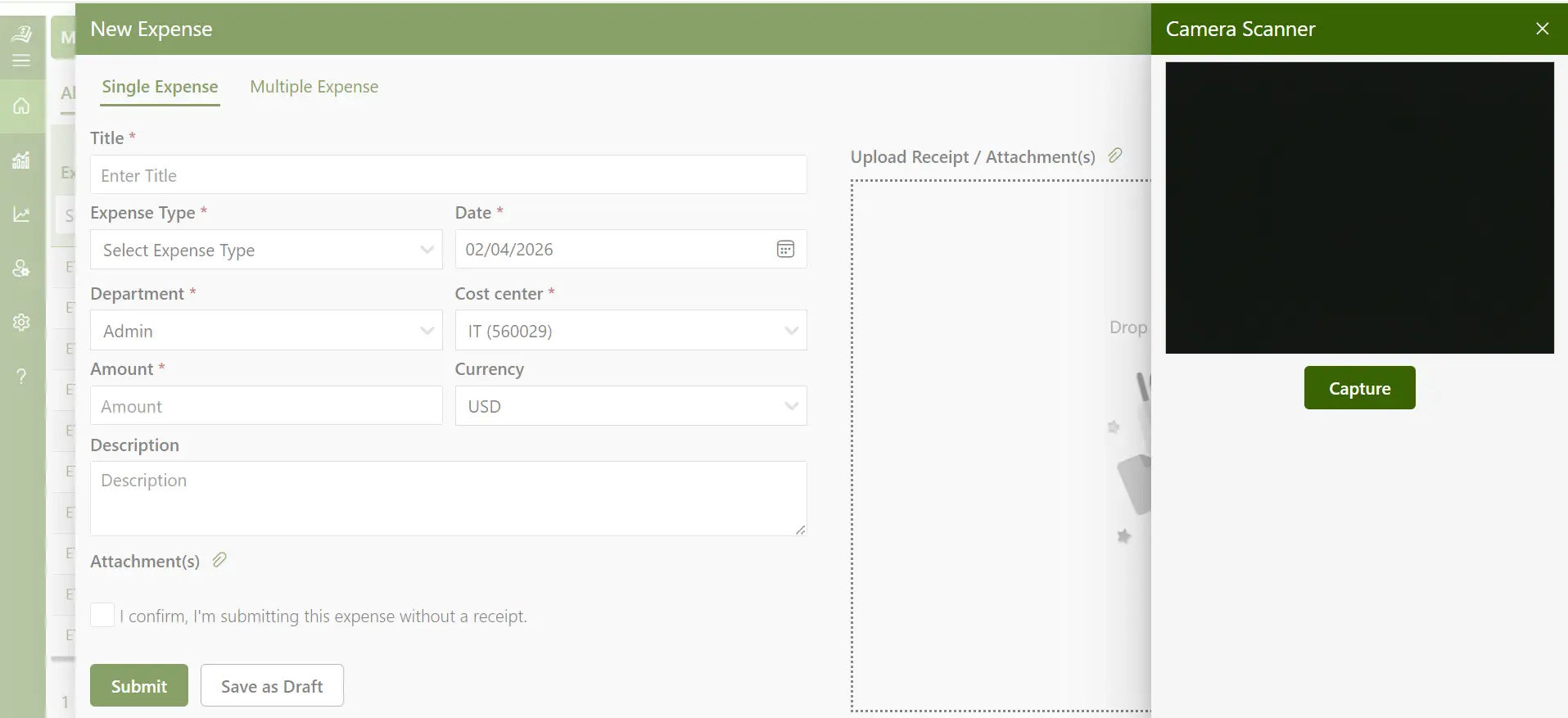
Manual data entry is time-consuming and introduces mistakes. A good business expense tracker uses AI to manage expense the moment an employee takes a photo. The tool automatically extracts the merchant name, date, and amount, then places the expense in the correct category. According to Stanford University’s 2025 AI Index Report, 78% of organizations now use AI in at least one business function and expense management is among the fastest-growing applications.
Tracking Receipts Manually? Begin your 14-day trial and track smarter
2. Automated Approval Workflows
Finance teams should not have to chase managers for approvals. A strong business expense tracker app lets administrators create rules based on department, cost center, or expense type. Once submitted, expenses route automatically to the right approver, with notifications sent at each stage. This keeps the approval cycle moving without manual follow-up.
3. Per Diem Management
Setting daily allowances for employees on business trips is far more practical than collecting individual receipts for every meal or taxi ride. A quality business expense tracker lets companies define per diem rates based on travel location, duration, and internal policy. Employees log their travel days, and the system calculates total allowances automatically.
3. Expense Delegation
When a key team member is unavailable, work should not stop. Expense delegation allows one person to submit or approve expenses on behalf of another. Department heads can hand off responsibilities to assistants or finance staff without losing visibility into what is being approved.
4. Corporate Card Integration
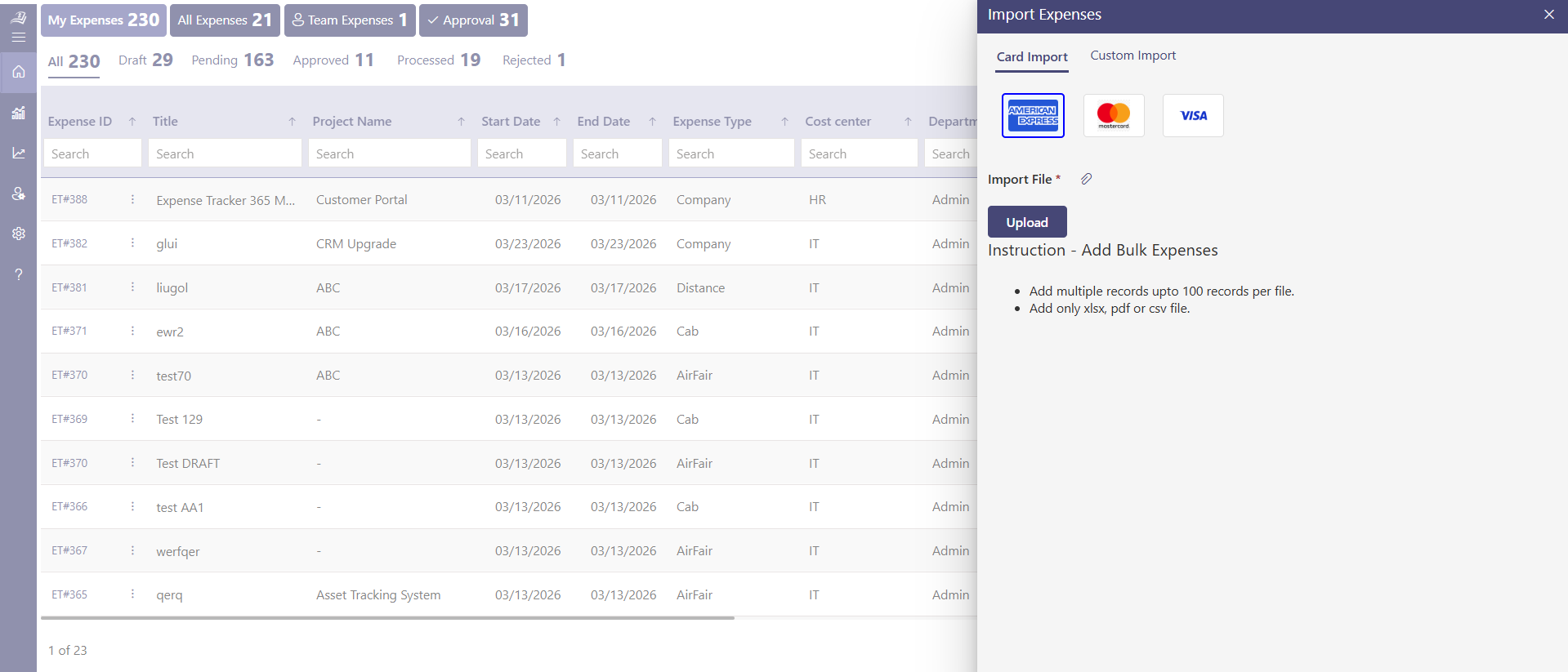
Corporate cards generate transactions that need to match with receipts and expense reports. A business expense tracker that connects directly with corporate card systems automatically syncs transactions and flags any that lack supporting documentation. Administrators can monitor spending limits and manage corporate card statements for reconciliation.
5. Mileage Tracking
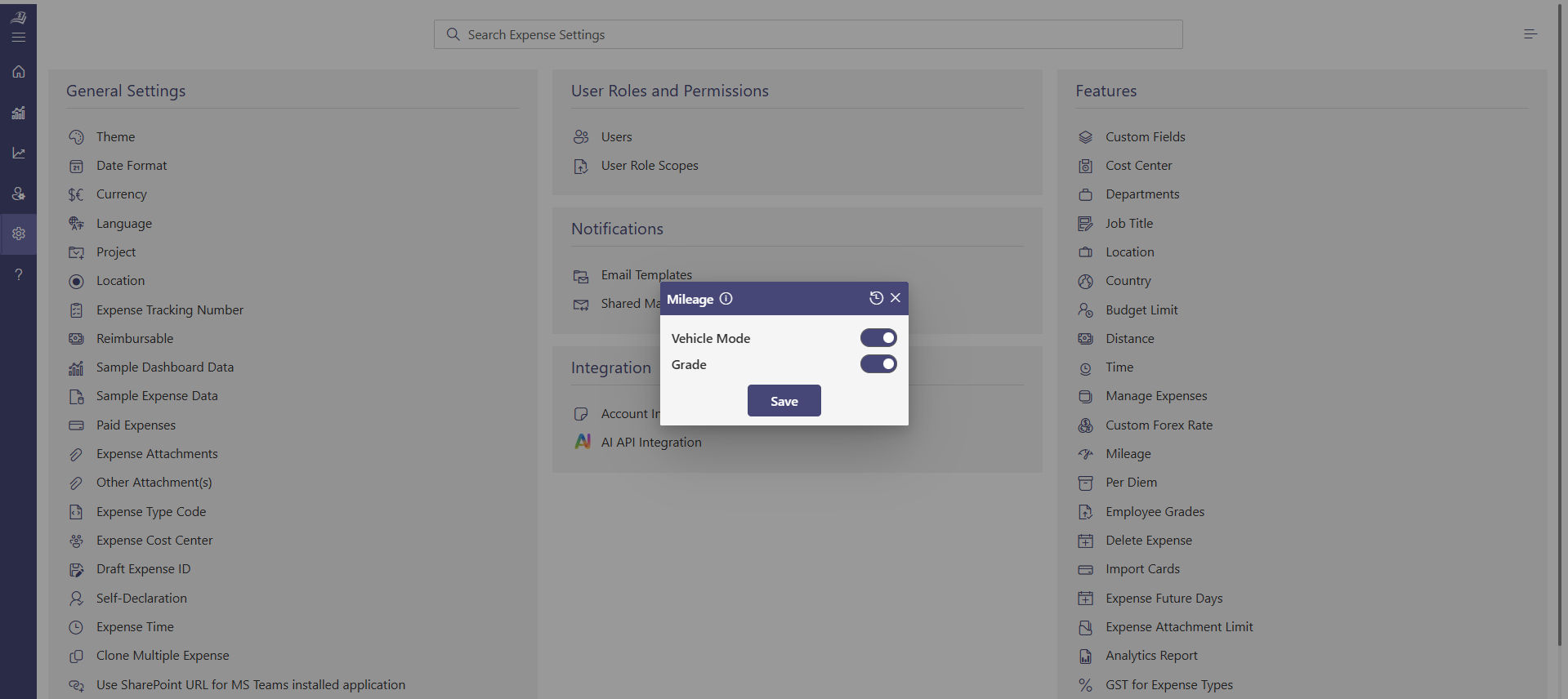
For employees who use personal vehicles for work, tracking mileage manually is tedious and often inaccurate. A business expense tracker app lets employees log routes and distances directly, and the system calculates reimbursements based on company. This ensures accurate payouts while saving time and maintaining consistent records across the organization.
6. Multi-Currency Support
Businesses operating across countries deal with expenses in multiple currencies. A good business expense tracker converts foreign currencies using real-time exchange rates, so international employees submit in their local currency. This simplifies global expense management and improves financial accuracy across regions.
7. Multi-Factor Authentication
Financial data requires strong security. A business expense tracker with multi-factor authentication adds a verification layer beyond passwords, so only authorized users can access sensitive records. This enhances data protection and builds confidence in handling critical financial information.
8. Detailed Expense Reports
Reports are where tracking delivers its greatest value. A capable business expense tracker app generates reports filtered by employee, department, project, date range, or expense type. These reports can be exported in PDF, Excel, or CSV formats for accounting, compliance, or internal review.
Benefits of Using Business Expense Tracker Application
Choosing the right business expense tracker app delivers clear, measurable improvements across finance, HR, and operations helping teams work smarter, faster, and with greater confidence.
1. Better Spending Visibility
Real-time expense management dashboard provide a clear view of how much is being spent, by whom, and in which category without the need for manual data collection. This live visibility empowers managers to make informed decisions quickly and keep budgets aligned with business goals.
2. Faster Reimbursements
A streamlined expense approval process creates a smooth experience for employees. By digitizing submissions and automating approvals, reimbursements move faster and more efficiently. Once receipts are uploaded and validated, approvers receive instant notifications, enabling quick action and improved employee satisfaction.
3. Smarter Expense Control
Industry insights from the Association of Certified Fraud Examiners suggest that around 5% of annual revenue is impacted by expense-related inefficiencies. A business expense tracker app enhances financial control by automatically validating entries against company policies, ensuring every claim is accurate, compliant, and transparent.
4. Easy Integration with Existing Tools
Finance teams already rely on multiple platforms for daily operations. A business expense tracker that integrates with tools like Microsoft 365, SharePoint, Power BI, and QuickBooks ensures seamless data flow across systems. This eliminates duplicate work and keeps reports consistently up to date.
5. Simple User Experience
An intuitive and user-friendly system encourages consistent usage across the organization. The best business expense tracker apps make it easy to submit expenses in just a few taps from a mobile device, increasing adoption and ensuring complete, accurate records.
6. Full Spend Lifecycle Coverage
From the initial expense request to final reimbursement, every step is managed digitally within a structured workflow. Managers can define spending limits, apply policy rules, and monitor activity at every stage creating a well-organized system that supports better financial planning and control.
Expense receipts often contain sensitive business information, including vendor details, payment information, transaction amounts, and employee expense records. As organizations adopt AI-powered receipt scanning, protecting this information remains a top priority.
Expense 365 helps organizations capture and process receipt data while keeping information within their existing Microsoft 365 environment. The data stays within your organization’s Microsoft tenant, providing greater control over how data is stored, accessed, and managed.
Because Expense 365 works within your Microsoft ecosystem, teams can continue using their existing permissions, security settings, compliance policies, and governance controls. This helps organizations maintain visibility over expense data while benefiting from AI-powered receipt scanning and data extraction.
Whether you’re scanning paper receipts, processing digital receipts, extracting expense details, or validating expense records, Expense 365 helps teams work more efficiently without moving sensitive data outside their trusted Microsoft environment.
For organizations with regulatory, compliance, or internal governance requirements, this approach supports secure expense management while maintaining control over financial and business-critical information.
Scan reimbursement receipts while keeping sensitive data protected
5 Best Practices to Implement While Tracking Business Expenses
Technology works best when paired with clear processes. These practices help businesses get the most out of a business expense tracker.
1. Categorize Expenses Consistently
Create a standard set of expense categories and make sure every team uses the same labels. When categories are consistent across departments, monthly reports become directly comparable and budget tracking is far more accurate. Review categories periodically to add new ones that reflect changing business activities.
2. Set Realistic Budgets Per Department
Assign spending limits based on historical data and realistic growth projections. When teams know their budget and can see current spending in real time through the business expense tracker app, they make more thoughtful decisions about what to submit and when.
3. Record Expenses as They Happen
Delayed submissions often mean lost receipts and incomplete information. Encourage employees to log expenses on the same day they occur using a mobile business expense tracker app. This habit produces cleaner data and faster processing downstream.
4. Build a Layered Approval Process
Not every expense needs the same level of review. Set approval tiers based on amount or category small routine costs might need only one approval, while larger or unusual expenses go to a senior manager. Automated notifications at each stage keep the process moving without manual reminders.
5. Review Reports Frequently
Monthly and quarterly report reviews help leadership spot spending trends early. Compare actual figures against budgets, identify categories that consistently run over, and share findings with team leads. Regular reviews turn expense data from a compliance record into a practical financial planning tool.
How Expense 365 Assists During the Workflow?
Expense 365 is a powerful and user-friendly business expense tracking solution built to work seamlessly within the Microsoft ecosystem. It connects effortlessly with tools like SharePoint, Microsoft Teams, Outlook, Power BI, Power Automate, Xero and QuickBooks, bringing all expense-related activities into one unified platform. With its intelligent features, businesses can manage the entire expense lifecycle in one place from submitting and approving expenses to generating reports and analysing spending patterns making financial management more streamlined and efficient.
Hear from our Happy Clients – G2 Platform
Expense Tracker 365 is a great app with excellent support. The advanced features make it a complete tool & has really improved our expense tracking and reporting workflow.
Steps to Create a Workflow in Microsoft using Expense 365
Expense 365 is fast and easy to use in designing an expense workflow in Microsoft. The following is how you can install it successfully.
Step 1 – Open the Application: Access the expense tracker from your Microsoft dashboard and create a new expense list. Use the built-in expense manager template as a starting point.
Step 2 – Add Core Data Fields: Set up columns for expense type, amount, submitter name, and approval status. Consistent field labels across the organization keep records uniform.
Step 3 – Add an Approval Date Field: Track when each request was reviewed. This makes it simple to measure how long approvals take and identify delays.
Step 4 – Set Up Reimbursement Due Dates: A dedicated column for reimbursement dates triggers automatic reminders and helps finance teams process payments on schedule.
Step 5 – Enable Receipt Uploads: Add an invoice or receipt upload field so employees can attach supporting documents directly to each expense record. This keeps all documentation in one place.
Step 6 – Include Vendor Details: A vendor information field stores supplier names and contact details, making payment follow-up easier.
Step 7 – Tag Expenses by Department: A department column links each expense to the correct business unit, improving the accuracy of departmental spending reports.
Step 8 – Create Custom Views: Set up filtered views for pending approvals, high-value transactions, or vendor-specific expenses. Team members see only what is relevant to their role.
Once this workflow is in place, the finance team has a structured, auditable record of all business spending within the familiar Microsoft 365 environment.
You’ve got a business to run. Expense tracking shouldn’t slow you down
From SMBs to enterprise teams, everyone can benefit from a simpler way to track expenses and manage receipts. Curious how it works?
Conclusion
Managing business expenses through spreadsheets or paper-based methods often slows down financial processes and limits visibility. Expense 365 offers a smarter approach by enabling businesses to record, review, and manage expenses in real time with greater ease and clarity.
Frequently Asked Questions
What expenses can a business claim?
Any cost that is necessary for and directly connected to running your business operations is claimable. This includes office rent, utilities, equipment purchases, software subscriptions, staff salaries, travel costs, marketing spend, and training fees.
What are actual business expenses?
Actual business expenses are the real, verifiable costs a company pays during operations. These include raw materials, utility bills, transport, maintenance, depreciation, and any other payment required to keep the business running.
Can a restaurant bill from a client meeting be claimed as a business expense?
Yes, if the meal was directly connected to a work activity such as a client discussion, team project meeting, or business travel. Keep the receipt and record the business purpose and attendees at the time of the expense.
Can employees scan receipts from a mobile device?
Yes. Most modern business expense tracker tools include a mobile app where employees photograph receipts, and the system reads the key details automatically.
Is a business expense tracker customizable?
Yes. A quality business expense tracker app lets administrators define approval workflows, expense categories, spending limits, and report formats that match the company’s own policies and structure.


_JiluXJRGNl.svg)









