


Every business, big or small, deals with money leaving the building in small, scattered pieces. A client dinner here, a flight there, a laptop charger bought at the airport.
- An expense report is a formal record of business spending, used for reimbursement, tax filing, and audit protection.
- Expense reporting affects real people directly nearly half of employees experience reimbursement delays because of slow, outdated approval steps.
- Common mistakes like missing receipts, vague descriptions, and late submission cause most rejections and rework.
- Moving from manual to digital expense reporting cuts reimbursement time dramatically, protects the business during audits, and gives finance teams better visibility.
Expense reports exist to catch every one of these small costs and turn them into a clean, provable record. Without them, a company has no real way to reimburse staff fairly, claim tax deductions, or spot spending that looks off.
Studies show that 75% of businesses report increased fraud risk due to manual expense tracking limitations, while automated solutions reduce error rates by over 60%.
According to a business travel study, 40% of businesses still don’t have a travel policy which means nearly half of all companies are managing travel without any structured framework.
What Is an Expense Report?
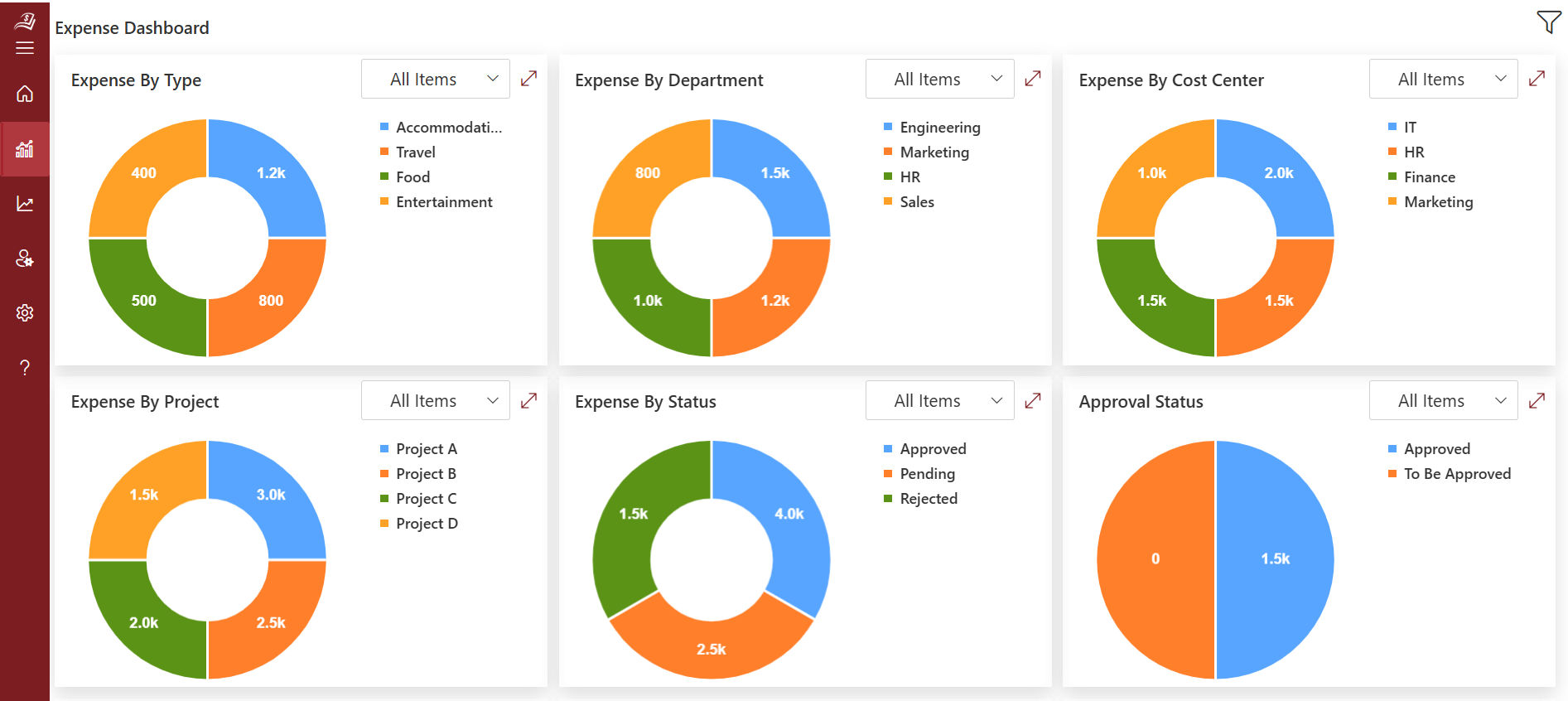
An expense report is a document that lists money an employee spent on behalf of a business, along with proof of each purchase. It usually includes the date, the amount, the vendor, the category, and a short note explaining the business reason for the purchase.
Think of it as a paper trail that answers three simple questions
- Who spent the money
- What was it spent on
- Does can it be proven?
A manager or finance team reviews this trail, checks it against company expense policy, and either approves or rejects the request. Once approved, the employee gets paid back, and the company records the cost in its books.
Why Are Expense Reports Important?
Expense reports do more than pay people back. They protect the business and the employee at the same time. Here’s why they matter so much.
- Accurate reimbursement: Employees get paid back for money they spent out of pocket, without guessing or arguing over amounts.
- Tax deductions: Properly documented business expenses can be written off, lowering the company’s taxable income.
- Audit protection: If tax authorities ever question a deduction, a detailed expense report with receipts is the proof that saves the claim.
- Budget visibility: Finance teams can see exactly where money goes by department, project, or employee, which helps with planning.
- Fraud detection: A clear paper trail makes it much harder to hide duplicate claims or inflated costs.
- Policy compliance: Reports show whether spending follows internal rules on limits, categories, and approved vendors.
- Employee trust: When reimbursement is quick and fair, employees don’t feel like they’re stuck floating company costs on their own credit cards.
Nearly 50% don’t know how much they spend on expense reports each year, according to a T&E trends survey. That’s a striking gap many businesses can’t measure the very process meant to give them financial clarity.
Slow Expense Reporting Is a Thing of the Past
From receipt submission and department-wise approvals to reimbursement, Expense 365 gives you complete visibility into every step.
What Does an Expense Report Include?
A clear expense report needs a few core pieces of information for every single line item.
- Employee name and department – identifies who made the purchase and where it belongs in the budget
- Date of the expense – needed for tax records and to check whether submission deadlines were met
- Vendor or merchant name – shows where the money went
- Amount spent – the exact figure, matched to the receipt
- Category – travel, meals, supplies, software, and so on
- Business purpose – a short note on why the purchase was necessary, and who was involved if it’s a meal or event
- Receipt or proof of payment – attached as an image, PDF, or scan
- Payment method – whether it was a personal card, cash, or a company card
Some companies also ask for a project code or client name on each line, especially if expenses get billed back to a customer later. Others require a manager’s initials next to any expense above a set dollar amount.
Types of Business Expenses Included in Expense Reports
Not every purchase belongs in an expense report, and the categories can vary by company policy, but most fall into these buckets.
- Travel: Flights, hotels, rental cars, parking, tolls, and mileage for personal vehicle use.
- Meals and entertainment: Client dinners, team lunches, and coffee meetings during business trips.
- Office supplies and equipment: Notebooks, pens, printer ink, and small electronics needed for work.
- Software and subscriptions: Tools bought for a specific job, like design programs or project trackers.
- Conferences and training: Registration fees, workshop costs, and professional certification materials.
- Miscellaneous costs: Shipping, work phone bills, internet fees for remote staff, and professional membership dues.
Businesses that clearly define which expense are reimbursable, and communicate that policy up front, tend to see far fewer disputes later.
Expense Reporting Process: Step-by-Step Workflow
A working expense reporting process usually follows this path from purchase to payment.
- Expense occurs: An employee pays for something work-related, either with personal funds or a company card.
- Documentation: The employee saves the receipt and notes the business reason.
- Report creation: The expense is logged into a report, either a spreadsheet, paper form, or software tool.
- Submission: The completed report is sent to a manager or finance contact for review.
- Manager review: A first-level check for accuracy and business justification, typically done within a few business days.
- Finance or compliance review: A second check against company policy and budget limits, especially for larger amounts.
- Approval or rejection: The report is either approved for payment or sent back with notes on what needs fixing.
- Reimbursement: Once approved, payment is issued to the employee, usually through payroll or a direct transfer.
- Bookkeeping entry: The expense is recorded in the company’s accounting system for reporting and tax purposes.
Each step adds time, and outdated, manual approval steps are a major reason 47% of employees report delays in reimbursements. When approvals sit in someone’s inbox for days, the whole chain slows down.
You’ve understood the process. Now imagine it running on its own
Expense 365 automates your expense reporting process, giving finance teams accurate, detailed data to make faster and smarter decisions.
Types of Expense Reports Used in Business
Different situations call for different report formats. The most common types include.
- One-time expense reports: Used for a single, non-recurring cost, like a one-off conference trip. These are short and simple: just the expense, date, description, and total.
- Recurring expense reports: Used for regular, expected costs like monthly software subscriptions or a recurring travel route for a sales rep.
- Travel expense reports: Dedicated forms for trip-related costs, often broken down by day, covering flights, lodging, meals, and transportation.
- Per diem reports: Used when a company pays a fixed daily allowance for meals and incidentals instead of itemizing every receipt.
- Mileage reports: Track personal vehicle use for work purposes, calculated using a standard rate per mile.
- Project-based expense reports: Group costs by a specific client or project, useful for businesses that bill clients back for expenses.
Key Expense Report Metrics Every Business Should Track
Numbers tell you whether your expense reporting process is working. A few worth watching closely.
- Average approval time – how long it takes a report to move from submission to sign-off
- Reimbursement turnaround time – the full time from submission to payment in the employee’s account
- Rejection rate – the percentage of reports sent back for corrections
- Cost per report processed – what it actually costs finance staff, in time and resources, to handle one report
- Policy violation rate – how often submitted expenses fall outside company rules
- Spend by category and department – helps spot where budgets are being stretched
Digital expense automation reduces reimbursement time from 14-21 days down to just 2-3 days a 75% improvement. That single metric alone shows how much room for improvement exists in a manual system.
Common Expense Reporting Mistakes to Avoid
Even with a clear expense reporting process, employees and finance teams can make mistakes that lead to delays, rejected claims, or compliance issues. Here are some of the most common ones.
- Missing or illegible receipts – Lost receipts or faded paper copies make it difficult to verify expenses and are one of the most common reasons reports are rejected.
- Vague business descriptions – Generic notes like “supplies,” “travel,” or “meeting” don’t provide enough context for reviewers or auditors to understand the business purpose.
- Late submission – Waiting too long to submit expense reports can result in missed reimbursement deadlines, delayed approvals, or tax compliance issues.
- Duplicate entries – The same expense may be submitted more than once, especially when employees use multiple submission methods or accidentally upload the same receipt twice.
- Math and calculation errors – Incorrect totals, tax calculations, or mismatched receipt amounts often require finance teams to send reports back for corrections, delaying reimbursement.
- Ignoring company expense policies – Submitting non-compliant expenses or exceeding spending limits can lead to rejected claims and additional review time for finance teams.
These mistakes show up in nearly every company at some point, but they’re also the easiest to fix once a business puts a clear policy and a simple checklist in place.
Best Practices to Implementing During Expense Reporting
An efficient expense reporting process doesn’t happen by chance. Organizations that manage business expenses successfully typically follow these best practices.
Write a Clear and Simple Expense Policy
Every employee should understand what qualifies as a business expense before making a purchase. Your expense policy should clearly explain eligible expenses, spending limits, expense approval, reimbursement rules, and any exceptions. Keep the language simple and make the policy easily accessible so employees can quickly find answers.
Set Standard Submission Deadlines
Late expense submissions create delays in approvals, budgeting, and financial reporting. Establish a standard deadline, such as submitting expenses within 30 days of the purchase, and apply it consistently across the organization. Regular reminders can also encourage employees to submit reports on time.
Require Digital Receipts
Paper receipts are easy to lose, damage, or misplace. Encouraging employees to upload digital receipts immediately after making a purchase helps maintain accurate records and speeds up the verification process. Digital receipts also simplify audits and reduce manual paperwork.
Use a Standard Expense Report Template
Using a consistent expense report template across the organization makes reviews much easier. Employees know exactly what information to provide, while managers and finance teams can review reports faster because every submission follows the same structure. Standardization also reduces missing information and reporting errors.
Use a Standard Expense Report Template
Using a consistent expense report template across the organization makes reviews much easier. Employees know exactly what information to provide, while managers and finance teams can review reports faster because every submission follows the same structure. Standardization also reduces missing information and reporting errors.
Review Expense Reports Regularly
Waiting until the end of the month or quarter to review expenses often creates approval bottlenecks and reimbursement delays. Instead, review expense reports on a regular schedule, such as weekly or bi-weekly. Frequent reviews help identify policy violations early, improve cash flow visibility, and keep expense reimbursement cycles moving smoothly.
Benefits of Automated Expense Reporting
Businesses that automate expense reporting experience faster workflows, better financial control, and greater visibility into company spending. Here are some of the key benefits organizations can expect by moving away from manual expense reporting.
Faster Reimbursements
Automation significantly shortens the time between expense submission and reimbursement. Instead of waiting weeks for manual reviews and approvals, employees can receive reimbursements much faster through automated workflows. This improves employee satisfaction while reducing the need for follow-ups with finance teams.
Improved Accuracy
Manual data entry often leads to duplicate entries, calculation mistakes, and missing information. Automated expense reporting captures and validates expense data automatically, reducing errors and ensuring reports are complete before they move through the approval process. This helps finance teams process reports with greater confidence.
Better Fraud Detection
Automated systems continuously monitor expense reports for duplicate claims, policy violations, unusual spending patterns, and suspicious transactions. Potential issues are flagged early, allowing finance teams to review exceptions before reimbursements are approved. This adds an extra layer of financial control without increasing manual effort.
Real-Time Visibility
Finance leaders no longer need to wait until month-end to understand where money is being spent. Automated dashboards provide instant access to submitted, approved, pending, and reimbursed expenses, making it easier to monitor budgets, identify spending trends, and make informed financial decisions throughout the month.
Consistent Policy Compliance
Expense compliance are automatically applied to every report, helping employees follow company guidelines from the start. Spending limits, approval rules, and required documentation are validated during submission, reducing policy violations and minimizing review process. This creates a more consistent and transparent expense management process.
How Expense 365 Helps Simplifies Expense Reporting?
Expense 365 simplifies expense reporting by replacing manual, paper-based processes with a centralized digital solution built for Microsoft 365. Instead of managing spreadsheets, chasing receipts, or following up on approvals, employees can submit expense reports quickly through an intuitive interface, and track every expense from a single platform.
The solution automates routine tasks such as receipt collection, approval routing, policy validation, and reimbursement tracking, helping organizations reduce manual effort and minimize errors. Built-in workflows send expense reports to the appropriate approvers automatically, eliminating unnecessary delays and speeding up the approval process.
Expense 365 also helps organizations stay compliant with internal expense policies by applying predefined spending limits, expense categories, and approval rules. Any policy violations or incomplete submissions can be identified early, reducing back-and-forth between employees and finance teams.
Curious what automated expense reporting looks like for a team your size?
It’s worth a quick look before your next budget cycle the time saved adds up fast across a whole finance team.
Conclusion
Expense reports sit quietly behind almost every part of a business’s financial health reimbursement, tax filing, audits, and budget planning all depend on them. Yet many companies still run this process manually, which drags out reimbursement times, invites errors, and leaves employees waiting weeks to get their own money back.
Ready to eliminate manual expense reporting? Apply these best practices and see how Expense 365 helps you submit, approve, and reimburse expenses faster.
Frequently Asked Questions
Can employees submit expenses from their phones?
Yes. Modern expense reporting software allows employees to capture receipts, fill out expense details, and submit reports directly from their mobile devices.
Can different departments have different spending limits?
Yes. You can define expense policies and spending limits based on departments, business units, locations, or employee roles.
How do companies handle mileage claims?
Employees typically enter their travel details, and the system automatically calculates reimbursement based on the organization’s mileage rate.
How do managers know which reports need approval?
Expense reporting systems notify managers automatically and display pending reports in their approval dashboard.


_JiluXJRGNl.svg)









