


An employee books a last-minute flight, a project team incurs significant hotel expenses, and a salesperson charges multiple client meals across different cities. Meanwhile, within the finance department, reconciling these transactions becomes a complex task often involving numerous receipts and manual spreadsheet tracking.
- An expense monitoring app is a software solution that helps businesses track, manage, and control employee expenses in real time.
- Submit receipts directly from your mobile device, while AI automatically extracts and organizes expense details, eliminating manual data entry.
- Track and manage expenses in multiple currencies, making it simple for teams operating across different countries and regions.
- Automatically monitor and reconcile American Express (AMEX) card transactions, reducing reporting errors and improving financial visibility.
An employee books a last-minute flight, a project team incurs significant hotel expenses, and a salesperson charges multiple client meals across different cities. Meanwhile, within the finance department, reconciling these transactions becomes a complex task often involving numerous receipts and manual spreadsheet tracking.
This is the everyday reality of business expense tracking, and it is one of the most underestimated operational challenges companies face.
A stats from Fortune Business Insights says that, The global expense management software market was valued at USD 7.08 billion in 2023. It is projected to grow from USD 7.64 billion in 2024 to USD 16.48 billion by 2032, exhibiting a CAGR of 10.1% during the forecast period.
That kind of growth does not happen without reason. Businesses of every size are recognizing that how they track, manage, and analyse expenses has a direct impact on their bottom line.
What Expense Monitoring Really Means?
Expense monitoring is the ongoing process of tracking, reviewing, categorizing, and controlling the money employees spend on behalf of a business. But to understand its real significance, it helps to look at what poor expense monitoring costs.
Consider a mid-sized consulting firm with 120 employees. Each month, consultants submit expenses client dinners, travel, and subscriptions averaging $500 per employee. That’s about $60,000 monthly, or roughly $720,000 annually.
- When gaps exist, even small leakages add up. Around 5% of expenses are often lost to misuse or unclear spending amounting to nearly $36,000 a year for this firm.
- In industries like construction, delayed visibility can be costly. A single project site can exceed its budget by tens of thousands before it’s identified, directly impacting margins.
- There’s also the cost of time. A 200-person company processing expenses manually can spend over 60 hours a month costing more than $2,000 in administrative overhead.
- Effective expense monitoring provides real-time visibility, helping businesses control costs proactively rather than after losses occur.
Why Visibility Is the Foundation of Financial Control?
Every financial control mechanism budgets, expense approval workflows, audits, forecasts depends on one thing which is accurate, timely information about how money is being spent. Without that visibility, even the best financial plans become guesswork.
Visibility means knowing that the sales team has already used 78% of its Q3 travel budget by mid-August driven by client meetings, along with rising food and accommodation costs well before the quarter ends and before there is nothing left to reallocate.
It means a CFO or HR department can see, on a Monday morning, exactly how much was spent across all departments in the previous week broken down by travel, meals, and lodging, across teams and projects without waiting for finance to compile a report.
Financial control without visibility is reactive. You find out something went wrong when you close the books, when you run an audit, or when the bank statement does not match the ledger. This is why an expense monitoring app is not just an accounting function. It is the intelligence layer that sits beneath every financial decision a business makes.
Challenges with Traditional Expense Monitoring Processes
For many companies, tracking business expenses still relies on a combination of email submissions, paper receipts, spreadsheet tracking, and periodic manual review. Expense monitoring app is a system that worked when businesses were smaller and spending was simpler, but it carries real costs as organizations grow.
1. Information Arrives Too Late
Employees submit expense reports weekly or monthly, not in real time. By the time finance reviews these reports, the money has already been spent and approved. This means teams only discover budget overruns after they happen. As a result, finance can only correct issues later instead of preventing them early.
2. Receipt Management Becomes Difficult
Employees often lose, damage, or forget to submit receipts. When this happens, they try to recreate expenses from memory or bank statements after several days or weeks. This leads to missing details, incorrect categories, and estimated amounts, which reduce the accuracy of financial records.
3. Policy Compliance Relies on Manual Checks
Finance teams are responsible for checking whether each expense follows company policies. This includes limits on meals, travel, and accommodation. However, when there are many reports to review, it becomes difficult to check every detail. Because of this, small policy violations often go unnoticed and slowly increase unnecessary spending.
4. Reimbursements Take Too Long
Employees usually pay for business expenses using their own money and expect timely reimbursement. In manual systems, approvals and processing can take several weeks. This delay creates frustration, especially for employees who travel frequently or spend large amounts. Over time, it can impact employee satisfaction and trust.
5. Reporting Takes Too Much Time
When management needs insights such as total expense spend or project-wise expenses finance teams must collect data from multiple sources like spreadsheets and emails. They then manually prepare reports, which can take hours or even days. This delay makes it harder for leaders to make quick and informed decisions.
How Smart Expense Monitoring Works?
Modern expense monitoring app replace the sequential, manual approach with a continuous, automated workflow. Here is how expense typically operates from the moment a business expense occurs to the moment it appears in the company’s financial records.
Step 1: An employee makes a purchase a hotel stay, a vendor meal, a rideshare and immediately captures the receipt using the mobile app. The system uses optical character recognition to read and extract the merchant name, date, amount, and category automatically, eliminating manual data entry.
Step 2: The scanned receipt is matched against the company’s policy rules. If the amount exceeds a category limit, or if the merchant type does not align with the approved expense types for that employee’s role, the expense monitoring app flags it immediately before it moves forward in the approval chain.
Step 3: The expense is submitted to the appropriate approver based on pre-configured routing rules. The expense monitoring app sends the approver, who receives a notification, reviews the details, and approves or queries the expense all from their phone or browser, without paperwork.
Step 4: Once approved, the spend report is automatically synced to the accounting system, coded to the correct ledger account and cost center, and reflected in real-time budget dashboards. No manual journal entries, no re-keying of data.
Step 5: At any point, finance managers can pull reports on spending by team, category, project, or time instantly. Month-end close involves reconciling clean, already-categorized data rather than sorting through a backlog of receipts.
This continuous flow means that by the time an expense reaches the accounting ledger, it has already been reviewed, approved, and categorized not as a batch process at the end of the month, but as a routine part of daily operations.
Types of Expense Monitoring Across Business Needs
Expense monitoring app is not one-size-fits-all. Different business models have different spending patterns, and an effective system needs to accommodate each of them.
1. Travel Expenses
Companies with large sales teams need to track travel expense, business meals, company car usage, and client meetings. This includes flights, hotel stays, fuel, and mileage claims across employees working in different cities or countries. Without proper expense monitoring app, these costs can quickly go beyond budget.
2. Event and Conference Spend
When companies send employees to events or training programs, they need to manage multiple expenses like airfare, accommodation, meals, entertainment, and even client gifts. Since these costs are tied to specific events, expense monitoring app helps track them closely to stay within the planned budget and avoid overspending.
3. Business Meals
Companies often spend on meals during client meetings, team discussions, or business travel. While these expenses are common, they can quickly increase without clear tracking. Monitoring meal costs helps ensure they stay within company limits, follow policy guidelines, and are genuinely tied to business activities.
4. Company Car Usage
Employees using company vehicles generate ongoing costs such as fuel, maintenance, tolls, and tracking mileage expenses. Without a proper expense monitoring app, it becomes difficult to understand how vehicles are being used or to control unnecessary expenses. Monitoring usage ensures vehicles are used efficiently, only for business purposes, and within approved limits.
5. Client Gifts
Businesses provide gifts to clients for relationship building, appreciation, or special occasions. However, without an expense monitoring app, these expenses can become inconsistent or exceed budget. Tracking client gift expenses helps maintain fairness, stay within policy limits, and ensure spending aligns with business goals.
6. Entertainment
Entertainment expenses include taking clients to events, outings, or other activities to strengthen relationships. These costs can vary widely and are often harder to control. Proper monitoring ensures that entertainment spending remains reasonable, justified, and aligned with company policies.
Core Features of a Reliable Expense Monitoring App
The capabilities of an expense monitoring platform determine how much control a business gains. Here is what each core feature delivers in practice.
1. Receipt Scanning
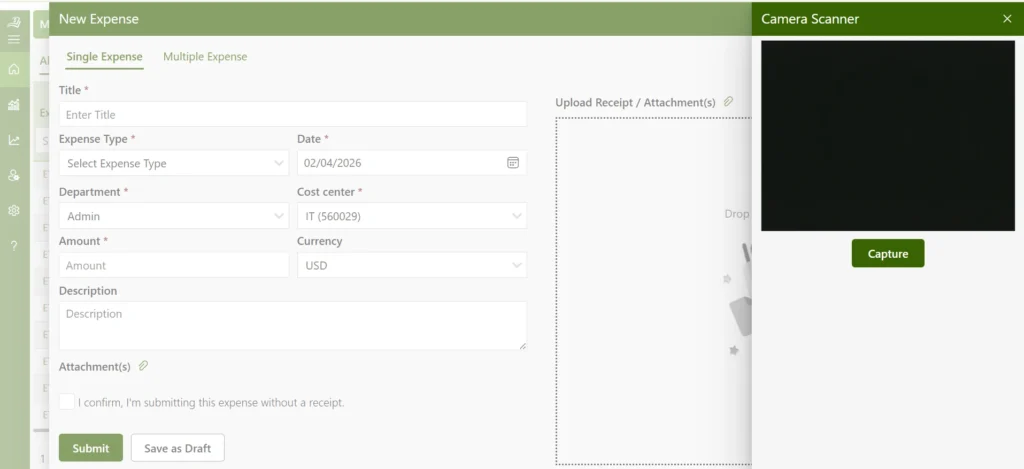
Receipt scanning uses optical character recognition (OCR) to automatically read and parse receipt data vendor name, date, amount, and often item categories from a photo taken on a mobile device.
Through this employees no longer need to do receipt management manually, enter expense details, and finance no longer needs to manually verify that the numbers submitted match the actual receipt.
Every expense has a digital record attached to it from the moment it is captured, which means documentation is complete and audit-ready without any additional effort.
2. Expense Reimbursement
83% of employees who travel for work struggle to reconcile their travel expenses a challenge that points directly to how broken traditional reimbursement processes are for most organizations.
A well-designed expense monitoring app connects the submission, approval, and payment steps into a single workflow.
Employees submit their expenses, approvals happen digitally with full visibility into status, and expense reimbursements are processed in a predictable, timely cycle.
3. Mileage Tracker
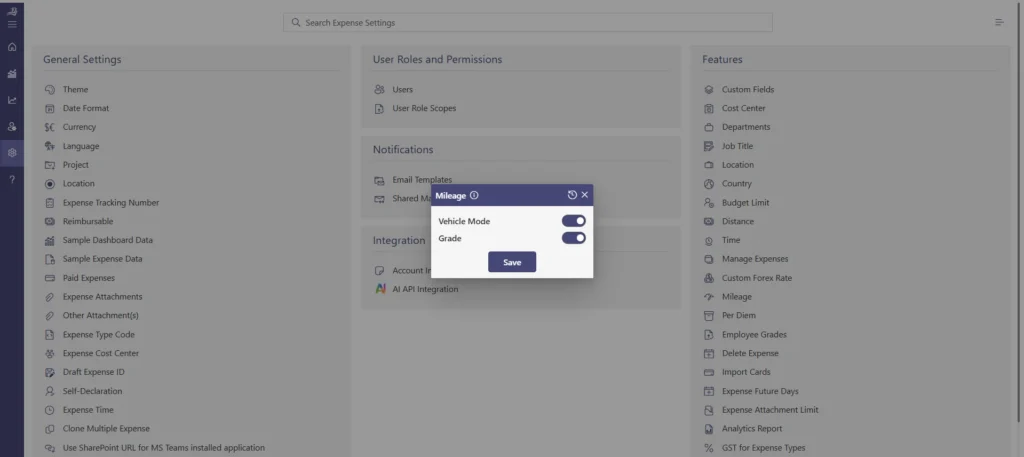
For employees who use personal vehicles for business purposes, mileage tracking has traditionally relied on handwritten logs that are easy to forget, difficult to verify, and time-consuming to reconcile.
An integrated expense monitoring app uses GPS or trip logging to automatically calculate distances traveled, applies the approved mileage reimbursement rate, and generates a complete record of each trip.
This protects both the employee who gets accurately reimbursed and the company, which maintains an auditable mileage log without relying on self-reported estimates.
4. Expense Audit Trail Reports
Every expense that moves through the system creates a timestamped record who submitted it, when, what approvals it received, whether any policy flags were triggered, and how it was coded in the expense monitoring app.
This complete audit trail means that during an internal review, a tax audit, or a client billing dispute, every transaction can be traced from submission to payment with full supporting documentation.
The audit trail also serves as a deterrent when employees know their submissions are logged and reviewable, out-of-policy behaviour declines naturally.
5. Integration with Accounting Systems
An expense monitoring app that integrates with tools like QuickBooks and Xero removes the need for manual data entry at the end of every expense cycle. Instead of exporting and reformatting data, approved expenses automatically sync with the accounting system.
Each expense is recorded with the expense monitoring app, cost center, and project details, reducing errors and saving time.
This ensures that financial records stay accurate and up to date without extra effort from the finance team.
6. Reporting and Analysis
According to Center, nearly 40% of finance leaders say the time spent on tasks like filling out reports and collecting receipts is their top challenge in expense management.
Reporting in an expense monitoring app turns raw transaction data into operational intelligence. Finance teams can see spending trends by department, category, vendor, or period without building custom reports.
This kind of spend analysis is only possible when the data is clean, structured, and accessible in real time.
7. Manage Expenses in Multi-Currencies
Global teams introduce currency complexity: an employee in Germany submits in euros, one in Singapore in Singapore dollars, one in Brazil in reais and the finance team needs all of it consolidated in the company’s home currency for reporting.
A multi-currency expense monitoring app automatically applies real-time exchange rates at the time of submission, converts amounts for reporting purposes, and maintains the original currency record for compliance purposes.
This eliminates the manual conversion work that makes international expense reconciliation so tedious and error prone.
8. Expense Dashboard
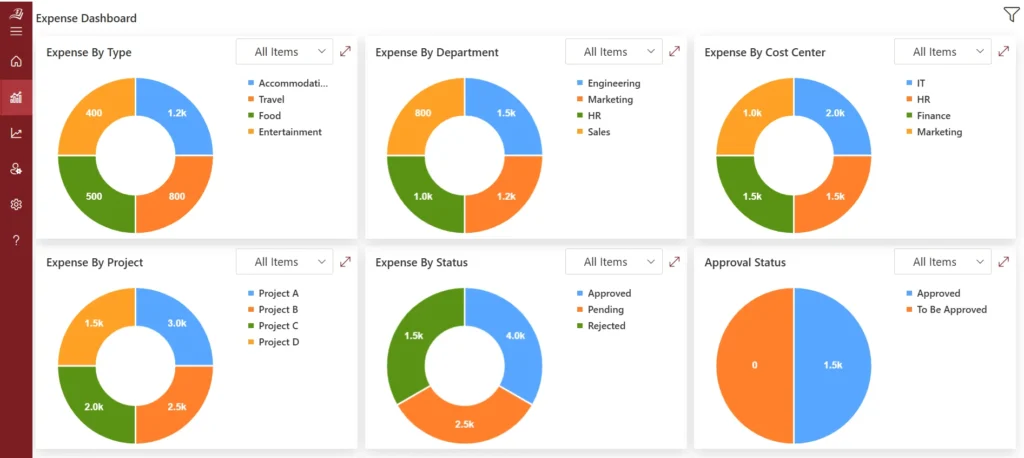
The expense monitoring app gives every stakeholder from a department head to the CFO a real-time view of spending relevant to their scope. A project manager sees budget consumption for their active projects.
A finance director sees company-wide spend against the current period’s plan. An executive sees the metrics that matter, total spend, variance from budget, top spending categories, and flagged exceptions.
The expense dashboard translates raw transaction data into decision-ready information, available without waiting for a report to be compiled.
From Receipt Capture to Final Reporting — All Managed Securely in One Platform.
The ROI of Investing in Smarter Expense Monitoring
The case for investing in a proper expense monitoring system is not just about convenience it is about measurable financial and operational outcomes that compound over time. Here are seven genuine returns businesses experience when they make the shift.
1. More Productive Finance and Operations Teams
When expense data is captured in real time and accurately coded at the point of submission, finance teams no longer need to spend hours on expense reconciliation, chasing receipts, or fixing errors. Expense monitoring app allows them to shift their focus toward higher-value activities such as financial analysis, planning, and strategic decision-making that support business growth.
2. Sharper Cash Flow Visibility and Forecasting
Real-time visibility into spending patterns and budget usage enables finance leaders to build more accurate cash flow forecasts. Instead of relying on assumptions or delayed data, they can base decisions on actual spending behavior, leading to more confident budgeting and better financial control.
3. Reduced Out-of-Policy Spending
An expense monitoring app enforces policies on travel expenses automatically by flagging or blocking non-compliant expenses before approval. Over time, employees better understand the rules and submit fewer incorrect claims, helping the business control unnecessary spending. This also builds a culture of accountability, where employees follow guidelines without constant oversight.
4. Stronger Vendor Negotiation Leverage
By using an expense monitoring app, businesses can analyse consolidated expense data across vendors and categories. This visibility from the expense monitoring app helps while also identifying preferred vendors for long-term cost optimization.
5. Audit-Ready Financial Records
An expense monitoring app maintains a complete and organized audit trail, including receipts, approvals, and policy exceptions. This ensures the business is always prepared for audits, tax reviews, or client inquiries without last-minute effort, while also reducing the risk of compliance issues and financial discrepancies.
6. Better Employee Experience and Retention
An expense monitoring app simplifies expense submission and speeds up employee expense reimbursements. Employees gain confidence that their claims will be processed quickly and fairly, reducing frustration especially for frequent travellers and improving overall satisfaction, which encourages timely and accurate submissions.
7. Measurable Cost Savings from Day One
By reducing manual effort, preventing policy violations, speeding up financial processes, and improving vendor terms, an expense monitoring app delivers immediate and measurable cost savings often exceeding the cost of the platform within the first year, directly contributing to improved profitability and smarter resource allocation.
Best Practices for Implementing and Auditing Expenses
Expense monitoring app works best when supported by clear processes and consistent habits. Businesses that combine both achieve stronger control and better financial outcomes.
1. Define a Clear Expense Policy and Keep It Accessible
Start by creating a well-defined expense policy that outlines reimbursable items, category limits, and submission timelines. When employees can easily access and understand these guidelines, it leads to more consistent and accurate expense reporting.
2. Train Employees on the Tool and Its Value
Leverage the knowledge base on how to use the expense monitoring app while also explaining its importance. When employees understand that accurate and timely submissions support financial health and faster reimbursements, they naturally adopt better practices.
3. Review Expenses Regularly for Better Control
Establish a routine, such as weekly reviews, to stay on top of expenses. Regular reviews with the help of expense monitoring app assists teams stay aligned, ensure accuracy, and address any issues early while the details are still fresh.
4. Use Insights to Improve Spending Decisions
Leverage reporting tools to understand spending patterns across departments and categories. These insights from expense monitoring app help identify opportunities to optimize budgets and make more informed financial decisions.
5. Conduct Spot Audits to Strengthen Accuracy
Perform periodic spot checks on approved expenses to ensure documentation and categorization are accurate. This reinforces accountability and helps continuously improve the overall expense management process.
Why Expense 365 Is the Ideal App for Expense Monitoring?
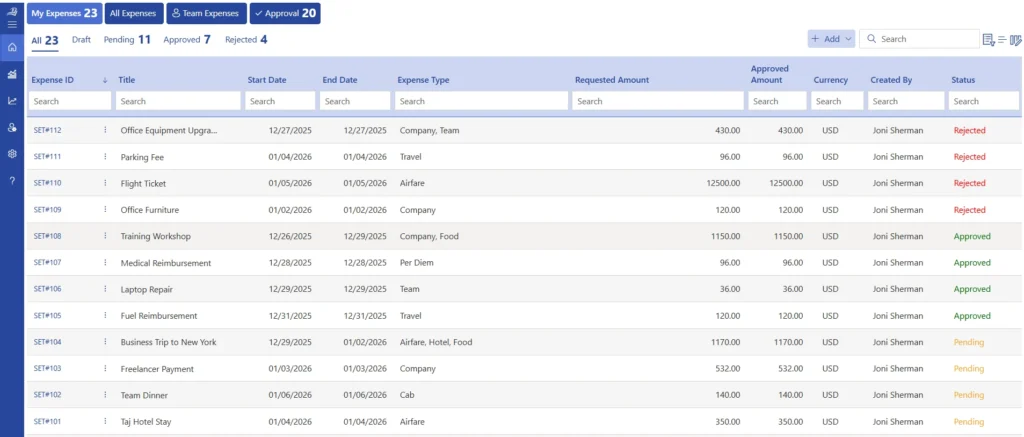
Expense 365 is a dependable expense monitoring app designed to simplify how businesses manage and organize their financial records. Built to work seamlessly within the Microsoft 365 ecosystem, it allows teams to record expenses, track claims, and generate detailed reports without relying on manual processes.
With smooth integration across Microsoft 365 applications such as Excel, Microsoft Teams, Outlook, and SharePoint, businesses can manage expenses within the tools they already use daily. This creates a more connected and efficient workflow across departments.
The expense management platform provides real-time visibility into business spending, making it easier to monitor expenses accurately and reduce errors that typically occur with manual data entry.
Smart automation features organize and process expenses automatically, saving time and effort. Suitable for both small businesses and large enterprises, Expense Tracker 365 makes expense monitoring simple and efficient.
Already leaning toward a Microsoft 365-native expense management solution?
Expense 365 helps teams track, manage, and control expenses efficiently all within the Microsoft ecosystem.
Conclusion
Expense monitoring is one of those operational functions that only gets attention when something goes wrong a budget blowout, a failed audit, a frustrated employee waiting on a reimbursement.
Start your 14-day free trial of Expense 365 today, no credit card required, no commitment. See for yourself how much cleaner your expense process can be.
Experience the full platform, onboard your team, and see what real-time expense visibility feels like all within two weeks, at no cost.
Frequently Asked Questions
How can custom approval workflows be configured?
Approval workflows can be tailored based on hierarchy, expense amount, or department. Expense monitoring app ensures that every expense follows the right approval path, improving control and speeding up the review process.
How is department-wise spending tracked?
Expenses can be organized and viewed by department, project, or category. This gives clear visibility into where money is being spent and helps teams manage budgets more effectively.
What options are available for submitting expenses on the go?
Employees can submit expenses easily through mobile apps by uploading receipts and entering details in real time. Expense monitoring app ensures timely submissions and reduces the chances of missing or delayed entries.
Which industries benefit from this solution?
The expense monitoring app is designed to support a wide range of industries, including consulting, construction, sales, and service-based businesses. It adapts to different workflows and expense types across sectors.
Which travel expenses can be monitored?
The system allows tracking of various travel-related costs such as flights, hotel stays, local transportation, meals, mileage, and visa fees. This helps businesses maintain full visibility and control over travel spending.


_JiluXJRGNl.svg)























