
SharePoint Learning Management System Guide 2025
Most teams know SharePoint as a place to store documents and manage projects. But in 2025, it’s doing something far more powerful shaping the way people learn.

Overview
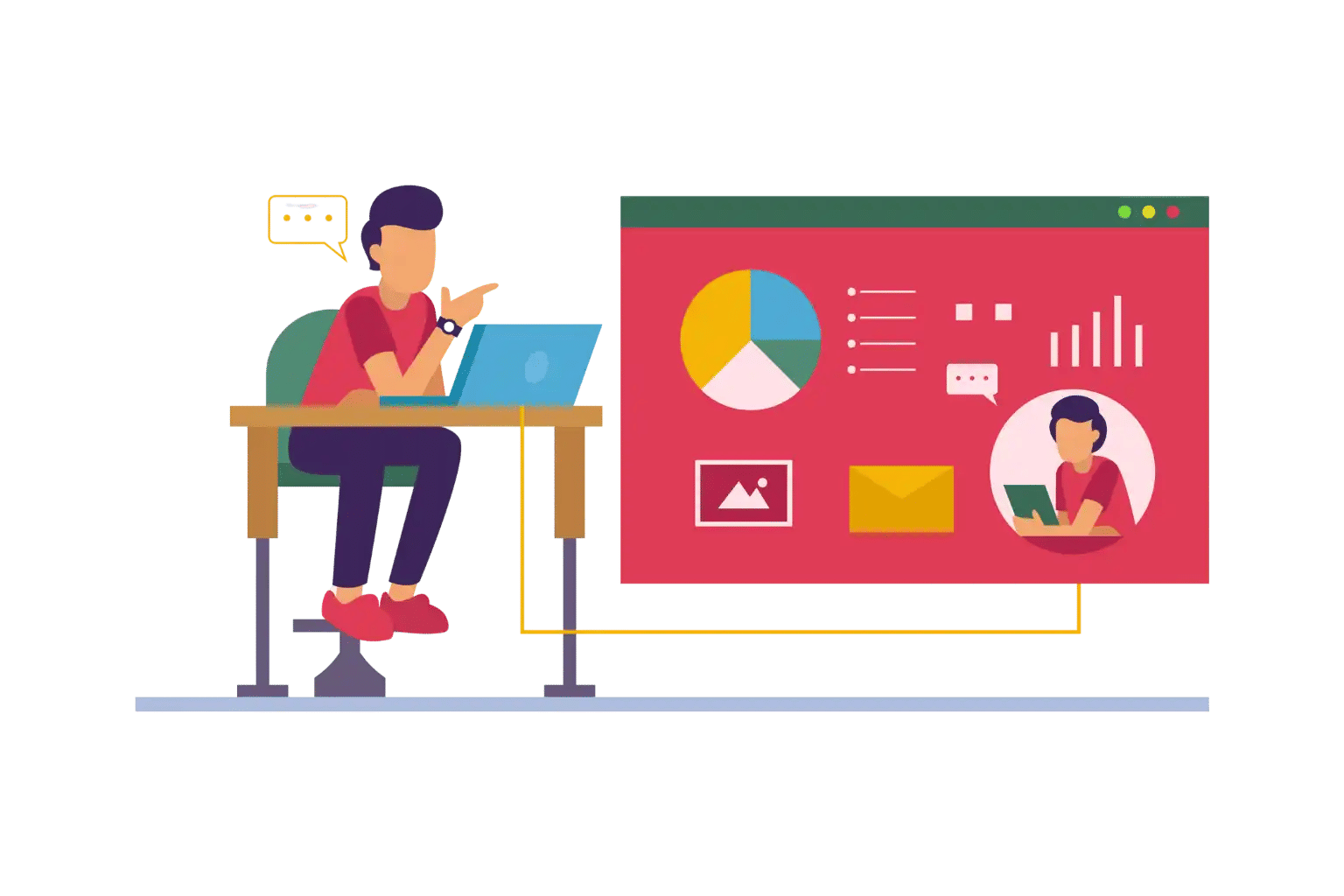
A SharePoint Learning Management System takes the familiar platform your employees already use daily and transforms it into a training engine that drives growth, compliance, and engagement.
Because your employees already have everything they need (log-ins, dashboards, etc.) on SharePoint, they do not have to worry about extra log-ins, additional dashboards or unfamiliar tools when they are learning. That means there will be a larger number of employees who actually participate in training sessions since they are more likely to adopt this form of learning. Companies using integrated LMS’s are typically able to report as much as a 40% increase in the number of employees who participate in learning as compared with companies that utilize stand-alone LMS’s.
As many enterprises are struggling with training their global workforce on the same skills and have scarce resources to distribute training, SharePoint Learning Management Systems are the perfect tool for providing secure training options that can be integrated with Microsoft 365 products. Providing the necessary skills and support to a global workforce not only equips employees with knowledge, but also builds their confidence, helps ensure compliance and helps develop a culture of lifelong learning and readiness for tomorrow.
What is SharePoint Learning Management System?
An LMS built-in Microsoft SharePoint, Also Known as a SharePoint Learning Management System (LMS), is a comprehensive tool for organizations to create, deliver and keep track of training through a single system built right into Microsoft SharePoint. Because an LMS created on this platform allows employees to learn and use training content, courses, and certifications within their own work environment, employees are comfortable using and adapting to the LMS within their daily workplace activities.
SharePoint LMS allows for automation of all administrative functions associated with training, including enrollment and reminder notifications and process tracking while supporting compliance by retaining audit-ready records. The LMS integrates seamlessly with Microsoft 365 applications including Teams and Outlook; therefore, the learning process is both natural and engaging.
Employees using SharePoint LMS do not view it as simply another add-on to their work toolbox, but rather as a natural extension of the digital workplace. By creating this way of working for employees, companies benefit by increasing employee involvement in their own training efforts and decreasing administrative load on the organization. Employee training is positioned as a key element in driving the growth of the company.
Why a SharePoint LMS Matters
Organizations often ask, “What are the Benefits of Building a Learning Management System in SharePoint?”. The answer is twofold: SharePoint is already an established enterprise solution that many large companies trust to support their learning systems – over half (62%) of all Fortune 500 companies use SharePoint for their enterprise solutions, making it a proven infrastructure to use when building an enterprise-level LMS; furthermore, SharePoint’s platform allows organizations to build off an existing system their employees already know how to use, as opposed to starting from scratch.
Using SharePoint as the foundation for an LMS enables organizations to train employees, track their progress through online courses, and manage content all through the same interface they are accustomed to using on a day-to-day basis. This seamless integration reduces friction, improves training utilization, and enables training to fit into an employee’s workflow more naturally.
Additionally, using SharePoint as a foundation for an LMS is typically less expensive than other third-party LMS vendors because it utilizes the infrastructure that most companies already have in place for SharePoint. By leveraging the SharePoint infrastructure to build a learning management system (LMS) in SharePoint, organizations equip their teams with familiar tools that allow for quicker and more efficient completion of work and a more favorable outcome.
Take the next step toward better support operations.
Key Features of SharePoint LMS
When you build a learning management system in SharePoint, it combines powerful learning tools with the familiarity of the Microsoft environment. Below are the key features that make it stand out:
- Centralized Content Hub
The SharePoint site serves as a Central Hub for all Learning Materials including Policy & Procedure documents, Onboarding Guides, Videos, Quizzes, SCORM Files ,etc. Since training materials will now be in one location, employees won’t have to search multiple systems to find what they need. Centralizing these materials increases Training Accessibility & Consistency; eliminates confusion over multiple physical locations; and therefore, makes it easier for employees to complete their training on time.
Automated Enrollment and Scheduling
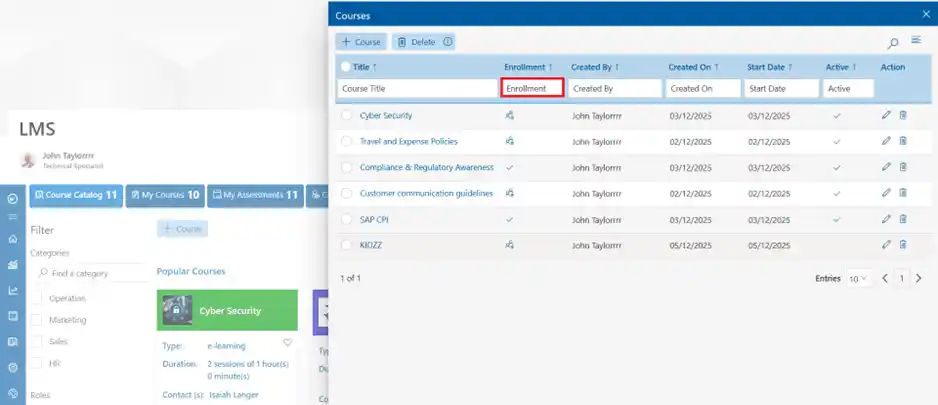
Using Sharepoint, Administrators can create rules and automatically assign required training by Role, Department or Compliance. Employees will have a training session automatically placed into Outlook Calendar and automated Reminders will keep them on track to complete their training. Additionally, using this automated process allows HR Teams to reduce their Manual Workload and ensure employees don’t miss out on important training.
Interactive Dashboards and Reporting
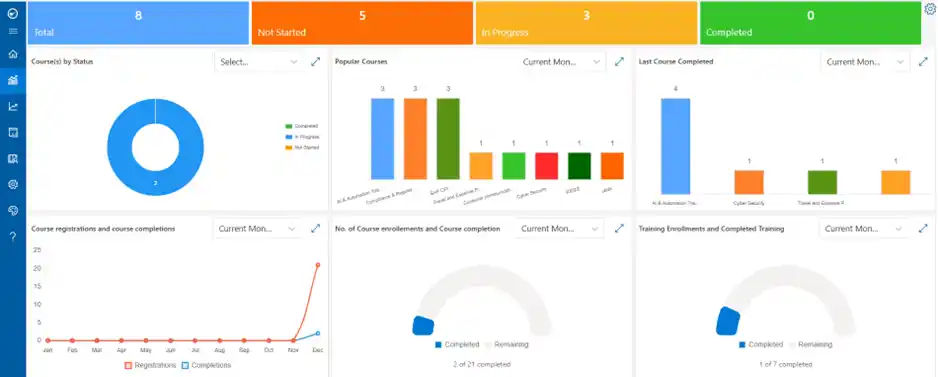
Managers and HR professionals have complete visibility into the learner’s progress with Real-Time Dashboards. They can view how many employees have completed courses, how many employees need to renew certifications, and how well employees performed on assessments. By aligning Associated Reports with Business Goals, Organization’s can measure their Training Programs’ ROI as well as identify Skills Gaps that need to be addressed.
Flexible Learning Formats
Employees learn in many different ways; SharePoint LMS provides a variety of learning formats to accommodate those differences. Self-Paced Courses are best suited to Independent Learners and Blended-Format Learning Programs are great for Hybrid Training. Additionally, Microlearning enables Learners to build their Skills Quickly, and Mobile Access provides flexible opportunities for Remote and Field Employees.
Assessments and Certifications
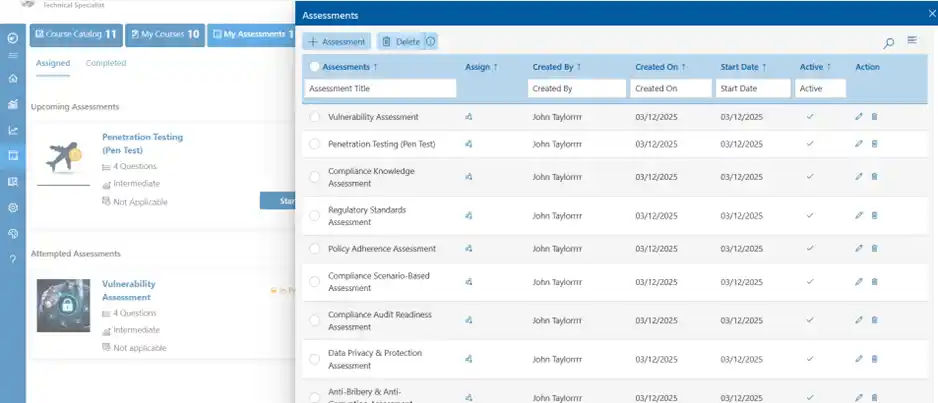
One method of incorporating knowledge checks during employee training is to use automated assessments to score and issue employee completion certificates at the same time. Automated assessment means no longer needing to grade tests manually, which saves time for both HR administrators as well as providing employees with recognition for their accomplishment.
Collaboration and Engagement Tools
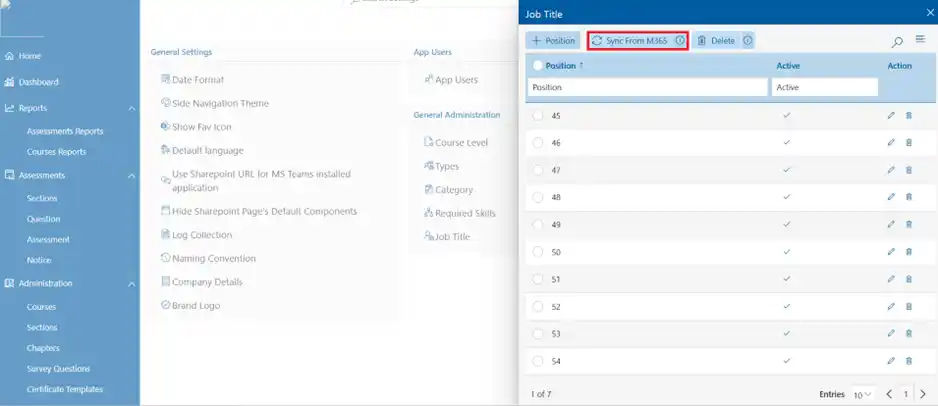
Communication among employees while they learn is possible when using SharePoint LMS. There are several ways to promote discussion about training between employees using SharePoint LMS, such as Discussion Forums, Learner Profiles, and Feedback Channels. The integration of Teams with SharePoint LMS allows employees to continue discussing lessons and collaborating on project creation in the same platform as their day-to-day work activity.
Smart Reminders & Notifications
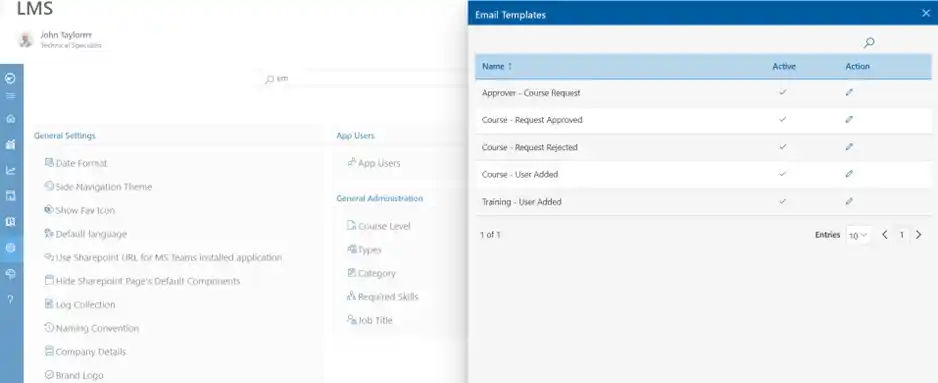
Automated reminders will keep learning on schedule for all learners and will reduce the need for HR departments to follow up on missed deadline reminders. Employees will receive these automatic reminders via email, Teams, and the LMS dashboard. This way, employees will always be informed, updated, and on pace without requiring additional manual communication from HR.
Enterprise-Grade Security
SharePoint LMS incorporates the same enterprise-grade level of security available in other Microsoft products. For example, SharePoint LMS uses encryption for sensitive employee data; it also utilizes role-based access to allow management to restrict access to sensitive information. SharePoint LMS also provides organizations with a degree of confidence that their training data is compliant with global standards, including GDPR and SCORM compliant audit-ready.
Personalized Learning Paths
At each level of the organization, employees have different training needs, which can be satisfied by using a SharePoint LMS system to create personal training programs tailored for each employee depending on their department, job responsibilities and other variables such as their career goals and career advancement opportunities. When an employee can receive a training program that has been developed based on their personal training needs and career aspirations, this will increase their motivation for continuing to learn and retain the information.
Integration with Microsoft 365 Apps
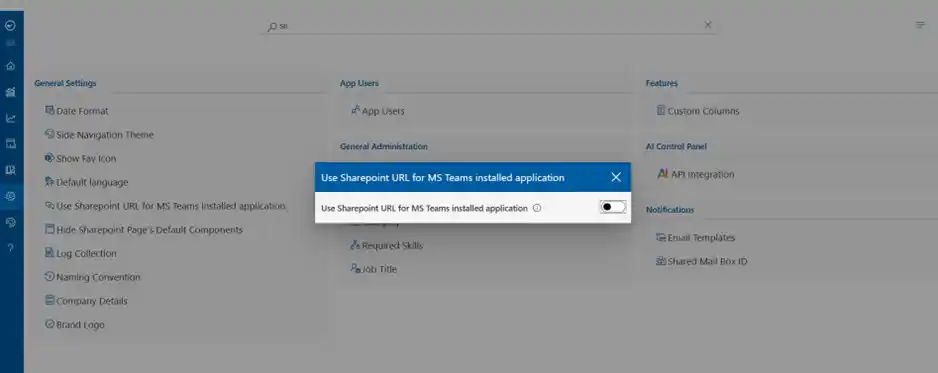
Additionally, since SharePoint LMS operates within the Microsoft platform, it will enable employees to use Microsoft Teams, Microsoft Outlook, Microsoft OneDrive and Microsoft Power BI to access training modules directly from applications they already use each day. It will also allow managers to obtain analytics about employee performance and tracking information through the use of advanced Power BI dashboards. Thus, by providing an integrated solution, it offers a comprehensive digital workspace for employees to learn within the workflow process.
Elevate your support system and empower collaboration with Helpdesk Software.
How to Choose the Right SharePoint Learning Management System
Choosing the right SharePoint Learning Management System means finding a platform that grows with your organization, engages learners, integrates seamlessly with Microsoft 365, and supports evolving training needs to drive better learning experiences and long-term workforce development.
Drive Engagement, Not Just Completion
The right SharePoint LMS should energize your workforce with features like gamification, leaderboards, and recognition badges. When learning feels rewarding, employees stay motivated and training becomes part of your culture not a checkbox.
Look for a system that transforms learning into an experience boosting participation, improving knowledge retention, and encouraging friendly competition.

Personalized Learning Powered by Intelligence
A modern LMS must adapt to each learner. AI-driven recommendations identify skill gaps, suggest relevant courses, and guide employees toward growth opportunities ensuring learning feels meaningful, timely, and future-focused.
Personalized learning keeps employees engaged longer and ensures training always aligns with their role, goals, and career aspirations.
Built for Every Learner, Everywhere
Accessibility and inclusivity are non-negotiable. Choose an LMS that supports WCAG standards, closed captions, text-to-speech, and multilingual experiences so every employee, across every region or ability level, can participate fully.
A system built for everyone boosts completion rates and ensures equal learning opportunities across your global workforce.
Future-Ready with Continuous Innovation
An effective LMS grows with your organization. Select a vendor that delivers ongoing updates, leverages Microsoft 365 advancements, and introduces new capabilities regularly keeping your learning ecosystem modern and competitive.
The right platform should evolve with industry trends, ensuring your training stays relevant and your teams stay ahead.
Learning That Builds Careers, Not Just Compliance
Go beyond completion tracking. A strong LMS connects learning data to performance reviews, promotions, and succession planning. It becomes a strategic tool for identifying talent, supporting career paths, and developing future leaders.
This shifts your LMS from a training requirement to a development engine that strengthens retention and builds your internal talent pipeline.
Step-by-Step: How to Build a Learning Management System in SharePoint
Building an LMS in SharePoint is more than creating a few sites and pages it’s about designing a learning space that helps employees grow, makes HR workflows lighter, and keeps compliance on track. When done right, your SharePoint LMS becomes a central hub for training, development, and knowledge, not just another internal site.
Plan Your Goals
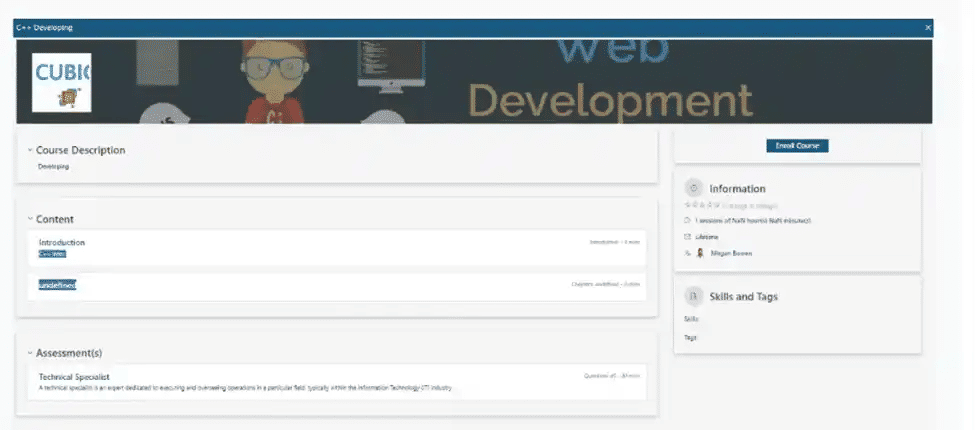
A successful SharePoint LMS begins with an understanding of what your learners need to achieve and how best to achieve those goals. Define who will be using the LMS as well as what type of training and development each user group will require; this may include onboarding, safety training, compliance training, etc. With this information in mind, you can develop an LMS that is not simply a means of delivering training, but a solution customized to meet the unique requirements of your organization. By defining your goals in advance, the LMS can help create measurable growth for your organization instead of just delivering training.
Set Up Content Structure
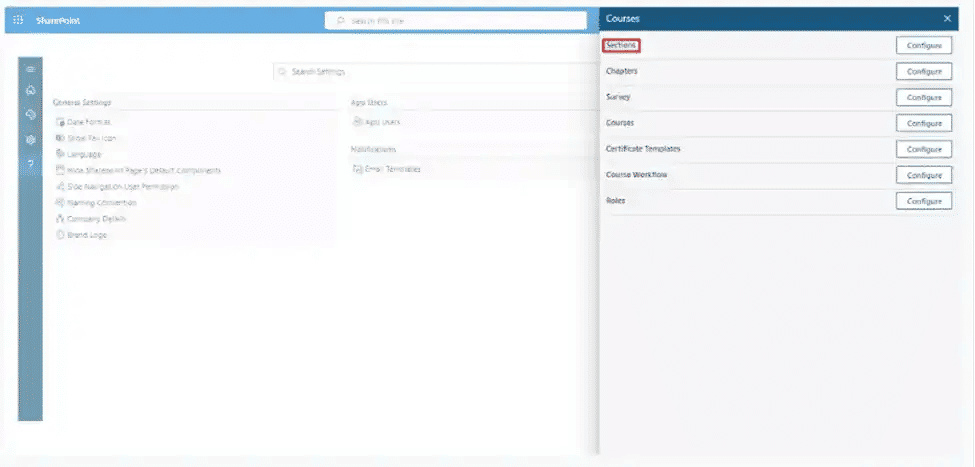
Define User Permissions
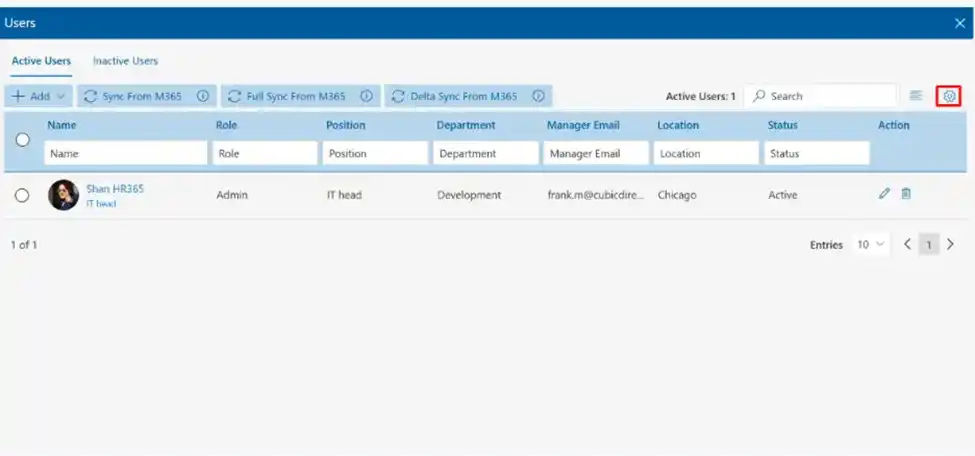
Access to your LMS based on an employee’s role is imperative. SharePoint offers a way for you to define roles (for example, Administrator, Instructor, or Learner) and allow only authenticated users to create, edit or/or access to your training materials/learning materials. By providing role-based access to your LMS, you will help to keep your LMS secure and protect the integrity of your trainer’s resources and data. In addition, you will keep the trust of your learners by allowing them to benefit from valid training programs.
Create Templates for Consistency
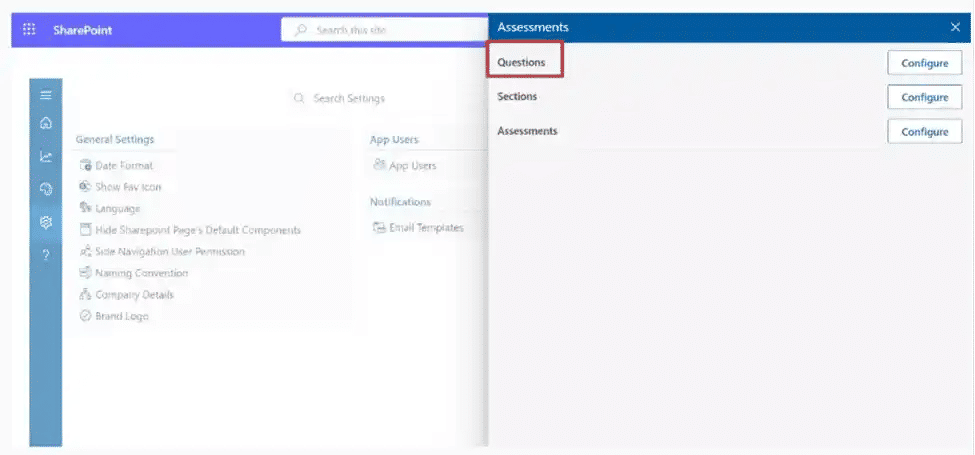
Repetition drives learner engagement. When you create course items, quizzes, and other content, it is recommended that you establish templates for your training programs so that your administrators will all have a common standard. By utilizing templates, you reduce the amount of time your administrators need to develop their training programs, and provide your learners with a standardized and predictable user experience. In addition, template use provides a consistent means of establishing and developing your corporate brand image. Thus, when your learners go through training, they will see that your training program is professional and aligned with your corporate culture.
Enable Enrollment Options
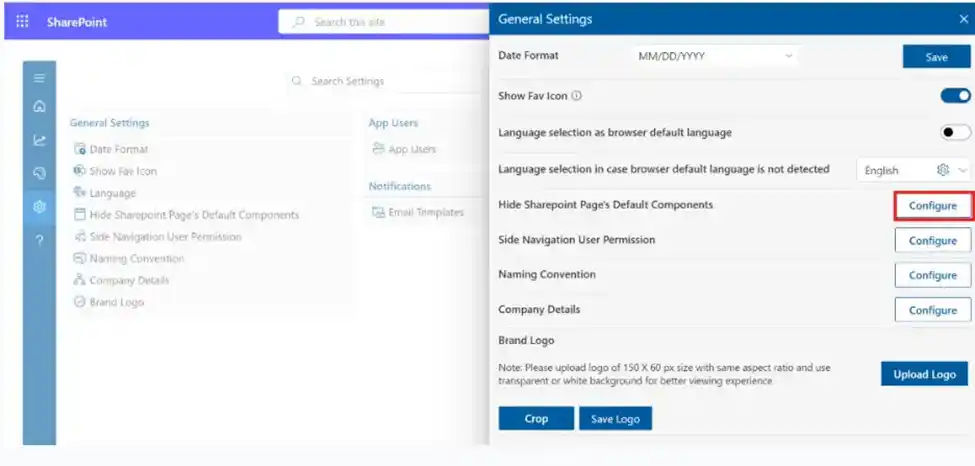
Automatic course assignment allows for streamlined enrollment and immersion into the learning management system based on department/role. For optional training, the self-registration option allows for employees choice of learning paths that fit with their career goals. The combination of both structure and flexibility drives employee engagement and allows for employees to take ownership over the process of developing their skills.
Use Calendars and Alerts
Connecting SharePoint and Outlook makes it easy for HR to maintain employee calendars, as HR can sync course schedule directly to the employee’s calendar. Additional reminders and alerts through automation keep learners engaged and on track in meeting deadlines while also eliminating HR’s need to send out manual reminders. Proactive communication is key in providing a smoother training experience and keeping training top-of-mind.
Build Dashboards
SharePoint LMS dashboards give both administrators and managers visibility into course completions, test results, and certification status on a real-time basis, which allows leadership to evaluate return on investment (ROI) based on this data. Additionally, this real-time visibility can help leadership identify skill gaps so that they may take action to address these skills gaps prior to the issuance of certifications.
Add Assessments and Certificates
Quizzes and assessments created through an LMS aid in the retention of knowledge gained through the learning experience. The ability to automate the scoring of quizzes saves time for HR, and allows employees to have a certificate immediately after they pass the associated quizzes. The structure of the assessment process provides evidence of the knowledge gained and motivates employees to improve on a regular basis.
Enable Interaction
In addition to the above, it is important for a modern LMS provide an environment that promotes interaction and collaboration among its users. For example, through using forums, feedback forms and Teams integration, an LMS can allow its users to exchange knowledge and ideas via the LMS; therefore, transforming the learning experience from a solitary to a collaborative one. Collaborative learning will help to facilitate numerous connections and relationships within the organization, ultimately contributing to a stronger workplace culture and peer-to-peer sharing of know-how and expertise.
Ensure Security
Also, it is common for many organizations to include sensitive data such as training records within their LMS; therefore, it is important for you SharePoint-based training platform to incorporate encryption, multi-factor authentication as well as adherence to international data protection regulations like GDPR. Through the use of enterprise-level security solutions provided by Microsoft, both your organization and your learners will be well protected from potential security breaches. The level of protection will foster increased trust amongst employees across the entire organization, further reassuring employees that their personal data is being protected.
Benefits of SharePoint Learning Management
A SharePoint Learning Management System (LMS) delivers far more than technical features it creates measurable business value and an emotional shift in how employees engage with training. Here are the key benefits organizations can expect:
- Seamless Experience
Since SharePoint is already part of the Microsoft 365 ecosystem, employees don’t have to learn a new system. Training is delivered inside the same familiar tools they use daily, such as Teams and Outlook, which reduces resistance and makes learning feel like a natural part of work. This ease of access leads to faster adoption and higher engagement rates.
- Time and Cost Efficiency
HR and L&D teams save countless hours by automating manual tasks like enrollment, reminders, and progress tracking. By using SharePoint as the foundation, organizations avoid the high costs of purchasing, integrating, and maintaining third-party LMS platforms. This efficiency allows HR to focus more on strategy and employee development rather than administration.
- Data-Driven Growth
Managers and supervisors gain immediate access to dashboards showing completion rates, performance trends, and skills data. With this visibility, organizations can tie learning directly to business objectives, ensuring that training isn’t just activity but impact. Data-driven insights also help refine training programs for continuous improvement.
- Employee Motivation
Employees feel more valued when training aligns with their real tasks and career paths. A SharePoint LMS nurtures pride and self-confidence by connecting learning to daily responsibilities and long-term growth. Instead of treating training as a burden, employees see it as an investment in their success.
- Compliance Assurance
Compliance training is often stressful for both employees and administrators. SharePoint LMS automates certification tracking, renewals, and audit reporting, removing last-minute chaos. When audits arrive, organizations can prove compliance instantly, reducing risk and avoiding penalties.
- Scalability with Flexibility
Whether you’re onboarding 50 employees or managing training for 50,000 across multiple regions, SharePoint LMS scales without performance issues. It adapts to both small teams and global enterprises, making it suitable for companies at any growth stage. The flexibility ensures the system evolves as the business expands.
- Stronger Engagement
Modern learners thrive on interaction. SharePoint LMS supports discussion forums, feedback tools, and Microsoft Teams integration to turn training into a collaborative experience. This social dimension encourages knowledge sharing and transforms learning into a community effort rather than a solo task.
- Personalized Learning Paths
Not every employee learns the same way. A SharePoint LMS allows administrators to design personalized journeys based on role, department, or career stage. This tailored approach improves relevance, increases motivation, and boosts long-term knowledge retention.
- Future-Proof Investment
Because it’s built on Microsoft’s constantly evolving ecosystem, a SharePoint LMS benefits from ongoing updates, integrations, and enhancements. Organizations don’t have to worry about obsolescence this makes the platform a long-term strategic investment that continues to grow with the business.
- Improved Collaboration Between Departments (New Point)
A SharePoint LMS doesn’t just connect learners to content—it connects departments to each other. By aligning HR, IT, compliance, and business teams on one platform, organizations create a unified learning environment. This cross-department collaboration reduces silos, improves communication, and ensures that training supports broader organizational goals.
Microsoft Teams Helpdesk

SharePoint Helpdesk
Solutions can be built or integrated to store all help desk data and documents within your SharePoint environment, providing robust security and keeping all information within your existing Microsoft infrastructure. This avoids the need for external cloud storage and simplifies user authentication using existing Microsoft credentials.
Best Practices for a SharePoint LMS That Truly Connects
Building a SharePoint LMS isn’t just about uploading courses it’s about making learning feel connected to the tools employees already use every day. To get the best results, your LMS should be designed to integrate seamlessly with other systems across your digital workplace.
Connect with Authoring Tools
The strongest LMS should have no restrictions on supported content types, and through integration with Learning Content Management Systems (LCMS), such as Adobe Captivate or Articulate, organizations can easily import ready to go SCORM compliant courses directly into SharePoint (SPL). As a result, since an LMS integrates with an LMS, organizations are able to deliver dynamic, engaging, and interactive training to their employees, thus eliminating any unnecessary manual effort required to get the content into the LMS.
Align with CRM Platforms
Like HR, training also has a major impact on sales performance. In fact, the integration of SharePoint LMS with CRM (Customer Relationship Management) software allows salesperson’s access to all of the training components they need to perform their job (training), including product training, onboarding modules, compliance updates, etc., within the same platforms they utilize every day to manage customer relationships. Consequently, employees can develop knowledge around the areas in which it is critically important for their jobs, thereby accelerating the rate of revenue growth.
Automate with HR Systems
Being at the core of employee development is why it is critical that organizations connect their SharePoint LMS with their HR System (HRS). By integrating SharePoint LMS with their HRS, organizations establish a two-way street of communication between the two systems in that the HRS can automatically enroll a new hire into their onboarding program; the HRS can update the employee record in real time with the newest certifications; and the HRS takes away repetitive administration by providing a mechanism for tracking training data and providing a accurate and up-to-date record for each employee.
Seamless Intranet Access
When it comes to finding training, it should not be difficult for employees. By placing the SharePoint LMS as part of your intranet, you enable complete access to training opportunities with just one click. Whether via navigation links, dashboards, or widgets located on the homepage of your intranet, integrating SharePoint LMS creates an environment in which learning can become an integral part of the daily work experience.
Power BI for Data Visualization
A connected LMS not only tracks but also converts data into a form that enables action. Organizations that link their SharePoint LMS to Power BI create dashboards that enhance visual representation of a learner’s development (learning), compliance levels and areas of skill deficiency; therefore, leaders are empowered through accessible data to make informed decisions on improving performance.
Microsoft Teams for Collaboration
Modern learners need interaction in their learning environment, so Teams creates opportunities for employees to access courses, have conversations about learning and work together on projects while using the same application for communication. This makes training fun, collaborative and integrated into employees’ daily activities.
Mobile and Remote Access
By providing mobile-friendly access to your SharePoint LMS and the ability to use offline modes for learning, your organization creates a consistent experience for remote employees, employees who work in the field and employees who travel regularly.
AI and Automation Enhancements
Through smart integration with artificial intelligence tools, SharePoint LMS will be further enhanced by 2025. The automated suggestions for learning based upon performance, chatbot support for frequently asked questions, and the use of AI predictive analytics for employee compliance will soon become the norm for forward-thinking organizations.
.webp)
A Guide to Building a SharePoint Ticketing System for Your Team
Conclusion
Creating a learning platform within SharePoint does more than simplify training it transforms the way your organization grows. It gives your team a familiar, trusted space to learn, reduces manual workload for HR, and ensures training programs actually deliver long-lasting impact. By choosing to build a learning management system in SharePoint, you’re not just rolling out another piece of software. You’re investing in a connected learning environment that builds employee confidence, strengthens collaboration, and nurtures a culture where development becomes part of everyday work.
Book a demo today to explore how SharePoint-based learning can transform your organization!



Frequently Asked Questions
How is a SharePoint Learning Management System different from a traditional?
A SharePoint Learning Management System (LMS) is a software solution built directly into the Microsoft SharePoint platform, allowing for seamless integration with other Microsoft 365 tools, such as Microsoft Teams, Outlook, and OneDrive. Unlike most traditional LMSs that are standalone applications, a SharePoint LMS integrates into the user’s day-to-day workflow and eliminates the requirement for additional logins. Because of this integration, employees do not have to leave their current work environment to complete a course, which increases engagement.
Can a SharePoint LMS support compliance training?
A SharePoint LMS serves companies in regulated industries (i.e. Healthcare, Finance, Manufacturing) by providing an automated system for managing required training assignments, tracking employee certifications and providing immediate access to an audit-ready report of training history. Therefore, a SharePoint LMS makes staying in compliance with regulations such as GDPR, HIPAA, ISO, etc., much easier by minimizing the disruption caused by time–sensitive requests for compliance documentation.
Is a SharePoint Learning Management System scalable for global teams?
A SharePoint LMS has the capability to support thousands of users located in multiple locations and time zones without sacrificing system performance. A SharePoint LMS permits the delivery of multilingual course content and can adapt to different time zones. Additionally, SharePoint LMS incorporates role-based access controls that assure uniformity among the users of the system. Therefore, the scalability of a SharePoint LMS makes it an excellent choice for organizations that wish to implement a consistent training program worldwide while accommodating individual regional training requirements.
Can SharePoint LMS personalize learning for different employees?
SharePoint LMS offers personalized Learning Paths based on Roles, Departments, & Career Stages. Personalizing training paths helps ensure that employees only receive what they really need to know as they perform their jobs & grow within the organization; thus, it encourages employee motivation and improves employee engagement leading to an increase in knowledge retention throughout the organization.
How does SharePoint LMS integrate with Microsoft Teams?
SharePoint LMS integrates directly into Teams, which allows users to not only communicate but also learn from each other within the same application. Through this integration, a learner has access to training courses to take, receive reminder notifications, and be able to participate in discussions regarding their courses and other topics without having to switch between applications; Hence, training remains aligned with an employee’s day-to-day collaboration efforts.
Schedule a free personalized 1:1 demo
By proceeding, you accept Cubic Logics’s terms and conditions and privacy policy










Try It Free, No Obligation





Don't leave yet,
get up to 30% special offer
until 31st March 2026
Enter your business email ID and we will send a personalized coupon code straight to your inbox.
Please provide your contact details, we will connect with you soon!
Please provide your contact details, we will connect with you soon!
By proceeding, you accept Cubic Logics Terms and Conditions and Privacy Policy
Schedule a free personalized 1:1 demo
By proceeding, you accept Cubic Logics’s terms and conditions and privacy policy








By proceeding, you accept Cubic Logics Terms and Conditions and Privacy Policy