Healthcare Recruiting Software for Hospitals and Clinics
Hire Qualified Healthcare Professionals Faster
with Recruitment Management 365
Recruitment Management 365 helps hospitals, clinics, and healthcare providers manage hiring from one secure platform. Track healthcare professionals, automate interview scheduling, manage credential verification, speed up approvals, and improve collaboration across HR and department heads. Hire qualified medical staff faster while ensuring a smooth and organized recruitment process.

Live inside Microsoft 365 in minutes
Built on SharePoint & Microsoft Teams
Start with 14-Day Free Trial
4.8/5(344)
Start with 14-Days Free Trail

Trusted by 12,100+ deployments from 172 countries














What is Healthcare Recruitment Software?
Healthcare recruitment software is a system built to manage hiring for hospitals, clinics, and medical facilities — job postings, applications, screening, interviews, and candidate records, all tracked in one place instead of scattered across email and spreadsheets.
Key benefits
- Centralize applications, screening, and scheduling for every clinical and non-clinical role
- Capture license, certification, and credential details per candidate with custom mandatory fields
- Speed up urgent clinical hiring with AI resume screening and Teams-based interview coordination
What Happens Without a Centralized Healthcare Recruiting System
Healthcare hiring requires speed, accuracy, and compliance. Recruitment Management 365 brings applications, candidate records, licensing details, interview scheduling, and hiring workflows into one platform, helping healthcare organizations fill critical roles faster while maintaining complete visibility throughout the recruitment process.

Applications Get Lost
Resumes arrive through job boards, email, and referrals. Without one system, strong candidates for urgent clinical roles slip through.

Credential Details Go Missing
License numbers, certifications, and expiry dates end up buried in resume attachments instead of tracked per candidate.

Hiring Managers Wait on Updates
Nurse managers and department heads have no visibility into where a candidate stands, so they keep asking recruiters for status.
Urgent Roles Sit Open
Without clear prioritization, a critical opening (like an ICU nurse) waits in the same queue as a lower-priority admin role.
No Record for Audits
When applications and approvals happen over email, there's no organized trail to show who reviewed what, or when.
Interview Scheduling Drags
Coordinating interviews across shift-based clinical staff and multiple approvers by email adds days to time-to-hire.
What Recruitment Management 365 Delivers for Healthcare Organizations
Everything Healthcare Teams Need in One Recruitment System
Manage job postings, applications, screening, and interviews for clinical and non-clinical roles from a familiar Microsoft 365 environment.
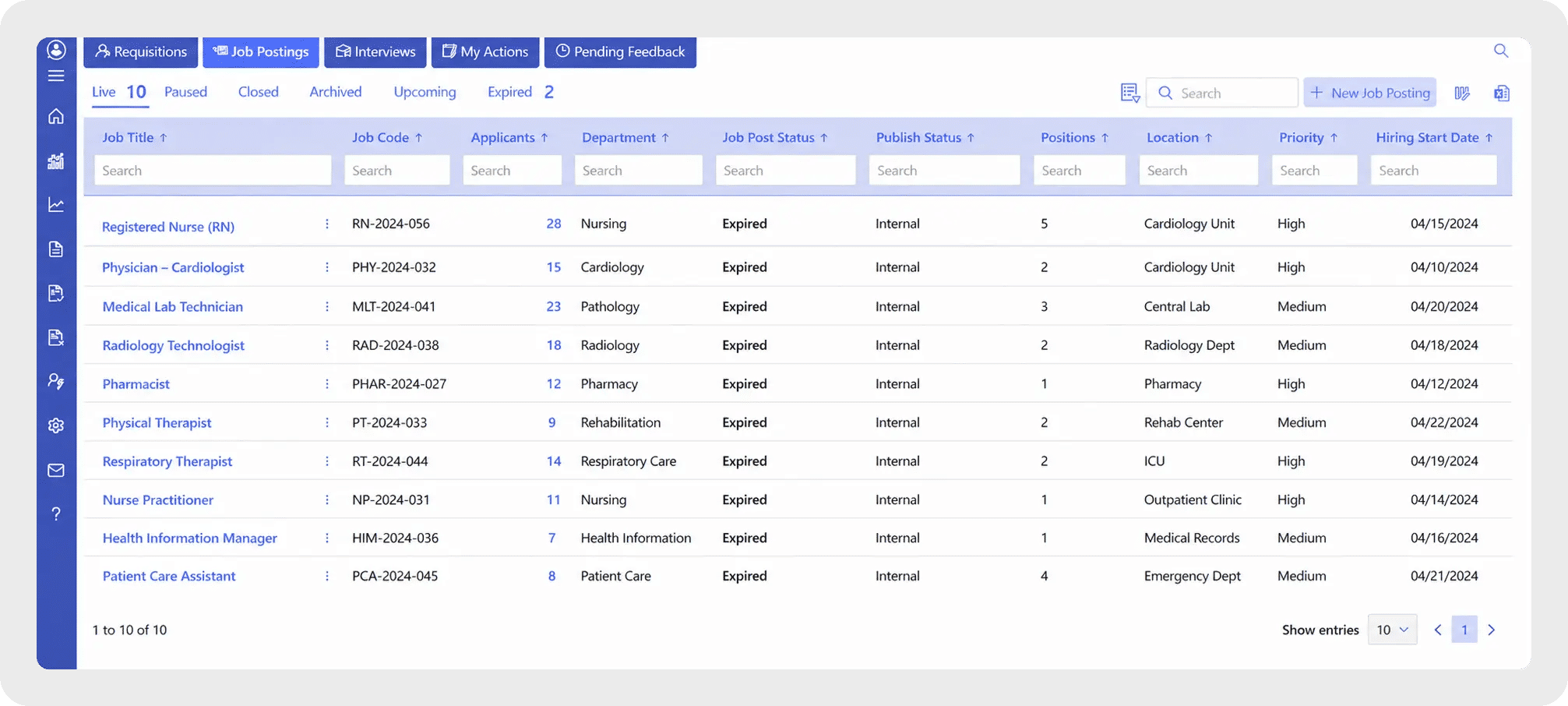
Applicant Tracking
Track every applicant — nurses, physicians, techs and support staff — through a centralized ATS.
- Post openings across multiple job boards and platforms with one click
- Custom application forms with mandatory fields for license numbers, expiry dates, and certifications
- Private/confidential postings for sensitive leadership or specialist roles
- Complete candidate record from application to hire
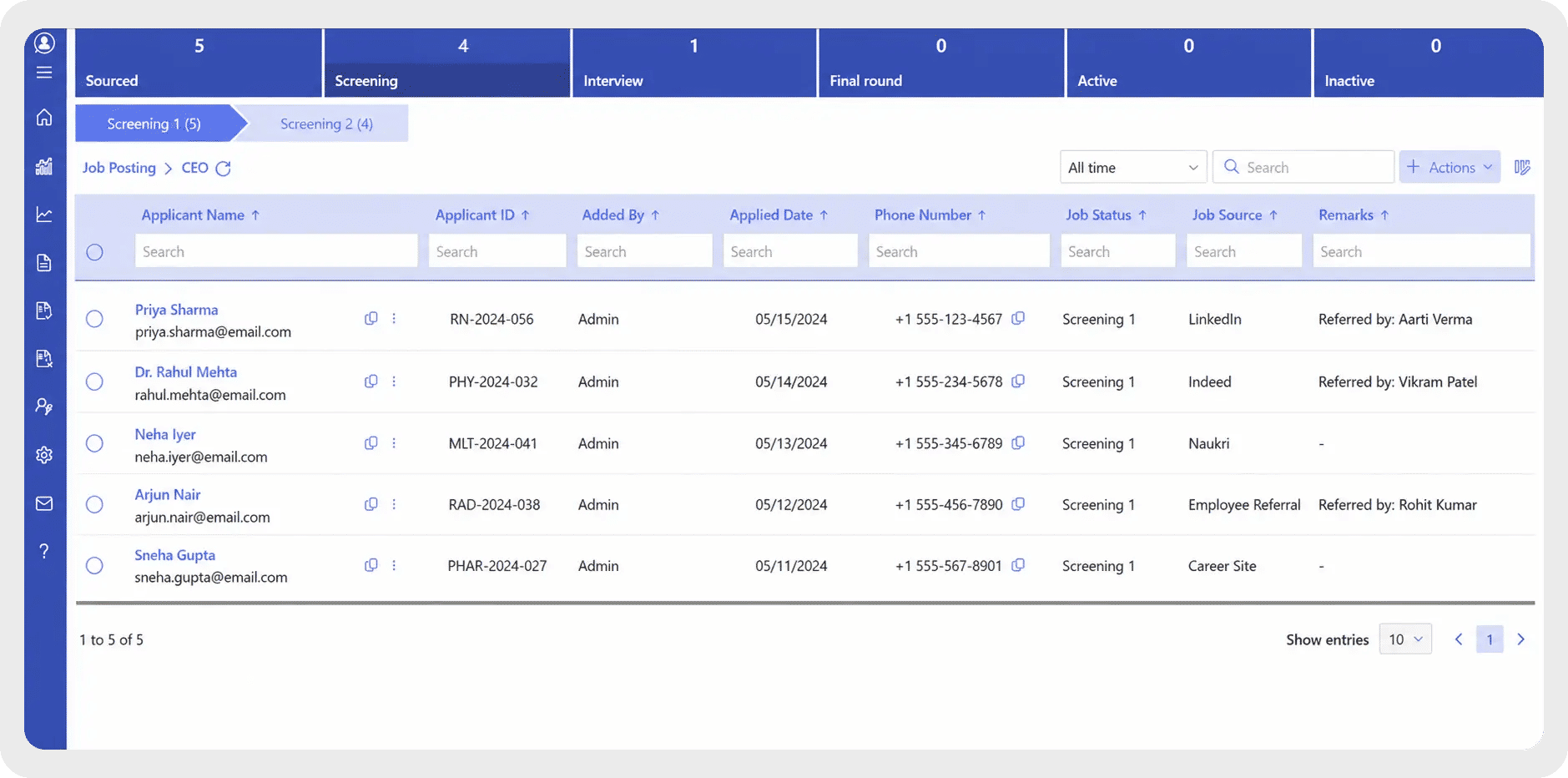
Screening
Let AI handle the first pass so recruiters can focus on qualified candidates.
- AI resume screening surfaces qualified candidates fast, while custom mandatory fields make sure license numbers, expiry dates, and certifications are captured for every applicant — no digging through resume text required
- Filter and rank candidates against role requirements
- Candidate referral system to tap your own staff's network
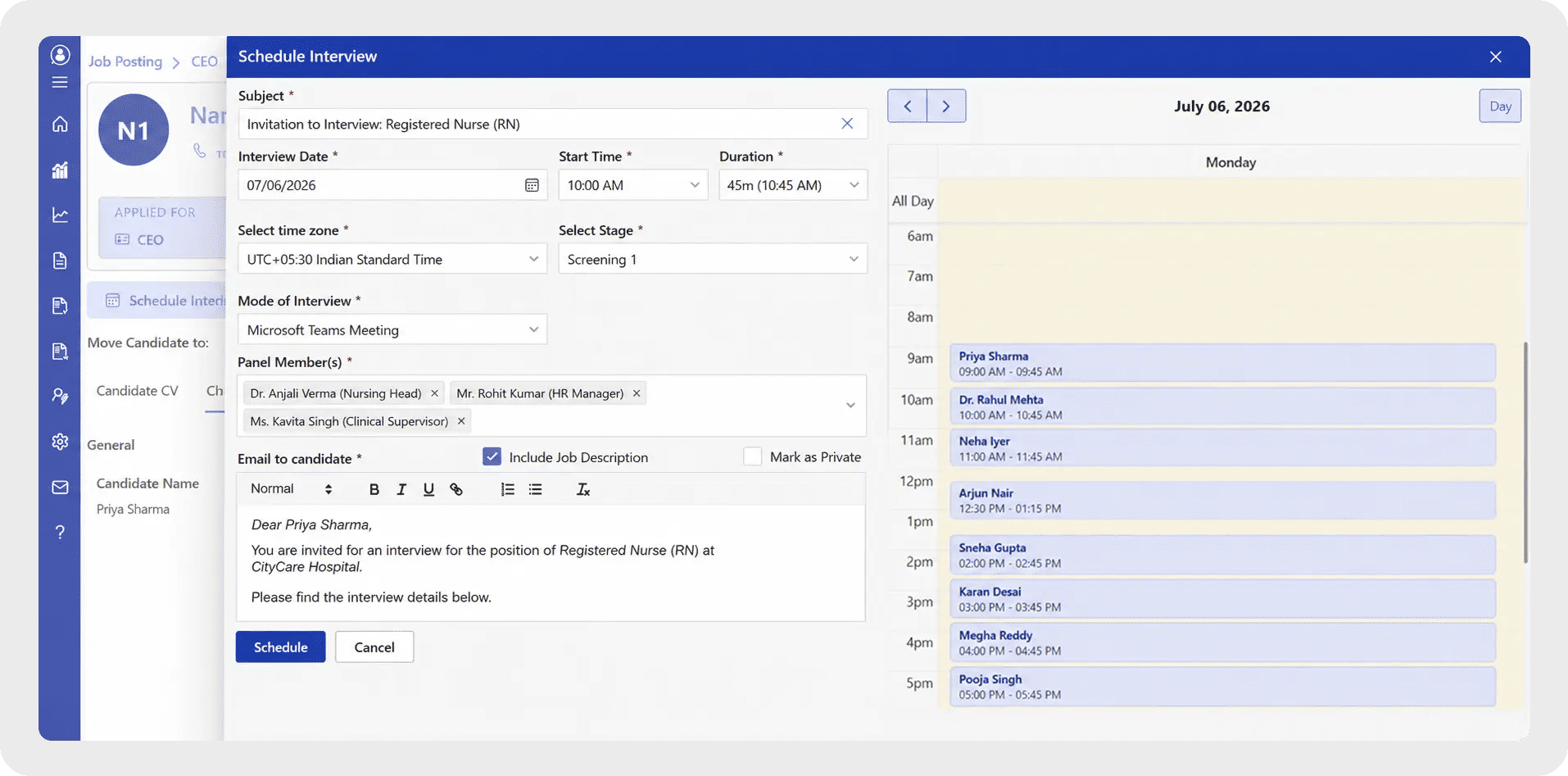
Scheduling
Coordinate interviews without email back-and-forth eating into time-to-hire.
- Schedule and manage interviews directly through Microsoft Teams
- Automatic calendar sync to avoid double-booking
- Reminders and notifications keep candidates and interviewers aligned

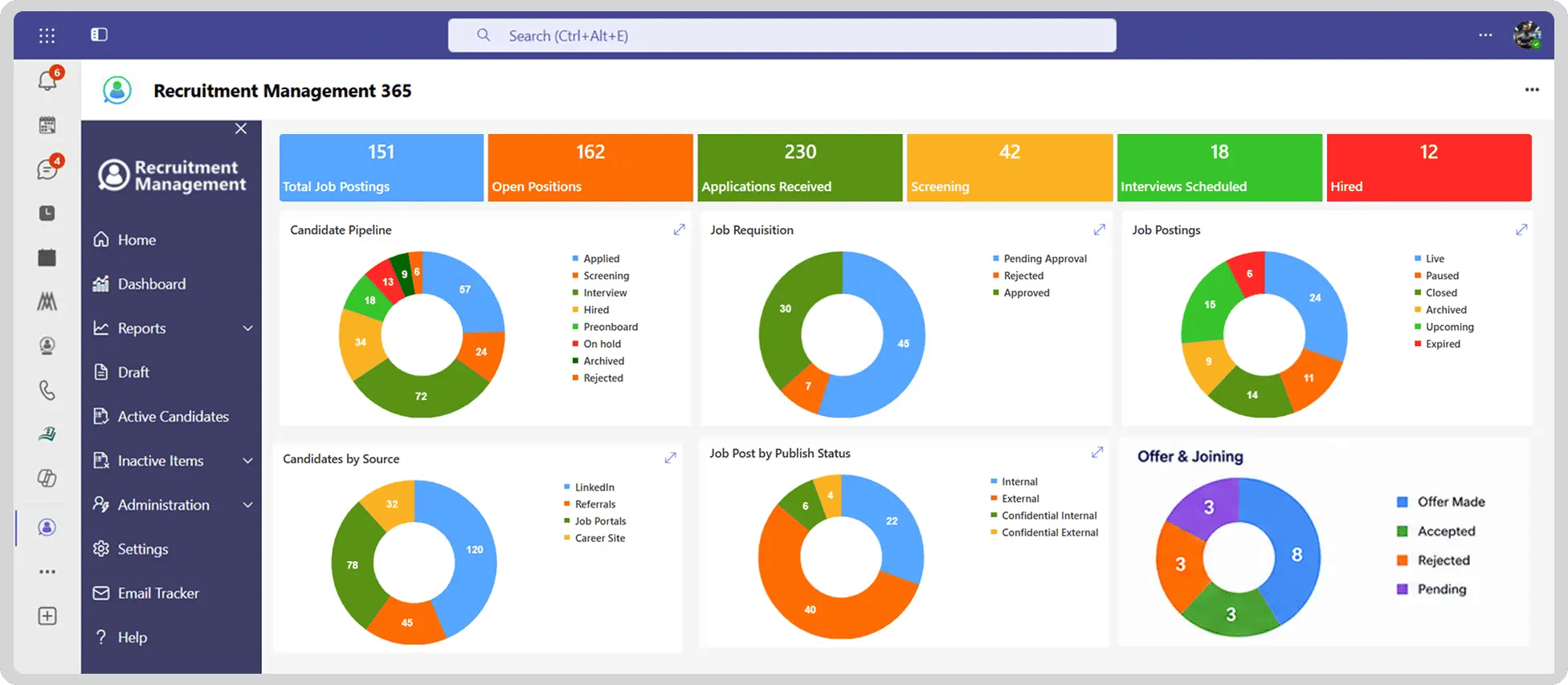
Reporting
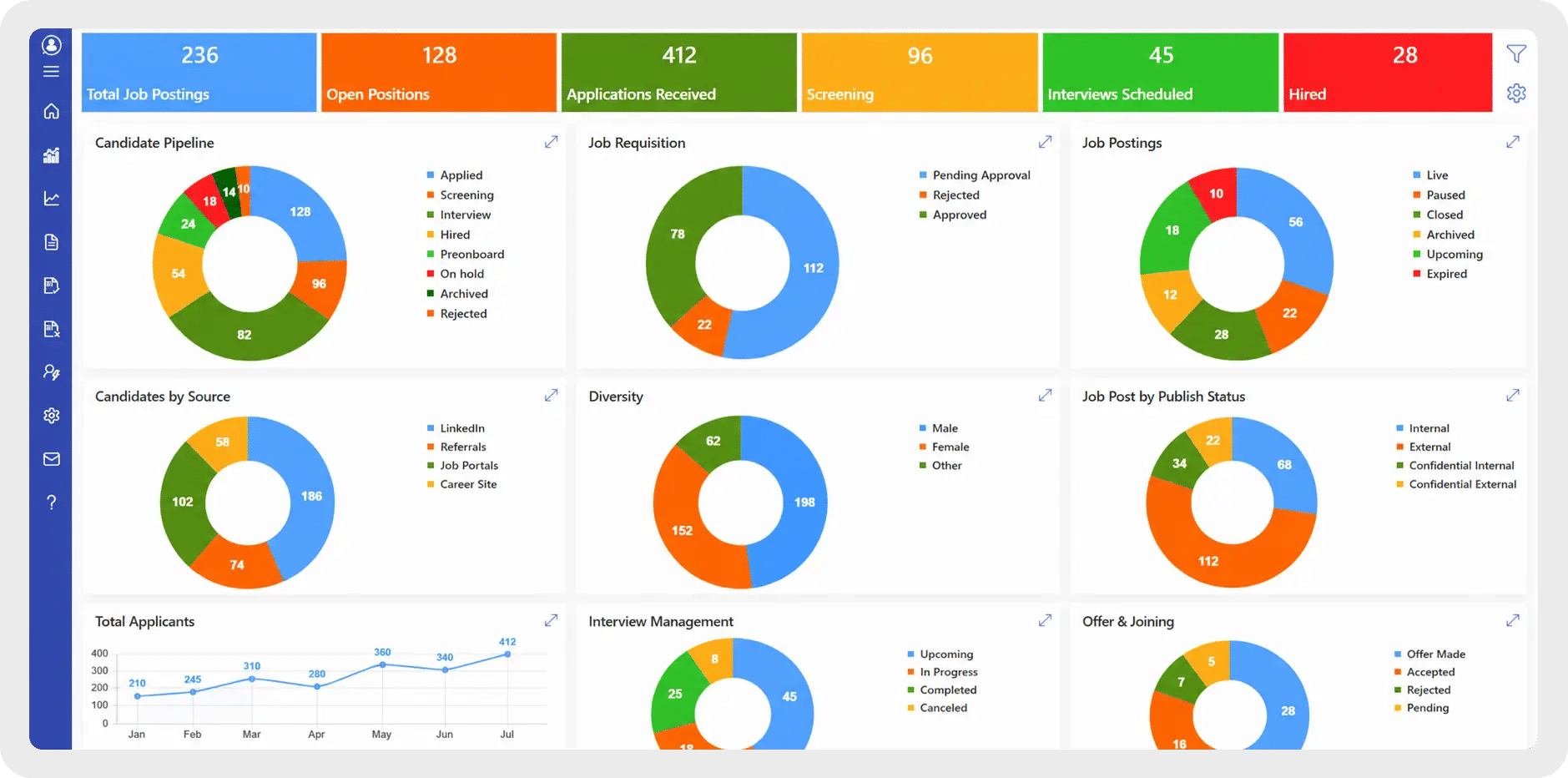
See where hiring stands, in real time.
- Recruitment dashboard with live visibility into every open role
- Track candidate source, time-to-hire and pipeline stage
- Data to support decisions on staffing and hiring process

RM365 Built for Every Team Across Your Healthcare Organization
Manage healthcare recruitment from a single platform while giving every department the tools, workflows, and visibility they need to hire qualified professionals faster.
Nursing & Clinical Recruitment
Hire nurses, physicians, technicians, and allied health professionals with custom hiring workflows. Track licenses, certifications, specialties, and shift preferences while moving critical roles through the hiring process faster.
Department Managers
Give department heads and clinical managers real-time visibility into their open positions, candidate progress, and interview feedback without relying on manual recruiter updates.
HR & Credential Management
Store licenses, certifications, compliance documents, and expiration dates in structured candidate profiles. Keep credential records organized and easy to verify throughout the hiring process.
Administrative & Support Staff Hiring
Recruit administrative, billing, reception, laboratory, facilities, and other non-clinical staff using the same recruitment platform with consistent workflows, centralized records, and complete hiring visibility.
See Recruitment Management 365 working inside your Microsoft 365
Connects with the Tools your Team Already Uses

Recruitment Management 365 integrates with the Microsoft tools your healthcare organization already relies on. Recruiters, HR teams, and department managers can collaborate, review candidates, schedule interviews, and manage hiring from a familiar Microsoft 365 workspace.
Use Microsoft Teams for collaboration, SharePoint for secure candidate records, Outlook for interview communication, Power Automate for recruitment automation, and Power BI for hiring analytics and reporting.
How RM365 Improves Recruitment Operations
Prioritize Critical Healthcare Vacancies
Identify and fast-track urgent positions such as ICU nurses, emergency physicians, surgeons, and other high-demand clinical roles. Ensure priority openings move through the hiring process without delays.
Centralized Candidate Profile Enrichment
Custom mandatory fields enrich candidate profiles by capturing license numbers, certifications, registration details, and expiry dates during the application process.
Simplified Interview Scheduling
Coordinate interviews with candidates, recruiters, and hiring managers using Microsoft Teams and Outlook. Schedule interviews around rotating shifts and busy clinical schedules with automated reminders.
Collaborative Hiring Across Departments
Give HR teams, nurse managers, physicians, and department heads real-time visibility into job openings, candidate progress, interview feedback and hiring decisions from a single platform.
Employee Referral Management
Encourage hospital staff to refer qualified healthcare professionals through a structured referral process. Track referrals, monitor candidate progress, and speed up hiring while improving the quality of new hires.
How Recruitment Management 365 Supports Healthcare Hiring
Post the Role
Share openings across job boards, your career page, and internal channels in one step.
Capture Applications
Candidates apply through a form with mandatory fields for licenses, certifications, and role-specific requirements.
Screen with AI
AI resume screening surfaces qualified candidates against your role criteria.
Schedule Interviews
Coordinate interviews through Microsoft Teams with hiring managers and department heads.
Track Progress
Recruiters and hiring managers see candidate status, notes, and next steps in one record.
Hire and Report
Completed hires stay on record for reporting, audits and process review.
Healthcare Recruitment Software Guide
This guide serves as a practical resource for hospitals, clinics, and healthcare organizations looking to implement, optimize, or standardize their recruitment process. It provides a structured framework for hiring qualified healthcare professionals, managing candidate credentials, automating recruitment workflows, and reducing time-to-hire through one centralized recruitment platform.
Follow this guide to:
- Establish a centralized recruitment system for managing clinical and non-clinical hiring from one platform.
- Standardize healthcare application forms with mandatory fields for licenses, certifications, registrations, specialties, and expiry dates.
- Prioritize critical healthcare vacancies so urgent clinical roles move through the hiring process faster than routine positions.
- Improve hiring collaboration by giving HR teams, department heads, and hiring managers real-time visibility into every candidate and hiring stage.
- Automate candidate communication by sending interview invitations, offer letters, and rejection emails using stage-based email templates.
- Route approvals through custom workflows so recruiters, hiring managers, and department heads can review and approve candidates without manual follow-ups.
- Use AI-powered resume screening to identify qualified healthcare professionals faster and reduce manual candidate reviews.
- Monitor recruitment performance with dashboards and reports to identify bottlenecks, improve recruiter productivity, and reduce time-to-hire.
Whether you’re implementing a healthcare recruitment system for the first time or improving an existing hiring process, this guide provides a practical roadmap to hire qualified healthcare professionals faster, maintain compliance, improve collaboration, and deliver a better hiring experience.
Why Healthcare Organizations Choose a Microsoft-Native Recruitment Platform
A simple comparison shows why healthcare providers choose Recruitment Management 365 over generic recruitment software and manual hiring methods.
Capability | Recruitment Management 365 | Generic Recruitment Software | Email / Spreadsheets |
Runs natively inside Microsoft Teams | ✓ | ✕ | ✕ |
Candidate data stored in your Microsoft 365 tenant | ✓ | Varies by vendor | ✕ |
Tracks licenses, certifications, and expiry dates | ✓ | Varies by plan | ✕ |
AI-powered resume screening | ✓ | Limited | ✕ |
Automated interview scheduling & email communication | ✓ | Varies by plan | Manual |
Custom approval workflows for hiring decisions | ✓ | Varies by plan | Manual |
Built-in Microsoft Copilot AI support | ✓ | Rare | ✕ |
Recruitment dashboards & hiring analytics | ✓ | Varies by plan | ✕ |
Healthcare Teams That Use Recruitment Management 365
Recruitment Management 365 supports every team involved in healthcare hiring by centralizing recruitment, automating workflows, and improving collaboration across departments. From HR to clinical leadership, every stakeholder has complete visibility into the hiring process.
Healthcare HR Teams
Manage job requisitions, candidate applications, interviews, and onboarding activities from one centralized recruitment platform while reducing manual administrative work.
Recruiters & Talent Acquisition Teams
Source candidates, screen resumes with AI, schedule interviews, communicate with applicants, and track every hiring stage from a single system.
Department Heads & Hiring Managers
Review candidate profiles, provide interview feedback, approve hiring decisions, and monitor recruitment progress without waiting for manual updates.
Clinical Leadership
Hire nurses, physicians, technicians, and allied healthcare professionals while tracking licenses, certifications, specialties, and compliance requirements throughout the recruitment process.
Compliance & Credentialing Teams
Maintain accurate records of professional licenses, certifications, registrations, and document expiry dates to support healthcare compliance and audit readiness.
Hospital Administration
Monitor recruitment performance, identify hiring bottlenecks, track time-to-hire, and improve workforce planning with real-time dashboards and recruitment analytics.
SharePoint Consultant, Raymond West
California
Finance Manager, Exeevo
New York
Sharepoint Developer, Recor Medical
Washington, US
Business Manager, Cerilon
Canada
Director of IT, JConnelly
New York
System Admin
Oregon, US
IT Manager, Pallas LLP
England, UK
IT Officer, HanmiGlobal Saudi
Saudi Arabia
ICT Manager, SMT Shipping
Europe
Barton Associates
Cofounder
Vice President of Operations
Head Of Information & Technology
Director of Infrastructure
Solutions Engineer
US
Director of Marketing
Chicago, US
Cloud Consultant
Netherland
Global Head, IT & Information Security
California
Educator, Department of Education
New York
IT Lead
Aberdeen, Scotland
System Administrator
San Antonio, Texas
HR Ops & Admin Manager
Boston
Partner & President
Puerto Rico
Program Manager
Adelaide, Australia
Learning & Development Manager
Florida, USA
IT Manager
Indiana
Digital Solutions Analyst
Montréal, Canada
Asset Manager
North Carolina
Administration
Dubai
IT Support Specialist
Virginia, USA
Supervisor
Mexico
IT Admin
United States
Our Clients
Clients Speak
Using Azure? now you can buy contract management software on Azure Marketplace or using your enterprise agreement
Get started with 14 days risk free trial.
No credit card details required.
Frequently Asked Questions
What is healthcare recruiting software?
Healthcare recruiting software helps hospitals, clinics, and medical facilities manage the full hiring process — from posting roles to verifying credentials — in one system.
Why do healthcare organizations need dedicated recruiting software?
Healthcare hiring involves strict licensing requirements and urgent staffing needs. Dedicated software helps track compliance and speed up time-to-hire for critical roles.
Can Recruitment Management 365 track licenses and certifications?
Yes. RM365 automates credential tracking, flags expiring licenses, and stores verification documents against each candidate record.
Does Recruitment Management 365 integrate with Microsoft Teams and Outlook?
Yes. Recruiters can manage applications, schedule interviews, and communicate with candidates directly through Teams and Outlook.
How does Recruitment Management 365 help with urgent hiring needs?
Priority routing, automated scheduling, and centralized pipelines help recruiters move qualified candidates through the process faster for time-sensitive clinical roles.
Can Recruitment Management 365 support multiple hospital locations or departments?
Yes. RM365 lets organizations manage hiring across multiple departments, facilities, or locations from a single platform.
Is candidate data secure in Recruitment Management 365?
RM365 is built on Microsoft 365 with SOC 2 and ISO 27001-aligned security standards, supporting HIPAA-conscious data handling for healthcare hiring records.
Try It Free, No Obligation










Schedule a free personalized 1:1 demo
By proceeding, you accept Cubic Logics’s terms and conditions and privacy policy





By proceeding, you accept Cubic Logics Terms and Conditions and Privacy Policy
Please provide your contact details, we will connect with you soon!
Please provide your contact details, we will connect with you soon!
By proceeding, you accept Cubic Logics Terms and Conditions and Privacy Policy
Schedule a free personalized 1:1 demo
By proceeding, you accept Cubic Logics’s terms and conditions and privacy policy