
How Search and Filtering Improve Employee Directory Usability in Employee Directory 365
Finding the right person quickly can save time and help teams work better together. For companies using Microsoft 365, an employee directory 365 is a tool that makes this easier. It’s more than just a list of names, it’s a smart system that connects employees fast. The secret to its success? Powerful search and filtering features. These tools help users find exactly who they need, when they need them, without frustration.
Search and filtering make employee directories faster and easier to use. Users can quickly find people by name, role, or department instead of scrolling through long lists.
Filters help narrow results based on specific needs, keeping the directory organized and saving time when looking for the right information.
This article explains how search and filtering make an employee directory so useful.
What is an Employee Directory?
An employee directory is a tool built for organizations to centralize employee information, like names, job titles, departments, and contact details, into one easy-to-use place. Many directories integrate with Microsoft tools like Teams, Outlook, and Azure Active Directory, ensuring that employee information stays fresh and correct.
Think of it like a digital phone book, but better. Instead of flipping through pages, you can search and filter to find people fast. Whether you’re in a small business or a big corporation with thousands of workers, an employee directory application makes finding the right person simple. But what really makes it shine are the search and filtering options, which we’ll explore next.
Why It Matters:
Time spent looking for people or information is time wasted. An employee directory app solves this by putting everything in one spot, ready to be searched or filtered.
Why Search Matters in Employee Directories
Imagine you need to find someone in your company, but all you know is they work in sales. Or maybe you remember part of their name, like “Jen,” but not the rest. In an old paper directory or a basic list, you’d be stuck scrolling forever. With an employee directory software, the search feature changes that. It lets you type a word or two and instantly find who you’re looking for.
How Search Works in Employee Directory 365:
- Simple Keyword Search: Type something like “sales,” “engineer,” or “John” into the search bar. The system shows you matching employees right away. For example, searching “marketing” pulls up everyone in the marketing department.
- Smart Suggestions: Many employee directory applications use artificial intelligence (AI) to guess what you’re looking for as you type. If you start with “Sa,” it might suggest “Sales” or names like “Sarah” or “Sam.” This saves time by cutting out extra steps.
- Detailed Results: Once you find someone, you can see their full profile, phone number, email, job title, and even who their boss is. You can also click to message them through Teams or send an email via Outlook, all from the same screen.
Why This Helps:
A study by McKinsey says employees spend about 20% of their week, almost a full day, looking for information. That’s a lot of wasted time! With an employee directory app’s search, you can cut that down and get back to work faster.
How Filtering Makes Things Even Better
- Department: Want only HR people? Filter by “HR” and see just that group.

- Location: If your company has offices across the US, you can filter by places like “Los Angeles” or “Remote Workers.”
- Skills: Need someone who knows Excel or speaks Spanish? Filter by skills to find experts fast.
- Availability: See who’s free to talk right now or who’s out of the office.
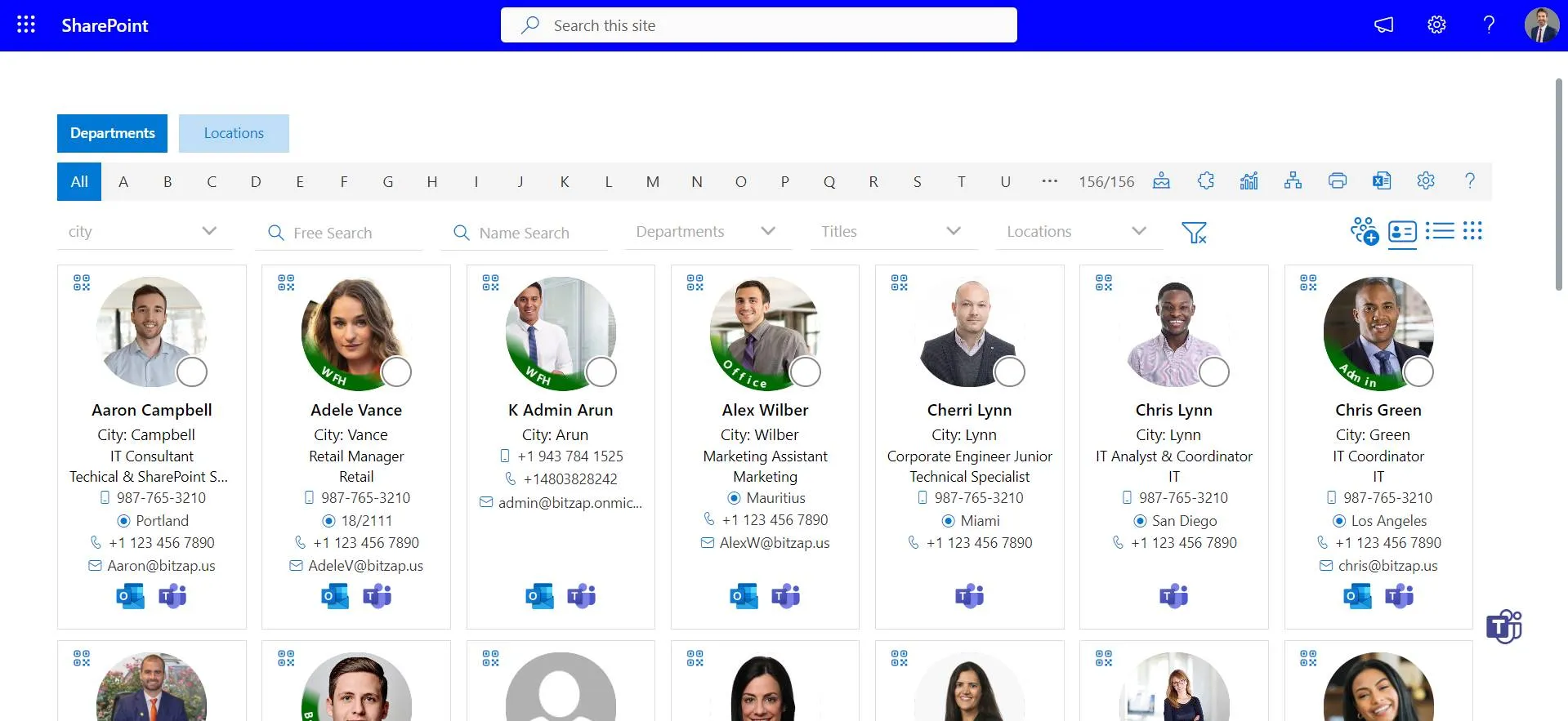
Combining Filters: The best part? You can mix filters together. For example, filter by “Sales” and “Texas” to find salespeople in Texas. Add “Available Now” to make sure they’re free to chat. This gives you exactly what you need without extra clutter.
Why This Helps: Big companies often have employees spread out across states or working from home. Filtering helps cut through the noise. Instead of seeing hundreds of names, you get a short list of the people who matter most for your task.
Features of Employee Directory 365
An employee directory software isn’t just any directory, it’s packed with features that make search and filtering extra powerful. These tools are built to work with Microsoft 365, so they feel familiar to those who already use Teams or Outlook.
Top Features:
- AI Search Power: The AI doesn’t just suggest names, it learns from what you search for. If you often look up IT people, it’ll start prioritizing those results for you.
- Custom Dashboards: Save your favorite filters, like “My Team” or “New York Staff”, so they’re ready to go next time.
- Microsoft Integration: Find someone, then click to call them on Teams or email them through Outlook.
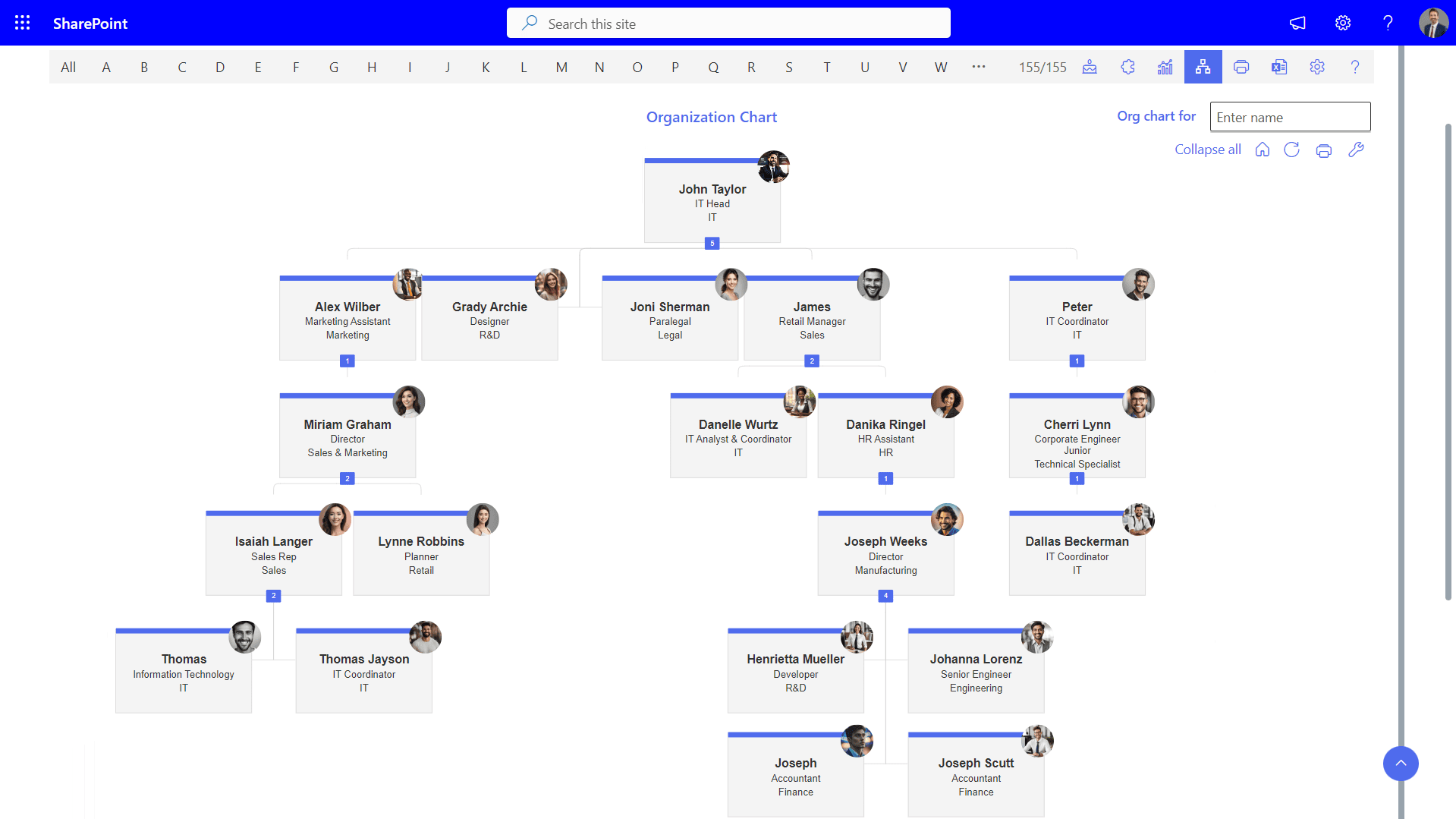
- Org Charts: See who reports to whom with interactive organization charts.

- Mobile Access: Use the directory on your phone or tablet, ideal for employees who travel or work remotely.
Benefits of Employee Directory
- Saves Time: A report by IDC says people spend 2.5 hours a day looking for info. Search and filtering cut that time way down.
- Boosts Teamwork: Helps teams stay connected across locations and departments.
- Optimizes Resources: Need a coder for a new app? Filter by “Skills: Programming” and find them fast.
- Supports Remote Work: Mobile access and location filters keep everyone linked, no matter where they are.
- Enhances Security: Many employee directory applications use Microsoft security to keep employee details protected.
Conclusion
Search and filtering aren’t just nice extras in an employee directory app, they’re what make it a must-have for every business. They turn a simple list into a smart tool that saves time, connects people, and helps companies run smoother. Whether you’re a small startup or a giant corporation, an employee directory 365 makes finding and working with your team easier than ever.
Frequently Asked Questions
What is search and filtering in an employee directory?
Search and filtering allow users to quickly find employees by using keywords (like name or role) and narrowing results based on criteria such as department or location.
How do search and filters improve employee directory usability?
They reduce the time spent finding information, make navigation easier, and help users quickly locate the right person without going through long lists.
What types of filters are commonly used in employee directories?
Common filters include:
- Department
- Job title
- Location
- Team or reporting manager
- Status (active/inactive)
Why is fast employee search important for organizations?
Fast search improves communication, saves time, and helps employees connect with the right people quickly, especially in large teams.
How can businesses improve their employee directory experience?
Businesses can improve usability by adding smart search, multiple filters, regular data updates, and a clean, easy-to-use interface.
_eH2jDg7dZ.png)







