
_aE0IuVLof.webp)
Quotation Management Software: Simplifying Your Business Quotes

No matter if your business handles subscriptions, invoicing, billing, or CPQ (Configure, Price, Quote) activities, using the right software can help you work faster, avoid errors, and manage customer offers more smoothly.
In this article, you will learn why manual quotation methods often create problems, what quotation management software actually does, the important features to consider, the benefits it brings to your business, and practical ways to get better ROI from it.
Quotation management software is not just for creating quotes. It helps businesses organize pricing, approval workflows, and customer communication from one platform.
Companies of any size can use it to keep sales processes structured, monitor quote performance, and speed up deal closures.
What is Quotation Management Software?
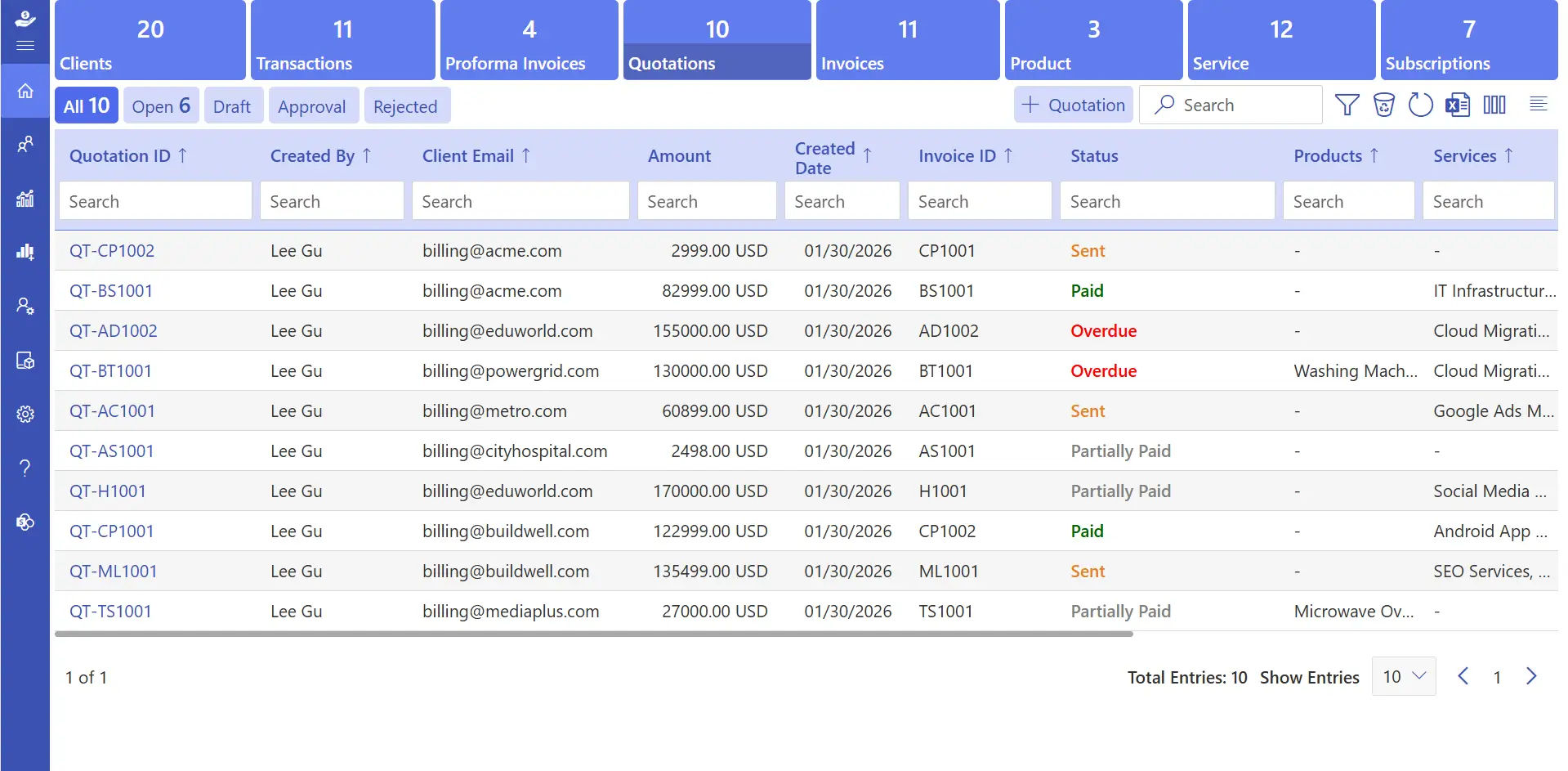
Quotation management software helps businesses create, manage, and send accurate quotes faster while reducing manual work and pricing errors.
Instead of relying on spreadsheets or outdated templates, modern solutions work alongside CPQ systems to streamline the entire quoting process in one platform.
With quotation management software, businesses can automate repetitive tasks, minimize pricing mistakes, and deliver a smoother and more professional experience to customers. It also helps sales teams manage approvals, track quotations, and respond to clients more efficiently.
Why Manual Quotes Fail?
Why Manual Quotes Fail? Many businesses still rely on manual methods to create and send quotations. They may use spreadsheets, Word documents, or email threads to calculate prices, apply discounts, and communicate with clients. While this approach might seem easy at first, it can lead to several challenges:
- Time-Consuming Work: Creating quotes manually takes a lot of time, especially when products, pricing, or discounts change often. Sales teams may spend hours updating details for every new quotation.
- Inconsistent Pricing and Details: When different employees create quotes separately, customers may receive different pricing, terms, or product information. This can create confusion and reduce trust in your business.
- Slow Response to Customers: Manual quotation processes usually delay responses to potential clients. In many cases, customers may choose competitors who can send accurate quotes faster.
- Difficulty Tracking Quotations: Managing quotations manually makes it harder to track which quotes are approved, pending, rejected, or expired. Important follow-ups can easily be missed, affecting sales opportunities.
Key Features of Quotation Management Software
According to the Aberdeen Group, businesses using CPQ software can shorten their sales cycle by 28% and create 49% more proposals per sales representative every month. Choosing the right quotation management software with useful features can improve productivity, accuracy, and customer experience.
1. Easy Quotation Creation
Quotation management software helps businesses create professional quotations quickly without depending on manual documents or spreadsheets. Users can add customer information, pricing, products, and terms in a simple format and send quotations faster to clients. It also helps sales teams save time and manage multiple quotations more efficiently.
2. CPQ (Configure, Price, Quote)
CPQ features help businesses configure products, apply pricing rules, and generate accurate quotations automatically. It reduces pricing errors and keeps all quotations consistent, especially for businesses with complex pricing models. This improves pricing accuracy and speeds up the sales process.
3. Invoice Approval Workflow
Invoices can be reviewed and approved internally before they are shared with customers. Managers or finance teams can verify pricing and details to maintain accuracy and avoid mistakes in final invoices. This approval process also improves internal control and financial transparency.
4. Custom Invoice Templates
Businesses can personalize quotation and invoice templates to match their branding. Users can add logos, change colours, adjust layouts, and include custom fields to create a more professional appearance. Branded documents also help businesses create a stronger impression on customers.
5. Customized Quotations
The software allows businesses to create quotations based on specific customer needs. Teams can include special pricing, discounts, terms, or additional details to provide more personalized offers. This flexibility helps businesses handle unique customer requirements more effectively.
6. Smart Tax Management
Quotation management software can automatically apply different tax rates based on products, services, or customer locations. This reduces manual calculations and helps businesses stay compliant with tax requirements. It also minimizes the chances of tax-related errors in quotations and invoices.
7. Multi-Currency Support
Businesses working with international customers can generate quotations and invoices in different currencies. The software can update exchange rates and display accurate totals, making global transactions easier to manage. This feature improves convenience for both businesses and international clients.
8. Advanced Reporting and Insights
Detailed reports help businesses track quotation performance, approvals, sales conversions, and revenue trends. These insights support better decision-making and help teams identify new growth opportunities. Businesses can also use reports to improve sales strategies and monitor overall performance more effectively.
Benefits of Quotation Management Software for Business
Quotation management software helps businesses improve speed, accuracy, and overall sales efficiency. It reduces manual work and makes the quotation process easier for both teams and customers. Below are some of the major benefits businesses can gain from using quotation management software.
1. Faster Customer Response
Quick responses can make a big difference when customers are comparing multiple vendors. Quotation management software helps businesses create and send quotations within minutes instead of hours. Faster communication keeps customers interested and improves the chances of closing deals successfully.
2. Better Pricing Accuracy
Manual calculations can lead to pricing mistakes, incorrect discounts, or tax errors. The software automatically calculates totals, taxes, and pricing rules to ensure every quotation is accurate. This helps businesses avoid confusion and build customer trust with transparent pricing.
3. Improved Team Collaboration
Sales, finance, and management teams often need to work together during the quotation process. Quotation management software keeps everyone connected on a single platform with updated information. Teams can review, edit, and approve quotations more efficiently without long email chains or confusion.
4. Stronger Revenue Forecasting
Every quotation contains useful business data that can support future planning. The software tracks quotations, approvals, and conversions to help businesses understand sales trends and expected revenue. These insights help companies plan inventory, manage resources, and set realistic business goals.
5. Professional Customer Experience
Well-designed quotations create a positive impression on customers. Businesses can send clear, branded, and professional-looking documents that are easy to understand. A smooth quotation experience improves customer confidence and supports stronger long-term business relationships.
6. Centralized Document Management
All quotations and invoices are stored securely in one location for easy access. Teams can quickly search past quotations, track customer history, and review previous transactions without wasting time. Centralized storage also simplifies reporting, audits, and compliance management.
7. Flexible Customization
Different customers may require different pricing, terms, or quotation formats. The software allows businesses to customize templates, add special conditions, and adjust pricing without creating documents from scratch every time. This flexibility helps businesses provide more personalized customer experiences.
8. Reduced Manual Workload
Handling quotations manually can consume a large amount of time and effort. Automation features such as tax calculation, subscription billing, currency conversion, and document generation reduce repetitive tasks for teams. Employees can then focus more on customer communication, sales growth, and business development.
Best Practices to Implement While Creating Quotations
- Clearly mention product or service names, descriptions, specifications, and scope of work to avoid confusion and improve communication with clients.
- Provide accurate pricing details, including discounts, taxes, and additional charges, to maintain transparency and prevent pricing misunderstandings.
- Add simple and clear terms and conditions such as payment terms, delivery timelines, and quotation validity to set proper expectations.
- Use professional and branded quotation templates with your company logo, consistent formatting, and structured layouts to create a strong impression.
- Mention all taxes, shipping fees, and extra charges separately so clients can easily understand the total quotation amount.
- Personalize quotations based on customer requirements by including custom pricing, special offers, or tailored terms to improve customer experience.
- Review and approve quotations carefully before sending to ensure pricing, calculations, and product details are correct and error-free.
- Keep quotations simple, organized, and easy to read so clients can quickly understand the offer and make faster decisions.
How Revenue 365 Helps Quotation Handling?
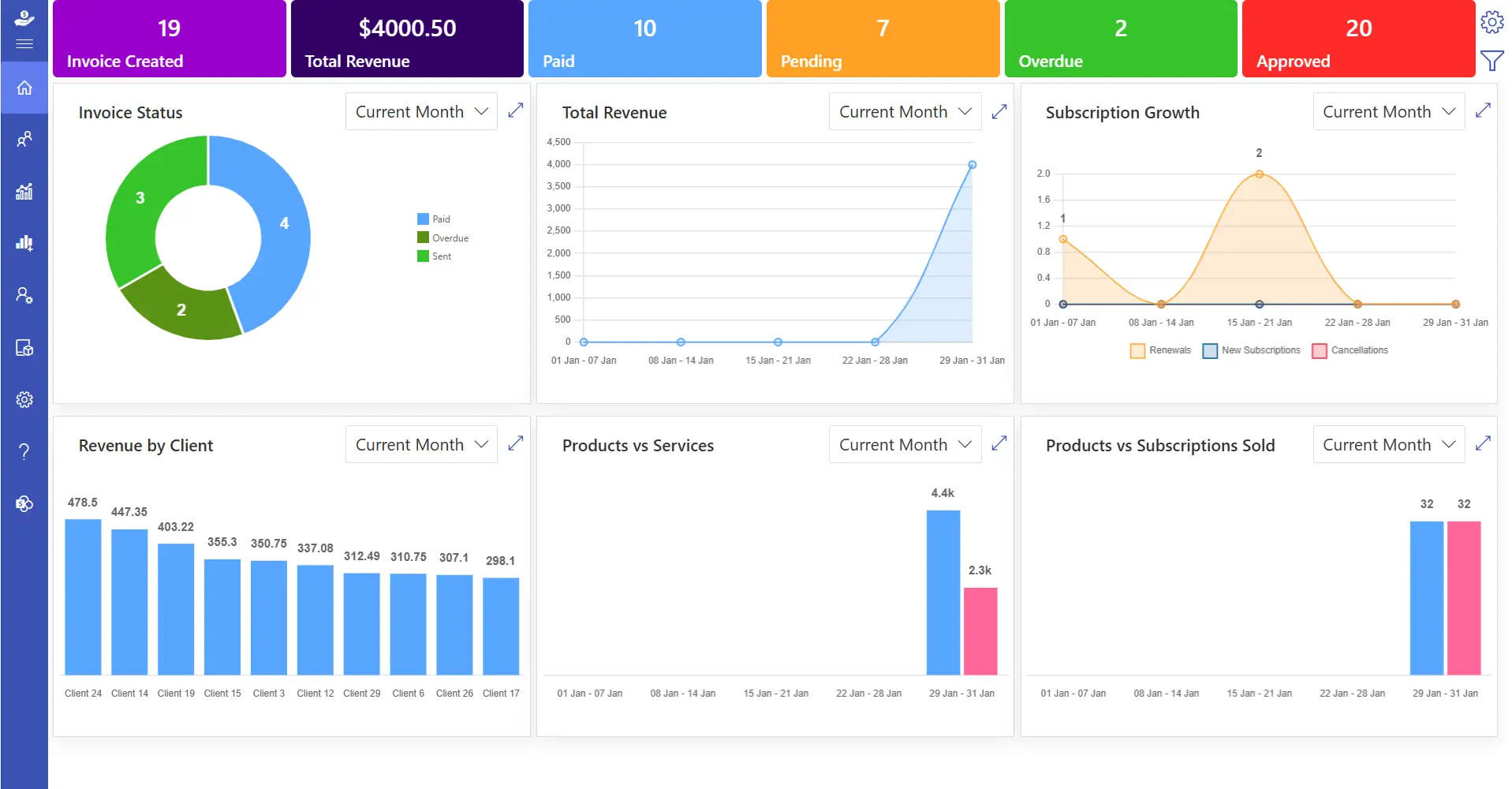
Revenue 365 is built to make quotation management faster, simpler, and more organized for businesses. Developed within the Microsoft ecosystem, the platform offers enterprise-level security to keep business information and customer data protected at every stage.
It connects seamlessly with Microsoft 365 applications such as Outlook, Microsoft Teams, SharePoint, and Power BI, helping teams work within a fully connected environment.
The platform also automates repetitive quotation tasks, reducing manual effort and improving operational efficiency. Businesses can quickly generate customized quotations, update pricing, modify terms, and personalize templates based on client requirements without slowing down the sales process.
Conclusion
Modern businesses need a smarter way to manage quotations, pricing, approvals, and customer communication. Quotation management software helps streamline these processes, reduce errors, and improve overall sales efficiency.
Revenue 365 helps businesses simplify quotation workflows with automation, secure integrations, and flexible customization features designed for growing teams.
Frequently Asked Questions
How do I create a customized quotation using quotation management software?
Select the client, add products or services, adjust pricing and terms, and send a personalized quotation based on customer requirements.
How can I add my company logo and brand colours to quotations?
Upload your company logo and choose brand colours in the template settings. The system applies them automatically to quotations.
Can I upgrade or downgrade my subscription plan anytime?
Yes, you can change your subscription plan anytime based on your business needs and required features.
Is it possible to create different quotations for different clients?
Yes, the software allows you to customize pricing, terms, discounts, and details for each client individually.
Does quotation management software support multiple currencies?
Yes, many quotation management platforms support multi-currency transactions. Businesses can create quotations in different currencies for international customers without manually handling exchange rate calculations.


_JiluXJRGNl.svg)









