

_eH2jDg7dZ.png)
Your IT team receives hundreds of support requests every week, password resets, broken devices, access issues, software bugs. Without a system to capture, route, and track every one of those requests, things fall through the cracks. Employees get frustrated. IT agents get overwhelmed. And your business slows down.
For businesses, understanding how to manage and calculate depreciation for IT assets is essential for accurate financial planning, tax savings, and efficient asset management. In this guide, we’ll cover everything you need to know about IT asset depreciation, including the types of assets, depreciation methods, tax implications, and best practices.
This guide covers everything you need to know about SharePoint IT ticketing systems: what they are, how they work, what features to look for, and how they connect to a bigger IT service management (ITSM) strategy.
What is an IT Ticketing System?
An IT ticketing system is a software tool used to track, manage, and resolve IT service requests, incidents, events, and alerts that require action from an IT team. When an employee submits a support request, whether it’s a password reset, a broken laptop, or a connectivity issue, the system captures the details, creates a unique digital record called a “ticket,” and tracks its progress from submission to resolution.
Think of it as the command center for all IT support operations. Instead of employees emailing IT staff directly, calling helpdesks, or walking up to someone’s desk, all requests flow through one organized system where nothing gets lost.
Simple Definition
An IT ticketing system is a centralized platform that converts every IT support request into a structured, trackable, and actionable record, so your IT team can work efficiently and employees get the help they need, fast.
At its core, a ticketing system exists to answer three questions for every IT issue: Who reported it? What is the problem? And has it been resolved?
What is an IT Ticket?
A ticket is a digital record of an IT issue or service request. Each ticket is assigned a unique ID so it can be tracked, updated, and referenced at any point. Think of it as a detailed to-do card for your IT team, with all the context they need to resolve an issue efficiently.
What’s Typically Inside an IT Ticket:
- Who reported the issue – name, department, contact details
- What the problem is – detailed description of the issue
- When it started timestamp of the issue and submission
- Priority level – low, medium, high, or critical
- Category/type – hardware, software, network, access, etc.
- Any troubleshooting steps already attempted
- Communication thread – all notes, replies, and updates
- Current status – open, in progress, pending, resolved, closed
- Assigned agent – who on the IT team owns the ticket
Tickets can be submitted by employees directly, or they can be automatically generated by system monitoring tools when a specific incident or threshold is triggered. Once a ticket is created, it moves through a structured lifecycle managed by the ticketing system.
How Does an IT Ticketing System Work? (Step-by-Step)
To understand how a ticketing system works, let’s follow a real-world example. An employee named Sarah can’t access her CRM software after a system update. Here’s what happens:
Step 1: Ticket Creation
Sarah visits the IT self-service portal and fills out a request form. Alternatively, she sends an email or opens a chat, and the system automatically creates a ticket from any of these channels. The ticket captures all the details she provides.
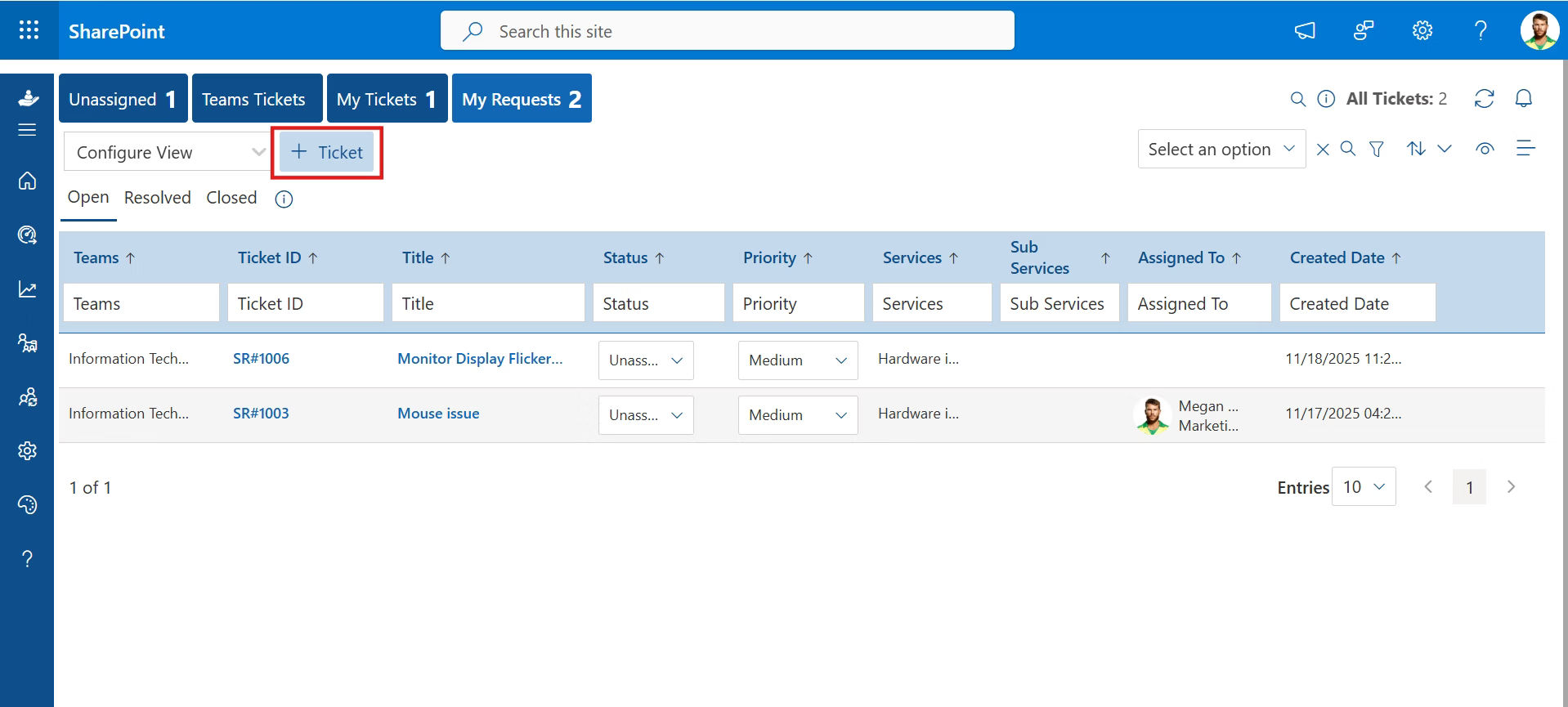
Step 2: Categorization & Prioritization
The system immediately tags the ticket, in this case, “Software Issue – CRM Access”, and assigns a priority level based on pre-defined rules. A CRM access issue affecting a sales rep might be flagged as high priority.
Step 3: Assignment & Routing
The ticket is automatically routed to the right agent or team. If the primary specialist is unavailable or already overloaded, the system reassigns based on workload balancing rules.
Step 4: Real-Time Tracking & Notification
Sarah receives an automated confirmation email with her ticket ID and a link to track its status. She can check progress at any time without needing to follow up via phone or email.
Step 5: Investigation & Diagnosis
The assigned IT agent reviews the ticket, investigates the issue, and may communicate with Sarah through the ticketing system, all interactions are logged in the ticket thread for full context.
Step 6: Resolution & Closure
The agent resolves the issue, updates the ticket with what was done, and marks it as resolved. Sarah receives an automatic notification. She may be asked to confirm the issue is fixed before the ticket is formally closed.
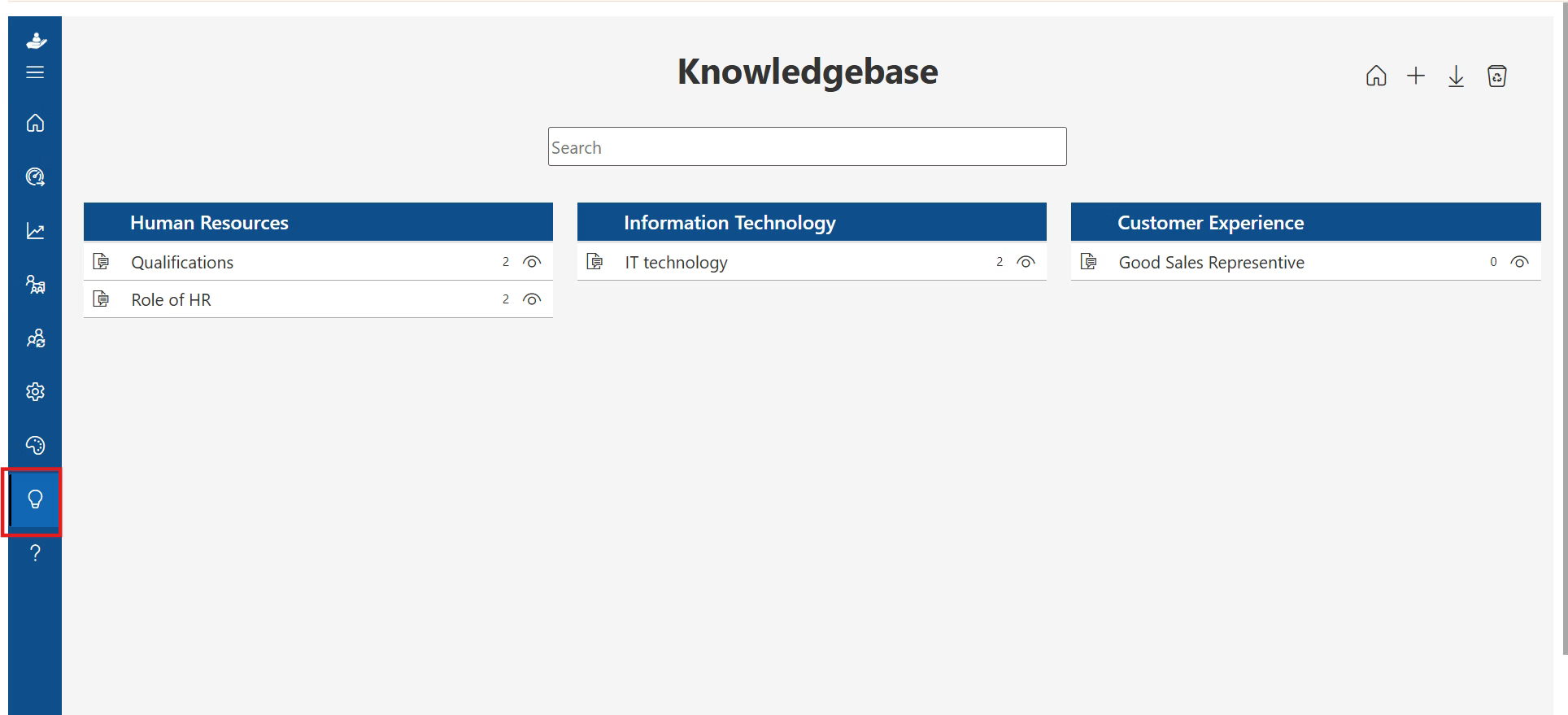
Step 7: Knowledge Base Update
The solution is documented and added to the knowledge base. The next time a CRM access issue occurs, the agent (or even Sarah herself) can find the answer without opening a new ticket.
Types of IT Tickets You Should Know
Not all IT tickets are the same. Properly categorizing tickets is essential for efficient triage, routing, and resolution. There are four primary ticket types:
Ticket Type | Definition | Example |
Incident Ticket | Unexpected disruptions or failures in IT services | System outage, email not working, printer offline |
Service Request Ticket | Routine, pre-approved requests for IT services or resources | New laptop setup, software installation, password reset |
Problem Ticket | Identifying and fixing the root cause of recurring incidents | Multiple users reporting the same VPN crash repeatedly |
Change Request Ticket | Formal requests to modify IT systems or infrastructure | Upgrade server software, deploy new security patch |
Understanding ticket types helps IT teams allocate resources correctly, set the right SLAs, and avoid treating a systemic problem as a one-off incident.
Why Do Organizations Need an IT Ticketing System?
As organizations grow, more employees, more devices, more SaaS tools, the informal ways of handling IT support (direct emails) completely break down. Here’s why a ticketing system is essential:
Prevent Issues from Falling Through the Cracks
Without a centralized system, IT requests can get lost in inboxes, forgotten after a hallway conversation, or simply never followed up on. A ticketing system ensures every request is captured, assigned, and tracked to completion.
Eliminate Unstructured Support Requests
Ad-hoc IT requests interrupt agents constantly and make it impossible to prioritize. A ticketing system creates one structured channel for all requests, protecting your team’s focus while still giving employees a clear path to get help.
Demonstrate IT Value with Hard Data
Without metrics, it’s difficult to prove the IT team’s contribution to the organization. A ticketing system provides cold, hard numbers: how many tickets resolved, average resolution time, SLA compliance rate, and more.
Enable Smarter Resource Planning
When you can see which issues consume the most IT time, you can make informed decisions about hiring, training, and technology investments. If 40% of tickets are related to one particular software, it might be time to invest in better tooling or training.
Improve Team Accountability & Collaboration
With clear ticket ownership, every issue has a named owner. IT agents can collaborate internally on complex tickets, escalate when needed, and see each other’s workloads, preventing both gaps and duplication.
Build Institutional Knowledge Over Time
Every resolved ticket is a lesson. Over time, documented resolutions build a searchable knowledge base that helps new team members onboard faster, enables self-service for employees, and reduces repeat ticket volume.
Ensure Business Continuity
Unresolved IT issues mean downtime. Downtime means lost productivity and revenue. A ticketing system helps minimize the time from issue detection to resolution, keeping your business running smoothly.
Key Components of an IT Ticketing System
An effective IT ticketing system is made up of several interconnected components that work together to manage the full lifecycle of a support request:
Ticket Submission Portal
The front door for all requests. Employees can submit tickets via web portal, email, mobile app, chat platforms like email, web forms, or integrated apps like Microsoft Teams. Multi-channel submission ensures no one is left out.
Ticket Management
The core of the system, handles categorization, prioritization, assignment, and status tracking. This is where rules and workflows are defined to ensure the right ticket reaches the right person with the right priority.
Automation Rules
Automation handles repetitive work: routing tickets, sending notifications, escalating overdue tickets, triggering status updates, and even resolving common issues like password resets without human intervention.
Knowledge Base
A searchable repository of articles, FAQs, how-to guides, and troubleshooting steps. Empowers employees to self-serve for common issues and gives agents instant access to proven solutions.
Agent & User Dashboards
IT agents manage their ticket queue, update statuses, communicate with users, and collaborate with colleagues through an agent dashboard. Users have their own view to submit requests and track progress in real time.
Reporting & Analytics
Data-driven insights into ticket volumes, resolution times, SLA compliance, agent performance, and recurring issue trends. This information is essential for continuous improvement.
Integrations
A solid ticketing system integrates with the tools your organization already uses, CRM, ERP, Active Directory, monitoring tools, HR software, and communication platforms, creating a seamless information flow.
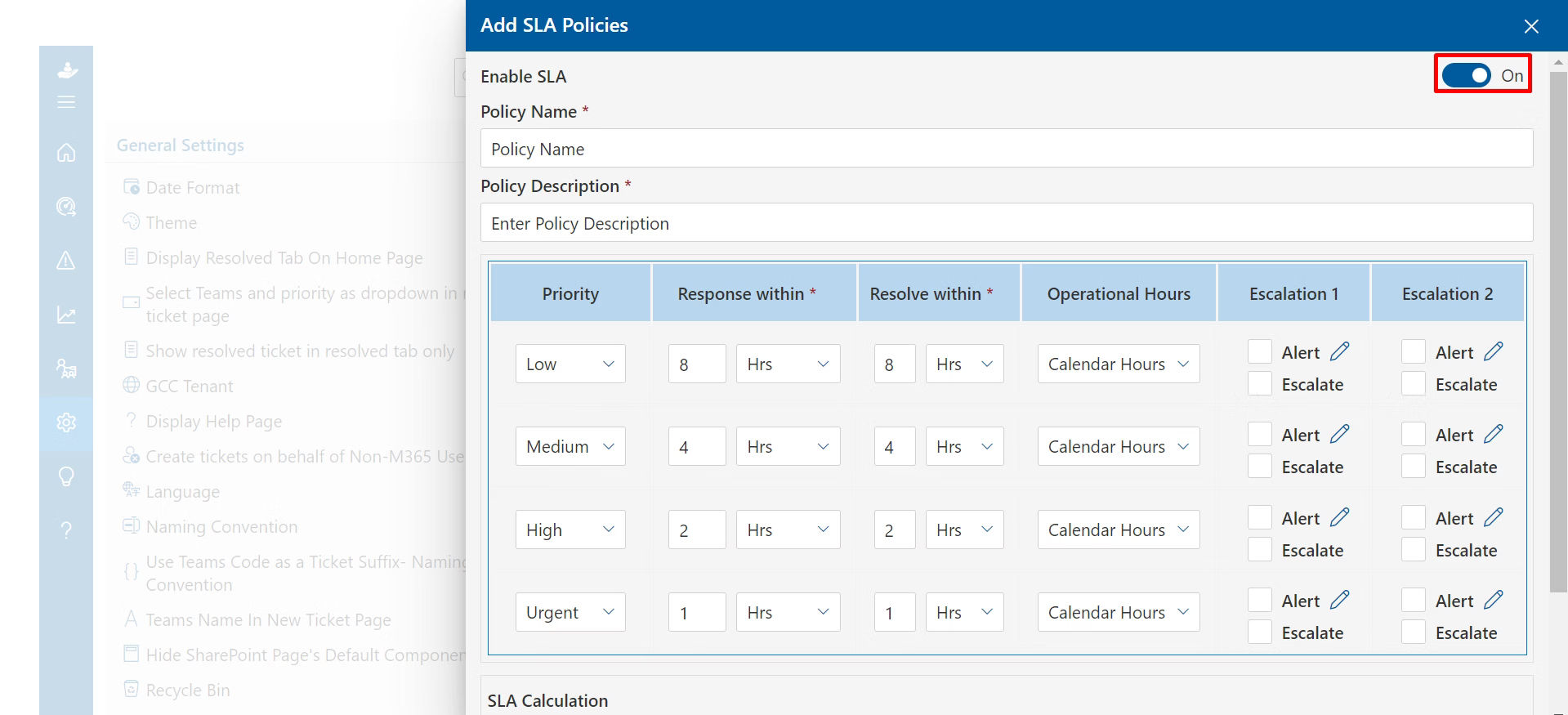
SLA Management
Service Level Agreement tracking ensures IT teams respond and resolve tickets within defined timeframes. The system alerts agents when SLAs are at risk and escalates automatically if thresholds are breached.
Top Benefits of Using an IT Ticketing System
The ROI of a well-implemented IT ticketing system shows up in multiple ways across the organization:
- Centralization: All IT tickets in one place, no requests fall through the cracks
- Real-time transparency: Progress is visible to both employees and IT agents at all times
- Efficiency gains: AI and automation handle routine tasks, freeing agents for complex work
- Employee satisfaction: Faster resolution times and proactive communication increase workforce satisfaction
- Data-driven decisions: Ticket volume, resolution rates, and trends are always measurable
- Accountability: SLA rules enforce accountability across the IT team
- Institutional knowledge: Resolved tickets become reusable knowledge assets
- Cost savings: Faster issue resolution means less downtime and lower productivity loss
Industry Insight
The average cost of handling an IT ticket manually is $22. For complex, multi-touch tickets, that figure rises substantially. A well-configured IT ticketing system with automation and self-service can dramatically reduce this cost per ticket.
IT Ticketing System vs. IT Help Desk Software
These two terms are often used interchangeably, but they’re not identical. Understanding the difference helps you choose the right solution for your team’s needs.
IT Ticketing System | IT Help Desk Software |
Focused on logging, tracking, and resolving individual IT issues | A broader suite covering all aspects of IT support delivery |
Captures request details, assigns ownership, and tracks status | Includes ticketing PLUS knowledge base, automation, analytics, and self-service |
Automates routing and escalation of tickets | Automates multi-step workflows across teams and departments |
Tracks ticket history for reference and auditing | Provides performance insights and strategic service improvements |
Best for structured request management | Best for end-to-end IT service delivery at scale |
In short: every IT help desk software includes a ticketing system, but a ticketing system alone does not make a full help desk. As your IT operation matures, you’ll likely want to evolve from a pure ticketing tool to a more comprehensive help desk or ITSM platform.
IT Ticketing System vs. ITSM
IT Service Management (ITSM) is the broader framework within which IT ticketing lives. While a ticketing system focuses on managing individual user requests, ITSM takes a strategic, organization-wide approach to planning, delivering, and continually improving all IT services.
IT Ticketing System | ITSM (IT Service Management) |
Handles individual support requests and incidents | Manages the full IT service lifecycle from strategy to operation |
Reactive, responds to issues as they’re reported | Proactive, designs services to prevent issues before they occur |
Focused on resolution speed and ticket closure | Focused on aligning IT with broader business objectives |
Used primarily by IT agents | Spans IT teams, business units, and executive stakeholders |
A tool or software | A framework, methodology, and culture (often aligned with ITIL) |
ITSM Processes That Work Alongside Ticketing:
- Incident Management: Standardized process for restoring service after disruptions
- Problem Management: Identifying and fixing root causes of recurring incidents
- Change Management: Controlling and safely implementing IT changes to minimize risk
- Asset Management: Tracking and optimizing hardware and software across the org
- Knowledge Management: Building and maintaining a repository of self-service solutions
Think of it this way: IT ticketing is what your team does today to handle requests. ITSM is the strategy that makes IT a driver of business value, not just a support function.
The Role of AI & Automation in Modern IT Ticketing
Artificial intelligence and automation are fundamentally changing what IT ticketing systems can do, and the gap between AI-powered tools and basic ticketing software is widening fast. Here’s where AI is making the biggest impact:
Intelligent Ticket Classification
AI uses natural language processing (NLP) to automatically read incoming tickets and classify them by category, priority, and type, without human input. This eliminates misrouted tickets and significantly speeds up the initial triage process.
AI-Powered Chatbots & Virtual Agents
Chatbots can handle common IT requests, password resets, account unlocks, software access, entirely without human involvement. They’re available 24/7 and can resolve tier-1 issues in seconds, dramatically reducing ticket volume.
Predictive Analytics
Machine learning models analyze historical ticket data to identify patterns and predict future issues before they become widespread. IT teams can proactively address vulnerabilities rather than reacting after employees are impacted.
Smart Routing & Workload Balancing
AI considers agent expertise, current workload, ticket complexity, and historical resolution patterns to route tickets to the best-available agent, not just the next available one. This improves both resolution speed and quality.
Automated Escalation & SLA Management
The system monitors ticket age and SLA timelines, automatically escalating tickets that are at risk and notifying supervisors, eliminating the need for manual SLA tracking.
AI-Assisted Resolution Suggestions
When an agent opens a ticket, AI surfaces similar resolved tickets and relevant knowledge base articles, giving agents a head start on the solution without requiring manual search.
Looking Ahead
AI in IT ticketing is not about replacing IT agents, it’s about freeing them from repetitive tier–1 work so they can focus on complex problems, strategic projects, and innovation that genuinely benefits the business.
Key Features to Look For When Choosing a System
When evaluating IT ticketing systems, prioritize features that will grow with your team and genuinely improve both the IT agent experience and the employee experience:
Must-Have Features:
- Multi-channel ticket submission (email, web forms, or integrated apps like Microsoft Teams).
- Automated ticket routing and assignment rules
- SLA management with breach alerts and escalation rules
- Self-service knowledge base and employee portal
- Real-time ticket status visibility for end users
- Collaboration tools: internal notes, @mentions, ticket sharing
- Reporting dashboards with key metrics (resolution time, CSAT, ticket volume)
- Integration with ITSM processes (incident, change, problem, asset management)
- Role-based access control and data security
Advanced Features Worth Evaluating:
- AI-powered ticket classification and routing
- Chatbots and virtual agents for self-service
- Predictive analytics and trend detection
- Custom workflow automation builder
- Asset management integration
- Mobile app for agents and users
- Gamification and agent performance tools
IT Ticketing Best Practices High-Performing Teams Follow
Having the right system is just the start. How you configure and operate it determines whether it actually improves IT performance. Here’s what top-performing IT teams do differently:
Define Clear SLA Tiers by Priority
Not every ticket deserves the same response time. Set defined SLA targets by priority level (e.g., Critical: 1hr response / 4hr resolution; High: 4hr / 8hr; Medium: 8hr / 24hr; Low: 24hr / 72hr) and configure the system to enforce them automatically.
Invest in Your Knowledge Base
A knowledge base only works if it’s actively maintained. Assign ownership of knowledge base articles, review them quarterly, and make it a habit to document solutions before closing tickets. The goal: reduce repeat ticket volume through self-service.
Design Smart Ticket Templates
Well-designed submission forms capture all the information an agent needs upfront, eliminating the back-and-forth that slows resolution. Tailor forms by ticket category so you’re always collecting the right details.
Standardize Ticket Categories and Tags
Consistent categorization makes reporting meaningful. If every agent categorizes differently, your analytics become useless. Define a standard taxonomy and enforce it through the system.
Review Metrics Regularly
Set a recurring cadence, weekly or monthly. to review key metrics with your IT team. Look for trends: Are resolution times increasing? Is one category generating disproportionate ticket volume? Use data to drive decisions.
Communicate Proactively with Users
Don’t wait for employees to chase updates. Configure automatic status notifications at key points in the ticket lifecycle: acknowledgment, assignment, update, and resolution. Proactive communication dramatically improves perceived service quality.
Common IT Ticketing Mistakes to Avoid
Even with a great system in place, poor practices can undermine the results. Here are the mistakes that consistently hold IT teams back:
- No prioritization framework: Treating all tickets equally means urgent issues wait unnecessarily and less critical tickets consume disproportionate resources.
- Ignoring SLA breaches: If breaches go unreviewed and unaddressed, they become normalized, and employee trust erodes.
- Inconsistent categorization: Agents categorizing tickets differently makes reporting unreliable and root-cause analysis impossible.
- A neglected knowledge base: A stale or incomplete knowledge base doesn’t reduce ticket volume, it just becomes a dead end that frustrates employees.
- No feedback loop: Not collecting user satisfaction (CSAT) scores means you’re operating blind to how employees actually perceive IT support quality.
- Over-reliance on email: Using email as the primary ticketing channel creates missed requests, lost context, and no audit trail, defeating the purpose of having a system.
- Failing to close old tickets: An open ticket backlog distorts your metrics and masks unresolved issues. Regular backlog reviews are essential.
How IT Ticketing Supports Digital Transformation
Digital transformation isn’t just about new technology, it’s about using technology to fundamentally improve how an organization operates. IT ticketing is often underestimated as a lever for transformation, but it plays a central role:
It Automates the Foundation
By digitizing and automating the management of IT requests, ticketing eliminates manual, paper-based, and email-based processes. This frees IT staff to focus on innovation rather than administration.
It Generates Strategic Data
Ticketing systems produce rich data about IT operations, what’s breaking, how often, how long it takes to fix, and what it costs. This intelligence informs strategic investment decisions and demonstrates the business value of IT.
It Scales with Growth
As organizations grow, IT complexity grows exponentially. A properly implemented ticketing system scales without requiring proportional headcount growth, because automation handles volume that would otherwise require more staff.
It Enables Remote & Hybrid Work
The shift to remote and hybrid work models created new IT challenges at scale. A cloud-based ticketing system ensures employees can get IT support from anywhere, and that IT agents can collaborate and resolve issues without being co-located.
It Connects IT to Business Goals
When IT ticketing is integrated within a broader ITSM framework, IT teams can align their service delivery with organizational priorities, ensuring technology supports business outcomes, not just technical maintenance.
Conclusion
An IT ticketing system is no longer a nice-to-have; it’s a foundational piece of infrastructure for any organization that depends on technology to operate (which is virtually every organization today). The right system gives your IT team clarity, structure, and data. Helpdesk 365 provides a seamless solution, giving employees confidence that their issues will be handled promptly and efficiently. It also gives leadership visibility into IT performance, while offering the flexibility to scale and grow with your organization’s needs.
Join Our Creative Community
Frequently Asked Questions
What is the difference between an IT ticketing system and a help desk?
A ticketing system is the core tool for logging and tracking individual IT requests. A help desk is a broader concept that includes people, processes, and tools, with the ticketing system as one key component. Help desk software typically adds features like knowledge base management, advanced automation, SLA tracking, and multi–channel support on top of basic ticketing functionality.
Is an IT ticketing system only for large companies?
Not at all. Even small IT teams benefit from a structured ticketing system. In fact, small teams often gain the most, because they can’t afford to have any request fall through the cracks or spend time on manual triage. Many modern platforms offer affordable plans scaled specifically for small and mid–sized businesses.
How much does an IT ticketing system cost?
Pricing varies widely. Entry-level tools start around $15–$20 per agent per month. Mid-tier platforms with full ITSM capabilities typically range from $40–$100 per agent per month. Enterprise solutions can go significantly higher. Most vendors offer free trials, so you can evaluate before committing.
Can IT ticketing systems integrate with Slack or Microsoft Teams?
Yes. Most modern IT ticketing platforms integrate natively with Slack, Microsoft Teams, and other collaboration tools. Employees can submit tickets directly from these platforms, and agents can receive notifications and update ticket statuses without leaving their primary workspace.
What is an SLA in the context of IT ticketing?
An SLA (Service Level Agreement) defines the expected response and resolution times for IT tickets based on priority. For example, a critical ticket might require a response within 1 hour and resolution within 4 hours. The ticketing system tracks these timelines and alerts agents or escalates automatically when an SLA is at risk.
What is the difference between an incident and a service request?
An incident is an unplanned disruption to an IT service, something broke that was working before. A service request is a formal, pre-approved request for something new, like access to software or a hardware upgrade. They follow different workflows, have different SLA expectations, and are handled differently within a ticketing system.
What does ITSM stand for and how does it relate to ticketing?
ITSM stands for IT Service Management. It’s the framework of policies, processes, and tools used to design, deliver, manage, and improve IT services. IT ticketing is one functional component of ITSM handling the day-to-day intake and resolution of IT requests. ITSM also encompasses problem management, change management, asset management, and more.


_JiluXJRGNl.svg)























