
_eH2jDg7dZ.png)
IT teams must manage a flood of requests efficiently. An internal IT ticketing system streamlines support, ensuring that employees receive timely help while IT departments maintain order and productivity. However, simply having an internal IT ticket system isn’t enough, it must be optimized for effectiveness.
To optimize your IT ticketing system, automate ticket triaging and routing to prioritize urgent issues. Integrate knowledge bases and communication tools to speed up resolutions and improve efficiency.
Streamline workflows by using predefined responses for common issues, reducing repetitive tasks. Ensure the system is user-friendly and continuously gather feedback to keep improving its performance.
Implementing best practices in an internal IT ticketing system can significantly improve support efficiency and service quality. Studies show that 34% of support teams report increasing ticket volumes, with organizations handling an average of over 10,000 tickets per month, making structured ticket management essential for maintaining effective IT support. Proper ticket categorization, prioritization, and tracking help IT teams respond faster and improve resolution rates.
Below, we explore the best practices for running a smooth internal ticketing system that boosts IT efficiency, enhances employee satisfaction, and reduces downtime.
Understanding the Importance of an Internal IT Ticketing System
An internal IT ticketing system serves as the backbone of IT support operations. It ensures that issues are documented, tracked, and resolved in a structured manner. Without a well-functioning internal ticketing system, organizations face inefficiencies, delayed responses, and increased downtime, all of which hinder productivity.
The key benefits of an optimized internal IT ticket system include:
- Streamlined Issue Resolution: IT teams can quickly categorize and prioritize tickets, reducing resolution time.
- Data-Driven Decision Making: Ticketing data helps IT managers analyze trends and allocate resources effectively.
- Improved Employee Experience: Employees receive timely support, minimizing frustration and disruption.
- Enhanced IT Team Productivity: Automation reduces manual tasks, allowing IT staff to focus on complex problems.
With these advantages in mind, let’s explore the best practices for ensuring a highly effective internal IT ticketing system.
Best Practices for ensuring a highly effective internal IT ticketing system
A highly effective internal IT ticketing system depends on clear processes and organized ticket management. When requests are properly categorized, prioritized, and assigned, IT teams can respond faster and maintain consistent support for employees.
Choose the Right Internal IT Ticketing System
Selecting the right software is the foundation of an efficient internal IT ticket system. Look for a platform that offers:
- Automated ticket assignment and routing
- Integration with collaboration tools like Microsoft 365 and Teams
- A self-service portal for employees
- Customizable workflows to match your IT needs
- Analytics and reporting features to track performance
- Investing in the best internal ticketing system will ensure long-term efficiency and scalability.
Simplify Ticket Submission for Employees
A complicated ticket submission process discourages employees from reporting issues. Make it easy by:
- Offering multiple submission channels (email, web portal)
- Using prefilled forms with dropdown options for quick categorization
- Providing an intuitive interface with minimal steps to create a ticket
- Implementing chatbots for instant issue reporting
- The more user-friendly the system, the more likely employees will adopt it consistently.
Categorize and Prioritize Tickets Effectively
Not all IT issues have the same urgency. Create a standardized ticket categorization and prioritization system:
- Categories: Software, hardware, network, access requests, security, etc.
- Priority Levels: Critical (system outage), High (workflow disruption), Medium (non-urgent issue), Low (general inquiry).
- SLA Guidelines: Define response and resolution timelines based on priority.
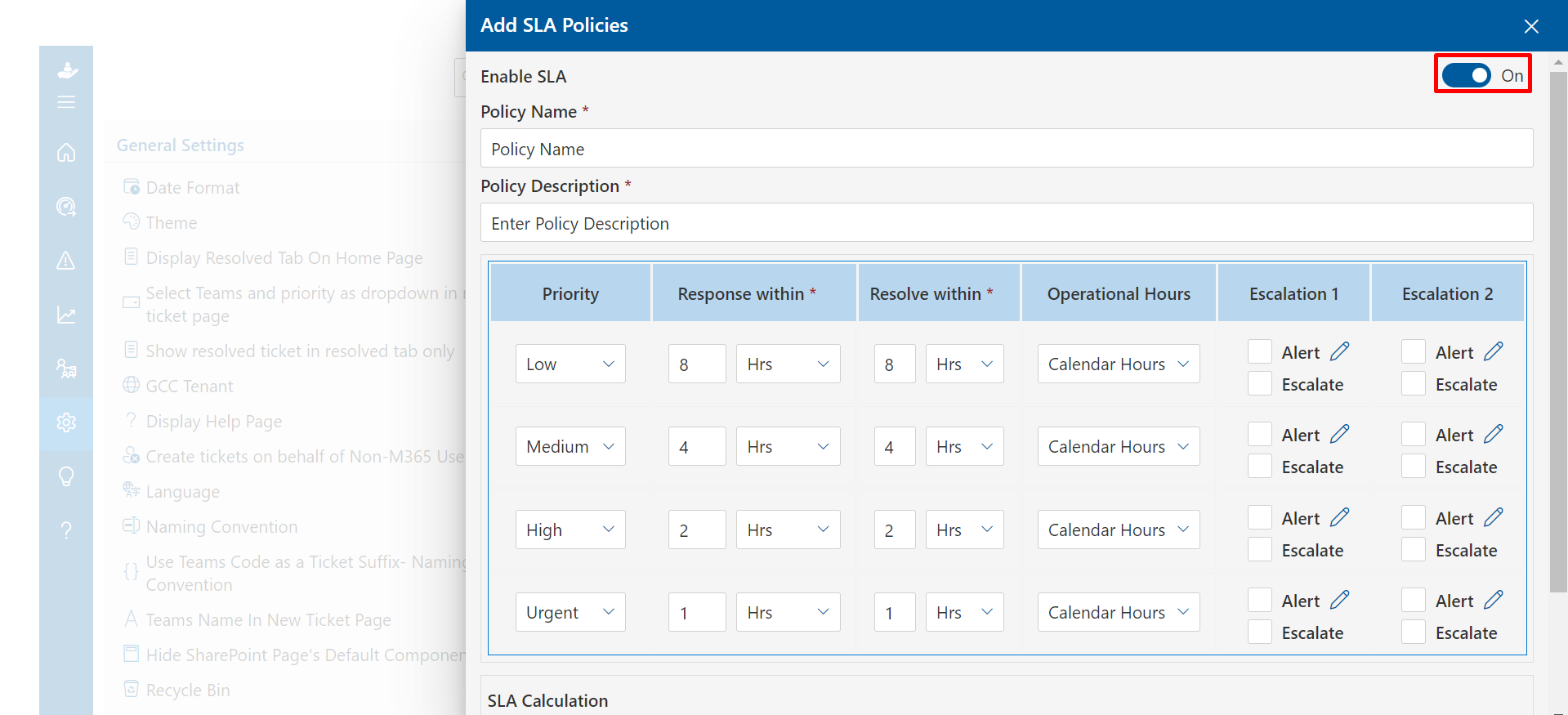
This structured approach ensures that critical issues are addressed first while routine tasks don’t clog the queue.
Automate Repetitive Tasks for Faster Resolution
Automation helps reduce IT workload and speeds up ticket resolution. Implement automation for:
- Ticket Routing: Automatically assign tickets to the right department or technician.
- Canned Responses: Use predefined replies for common queries.
- Auto-Resolution for Basic Issues: Allow self-healing scripts to resolve minor problems like password resets.
- Escalation Workflows: Automatically escalate unresolved tickets beyond SLA limits.
An automated internal ticketing system minimizes human intervention in routine processes, leading to higher efficiency.
Encourage Self-Service to Reduce Ticket Volume
A robust self-service knowledge base can prevent unnecessary tickets. Key elements include:
- Step-by-step guides for common IT issues
- Video tutorials for troubleshooting
- FAQs on software and hardware usage
- AI-powered chatbots for instant support
- Empowering employees with self-help options reduces the IT team’s workload and speeds up issue resolution.
Maintain Clear and Transparent Communication
Employees should always know the status of their requests. Ensure transparency by:
- Sending automatic status updates (received, in progress, resolved)
- Allowing employees to track ticket progress in real-time
- Providing estimated resolution times based on ticket priority
- Keeping communication lines open for follow-ups
- Clear communication enhances trust and reduces frustration among employees waiting for IT support.
Integrate IT Ticketing with Business Tools
An isolated internal IT ticket system can slow down workflows. Integrate your IT ticketing system with:
- Microsoft 365 for seamless access to ticketing from within the organization’s ecosystem.
- SharePoint for storing IT policies, troubleshooting guides, and knowledge base articles.
- Power BI for advanced analytics on IT support performance.
- Power Apps for custom workflows and process automation.
- Integration ensures that IT support aligns with overall business operations.
Train IT Staff for Efficient Ticket Management
A well-trained IT team is key to a successful ticketing system. Regular training should cover:
- Best practices for handling different types of IT issues
- Effective communication with employees
- Time management techniques for faster resolution
- Updates on new IT policies and cybersecurity threats
- Continuous skill development ensures that IT teams can handle tickets efficiently and professionally.
Use Data and Analytics for Continuous Improvement
Track performance metrics to identify areas for improvement in your ticketing system. Key metrics include:
- Average response and resolution time
- Number of open vs. closed tickets
- Reopen rates (to identify recurring issues)
- Employee satisfaction scores
- Regularly analyzing these metrics helps refine IT support strategies for better efficiency.
Standardize Ticket Documentation for Consistency
Incomplete or vague tickets slow down resolution times. Standardize ticket documentation by:
- Defining required fields for every ticket (e.g., issue description, device details, error messages)
- Implementing a structured ticket template for IT teams to follow
- Encouraging technicians to document resolutions for future reference
- Consistent documentation improves historical tracking and enables faster resolutions for similar issues.
Regularly Update and Optimize the System
An outdated IT ticketing system can lead to inefficiencies. Schedule regular updates and system optimizations to:
- Enhance performance and fix bugs
- Improve security features
- Add new automation capabilities
- Streamline user interfaces based on employee feedback
- Regular system improvements ensure that the internal ticketing system remains relevant and effective.
Gather Employee Feedback and Adapt
The goal of an internal IT ticket system is to improve the employee experience. Actively seek feedback through:
- Employee surveys on IT support effectiveness
- Focus groups to discuss common IT pain points
- Analysis of unresolved or reopened tickets to identify recurring problems
- IT team retrospectives to refine processes
- Adapting based on employee feedback ensures that the IT ticketing system continuously evolves to meet organizational needs.
Conclusion
An optimized internal IT ticketing system enhances IT team efficiency, reduces downtime, and improves employee experience. By implementing these best practices, organizations can ensure seamless IT support while continuously improving their internal ticket system. If you’re looking for the best internal ticketing system, Helpdesk 365 offers automation, ease of use, seamless integration, and a strong feedback loop for ongoing improvements.
With the right approach, your internal IT ticketing system will become a powerful tool in maintaining a productive and digitally empowered workplace.
Join Our Creative Community
Frequently Asked Questions
What is an internal IT ticketing system?
An internal IT ticketing system is a centralized platform that helps organizations manage and resolve IT issues efficiently. It allows employees to submit IT-related requests, track their status, and receive timely resolutions from the IT team.
Why is an internal ticketing system important?
An internal ticket system streamlines IT support, reduces downtime, improves response times, and ensures proper documentation of IT issues. It enhances productivity and allows IT teams to handle and prioritize requests effectively.
How does an internal IT ticketing system work?
Employees submit IT requests through a portal, email, or chatbot. The system categorizes and prioritizes tickets, assigns them to IT personnel, and tracks progress until resolution. Automated workflows and notifications keep users informed throughout the process.


_JiluXJRGNl.svg)























