

What Is an Employee Directory Application and Why Does Your Business Need One?
_eH2jDg7dZ.png)
In the age of hybrid work, global teams, and growing digital transformation, businesses are constantly seeking tools that connect people faster and more efficiently. Among such tools, the SharePoint employee directory application has quietly become one of the most valuable, yet often overlooked, assets in modern workplaces.
This blog explores what an employee directory application is, how it functions, and most importantly, why your business, whether small or large, needs one more than ever in 2026 and beyond.
An employee directory app helps your team find people fast. No more digging through outdated spreadsheets or emails.
It keeps all employee info in one place, updated, searchable, and secure. Tools like Employee Directory 365 make this effortless and reliable.
An employee directory application is a digital system that organizes employee information such as names, roles, departments, and reporting structures into a searchable platform, helping employees quickly identify and connect with the right colleagues. This becomes essential as organizations grow, since employees spend nearly 20% of their work time searching for internal information, highlighting the need for structured and easily navigable employee data.
What Is an Employee Directory Application?
An employee directory application is a software solution that provides a centralized, searchable digital database of all employees within an organization. Unlike static spreadsheets or printed contact lists, this application offers real-time, interactive access to employee information, typically including:
- Full name, job title, and department
- Work location and time zone
- Phone number and email ID
- Reporting manager and direct reports
- Skills, certifications, or areas of expertise
- Profile picture
- Office location or floor
- Social and internal communication links
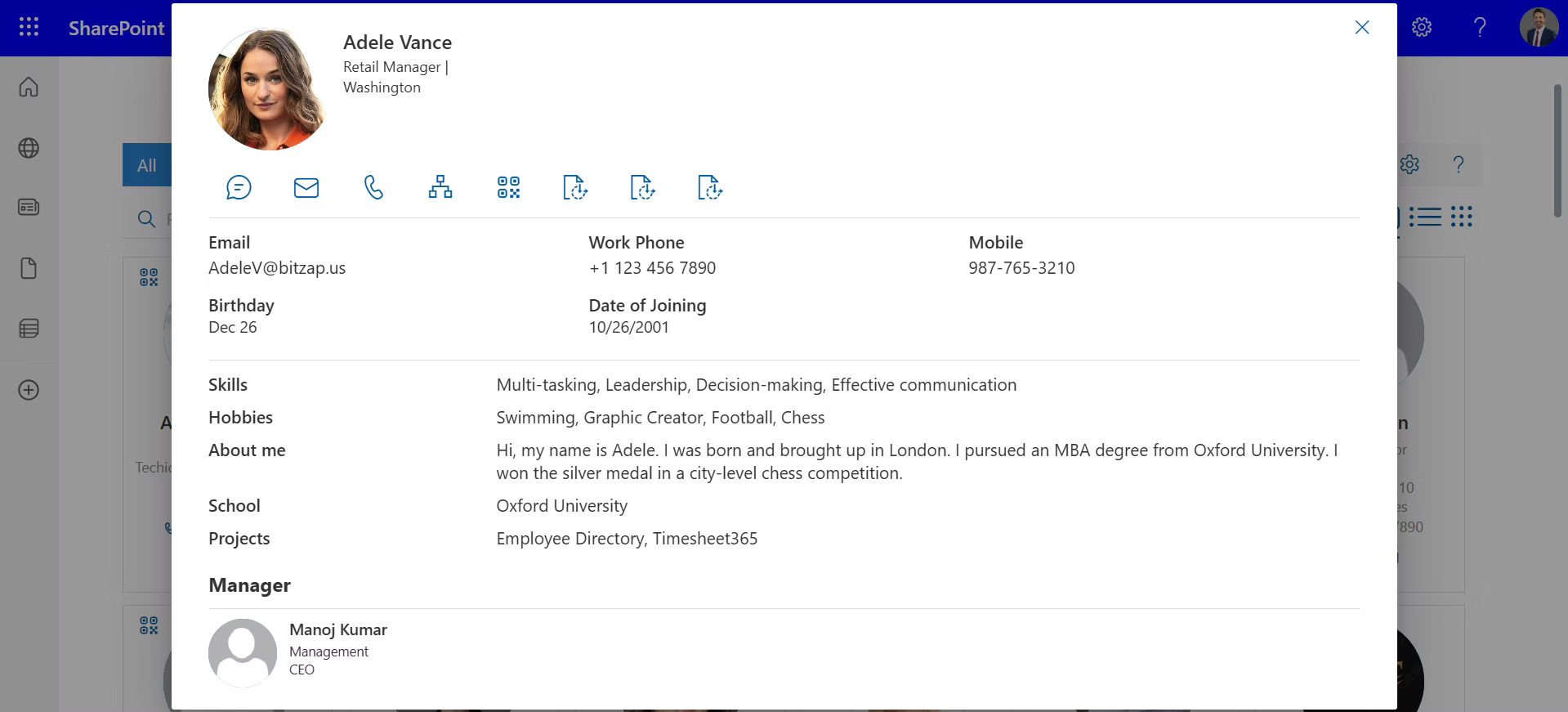
The best part? It is dynamic, automatically updated, accessible from any device, and integrated with tools like Microsoft 365, Slack, and HR platforms.
Evolution: From Phonebooks to Intelligent Directories
The way organizations manage employee information has changed significantly over time. What once started as simple contact lists has now evolved into intelligent digital directories that help teams connect and work more efficiently.
1. Printed Phonebooks and Manual Lists
In earlier workplaces, employee details were stored in printed phonebooks or physical directories. These books usuallycontained basic information such as:
- Employee name
- Phone number or extension
- Department
- Office location
While useful at the time, these directories had major limitations. Any change in employee roles, departments, or contact details required a new version to be printed, which often meant the information quickly became outdated.
2. Spreadsheets and Basic Digital Records
As organizationsadopted computers, many businesses moved their employee information to spreadsheets or simple internal documents. This made updates easier compared to printed directories.
However, these systems still created challenges:
- Information was often stored in multiple files.
- Updates depended on manual edits.
- Employees struggled to locate the right colleague quickly.
- Data inconsistencies became common as organizations grew.
3. Intranet-Based Employee Listings
Later, companies began placing employee lists on internal portals or intranet sites. This allowed teams to view employee information online rather than searching through files.
Although this approach improved visibility, it still had limitations:
- Employee data required frequent manual updates.
- Search capabilities were limited.
- Organizational structures were not always clearly visible.
4. Modern Intelligent Employee Directories
Today, employee directory applications have transformed how organizations manage and view employee information. These modern systems act as dynamic workplace directories rather than simple contact lists.
Modern directories typically provide:
- Department and team filters
- Organizational charts showing reporting structures
- Employee photos and profile details
- Integration with platforms such as Microsoft 365
Because these systems stay updated automatically, employees can quickly find the right person, understand team structures, and connect with colleagues across departments.
5. From Contact Lists to Workplace Visibility
The shift from printed phonebooks to intelligent directories reflects how workplaces have evolved. Organizations now require tools that keep employee information organized, current, and easy to navigate.
An employee directory application therefore serves as more than a digital list of names. It acts as a centralized hub that helps employees understand their organization, locate colleagues quickly, and collaborate more effectively.
Key Features of a Modern Employee Directory Application
A modern Employee Directory Application goes beyond basic contact listings. It offers a powerful, intelligent solution that fosters better employee internal communication, collaboration, and culture. Here are the top features to look for:
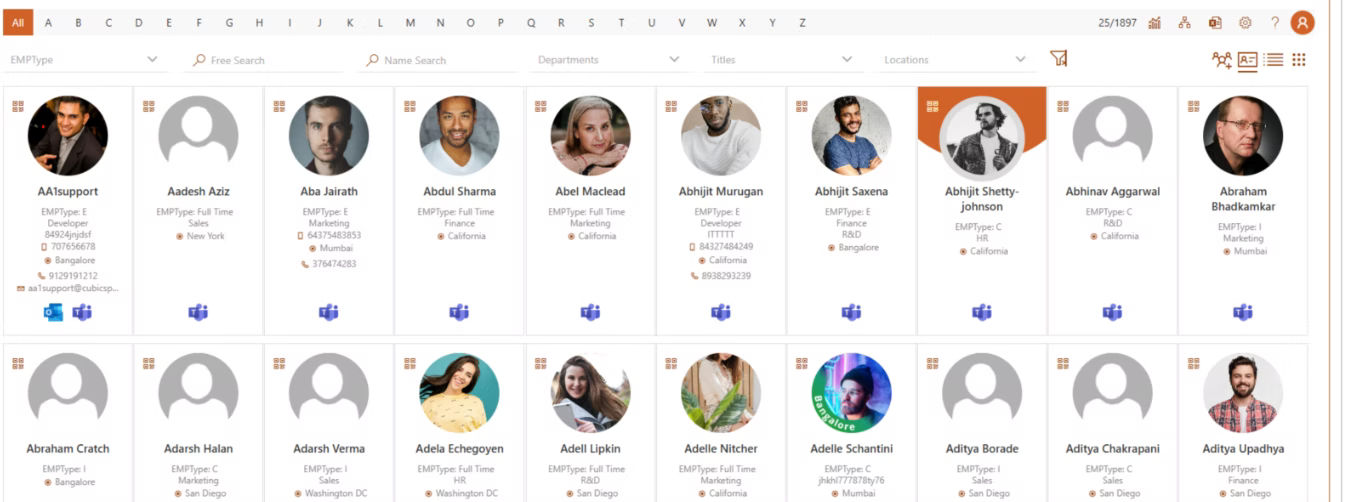
Advanced Search Filters
Quickly locate employees using filters like name, department, skills, location, or reporting manager.
Rich Employee Profiles
Each employee profile includes job title, contact details, skills, work location, profile photo, and even social/internal links.
Organizational Chart Visualization
A dynamic org chart helps users understand reporting structures, team layouts, and company hierarchy at a glance.
Microsoft 365 & HRMS Integration
Seamlessly syncs with Microsoft Azure AD, Teams, Outlook, SharePoint, and your HR systems for real-time data updates.
Mobile Access
Responsive design or dedicated mobile apps ensure users can access the directory anytime, anywhere.
Role-Based Access Control
Sensitive information remains secure with permission-based visibility and editing rights.
Employee Availability & Location Indicators
View current availability, office/remote status, and time zone to plan communication effectively.
Custom Fields & Tags
Allows the addition of industry-specific or department-specific data like certifications, projects, or language fluency.
Together, these features create a unified, searchable, and secure people network that drives productivity and connection across the organization.
Business Benefits: Why Every Organization Needs an Employee Directory Application
An Employee Directory Application is more than just a contact list, it is a business enabler that improves operational efficiency, communication, and employee experience. Here are key reasons every organization needs one:
Faster Internal Communication
Easily locate and connect with colleagues across departments, locations, or teams without relying on HR or IT support.
Improved Onboarding Experience
New hires can quickly understand team structures, find key contacts, and build connections from day one.
Boosted Collaboration
Search by skills, language, or project history to find the right people for cross-functional tasks, leading to better teamwork and project success.
Reduced Administrative Overhead
HR and IT teams spend less time answering basic directory-related queries, allowing them to focus on strategic work.
Stronger Workplace Culture
Putting faces to names and roles humanizes digital interactions—essential in hybrid and remote workplaces.
Organizational Clarity
A live organizational chart provides transparency into team structures and reporting relationships.
Better Resource Planning
Leaders can make smarter staffing and allocation decisions based on accurate, accessible employee data.
An employee directory app empowers everyone, from interns to executives, with information that saves time, supports collaboration, and strengthens culture.
Who Uses Employee Directory? Not Just HR
Integrations: The Real Game Changer
One of the biggest reasons employee directory applications are gaining popularity is their ability to connect with other systems. For instance:
- Microsoft Teams: Add profile cards inside chat windows.
- Outlook: Auto-fill contacts and org info.
- SharePoint: Embed directories in intranet pages.
- HRMS: Sync employee lifecycle data automatically.
With these integrations, the employee directory becomes the hub of workplace intelligence.
While HR departments often lead the implementation of an employee directory application, its impact extends far beyond their scope. This tool is a shared organizational asset that adds value across every function and level of the company.
HR Teams
They use it to manage accurate employee records, streamline onboarding and offboarding, and maintain compliance with labor and data protection laws.
IT Departments
IT ensures secure access, integrates the application with identity and access management systems, and supports system maintenance or upgrades.
People Managers
Managers rely on it to view team hierarchies, understand skill sets, assign roles, and identify cross-functional collaborators within the company.
Executives & Leadership
Executives gain visibility into talent distribution, departmental strength, and reporting structures, which supports strategic planning and workforce optimization.
General Employees
Every employee benefits from easy access to contact details, reporting lines, skillsets, and office locations—fostering a stronger sense of community and better collaboration.
Whether it is used to prepare for a client call, find help on a project, or welcome a new teammate, the employee directory application becomes a daily utility for everyone, not just a static HR tool. It connects people, roles, and purpose, company-wide.
Security and Compliance: A Must-Have
Security is a top concern for any business handling employee data. A good employee directory application provides:
- Role-based access to limit data visibility.
- Audit logs to track changes and access history.
- Data encryption for sensitive fields.
- Compliance support for GDPR, HIPAA, or regional regulations.
This makes it ideal for industries such as healthcare, finance, education, and government.
Future Trends in Employee Directory Applications
The employee directory landscape is evolving rapidly. Here are key trends to watch:
AI-Powered Suggestions
AI will recommend connections based on shared projects, interests, or skills, turning the directory into a collaboration engine.
Gamification
Companies are adding badges for completed training, years of service, or employee achievements directly into profiles.
Sentiment Insights
Anonymous pulse surveys and micro-feedback can be embedded within profiles, giving managers real-time morale insights.
Smart Alerts
Get notified when a team member joins, leaves, or changes roles, improving agility in communication and task delegation.
How to Choose the Right Employee Directory App
With dozens of tools in the market, picking the right one can feel overwhelming. Here’s a checklist to guide you:
- Does it integrate with your HRMS or Microsoft 365/Google Workspace?
- Can it scale with your team size?
- Is it customizable for your industry?
- Are data security and compliance measures in place?
- Is it mobile and desktop accessible?
- Can users self-manage profiles where allowed?
- Does it support multilingual interfaces?
If the answer is “yes” to most of the above, you have found a suitable solution.
Conclusion
In a world where speed, transparency, and connectivity define success, an employee directory application is no longer a “nice to have”, it is a strategic necessity.
Solutions like Employee Directory 365 reduce communication friction, improve operational efficiency, and foster human connection within organizations. Regardless of your industry, whether you are in tech, education, healthcare, or construction, if your team cannot easily find and connect with each other, you are missing a critical piece of the productivity puzzle.
Join Our Creative Community
Frequently Asked Questions
Is an employee directory app only for large companies?
Not at all. Small and medium businesses benefit equally, perhaps even more, due to leaner HR structures and faster communication needs.
Can it be used by remote teams?
Yes. In fact, remote and hybrid teams find it especially useful for staying connected and maintaining visibility across locations.
Will it replace the HRMS?
No. It complements your HRMS by offering a user-friendly front-end for employee visibility and collaboration.
Is it customizable for my industry?
Most modern apps offer custom fields, filters, and integrations suited for your specific use case—whether healthcare, IT, or nonprofit.


_JiluXJRGNl.svg)























